


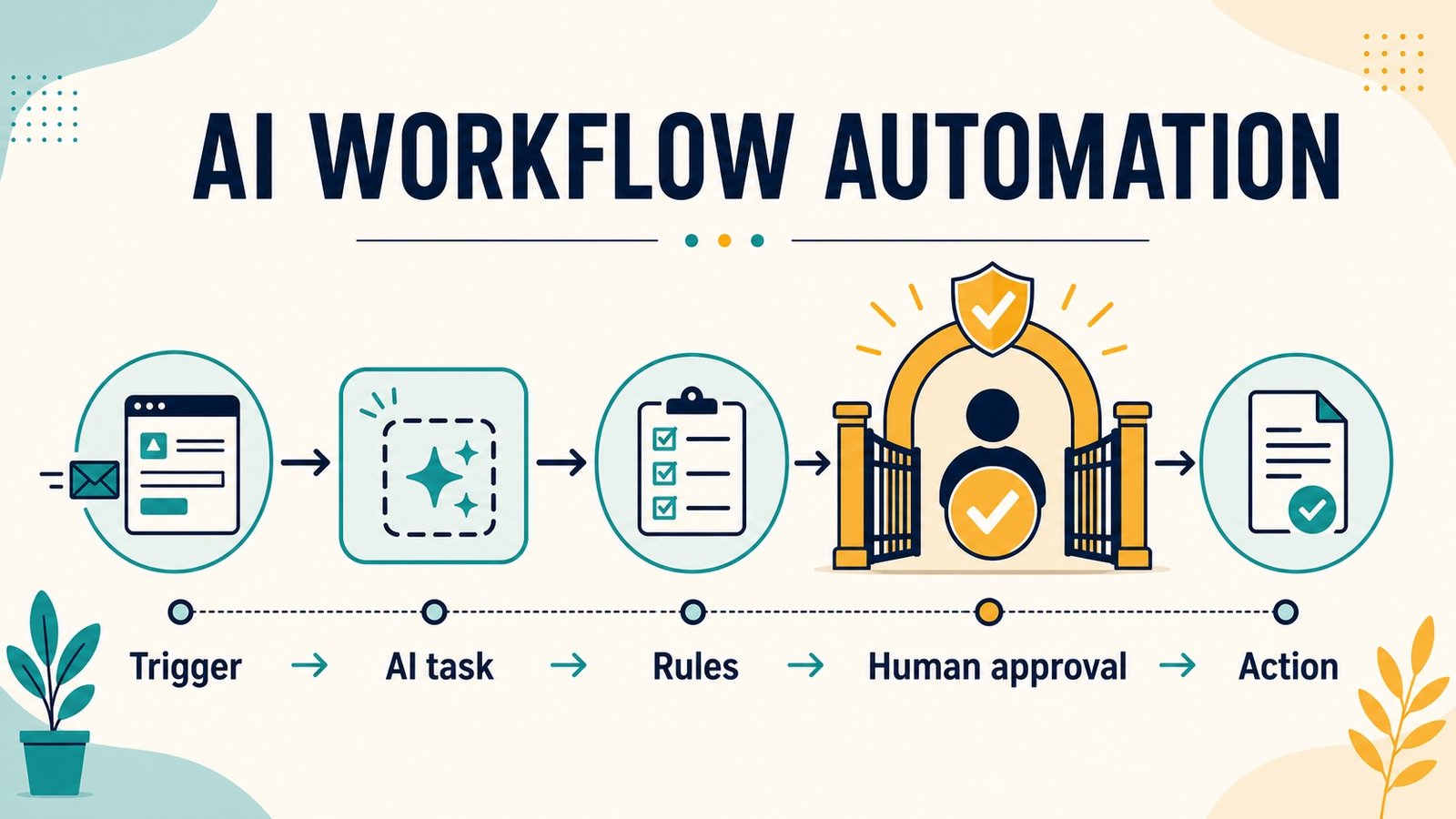

AI workflow automation for small business works best when AI handles one narrow judgement—such as classifying, extracting or drafting—inside a controlled trigger, rule and action sequence. Start with repetitive, reversible work; use dummy data first; keep a human approval step before customer messages, payments, record changes or other consequential actions; and measure the complete process, including review and rework.
Automation is not the same as asking a chatbot a question. A dependable workflow begins when an event occurs, moves approved data through defined steps, records what happened and stops safely when something is unclear. The AI component may interpret an email or prepare a draft, but rules and people still control what the business does.
This guide gives you ten practical examples, a reusable workflow template and evidence from two dummy-data dry runs. Use our AI tools guide to find possible components, or compare the best AI tools for 2026, but choose a workflow before choosing a product.
What does an AI workflow contain?
A useful small-business workflow has seven parts: a trigger, minimum necessary inputs, one bounded AI task, deterministic rules, a human checkpoint, an action and an audit record. For example, a website form can trigger an AI classification, a rule can route high-priority enquiries to a queue, a salesperson can approve the suggested next step, and the CRM can log the decision.
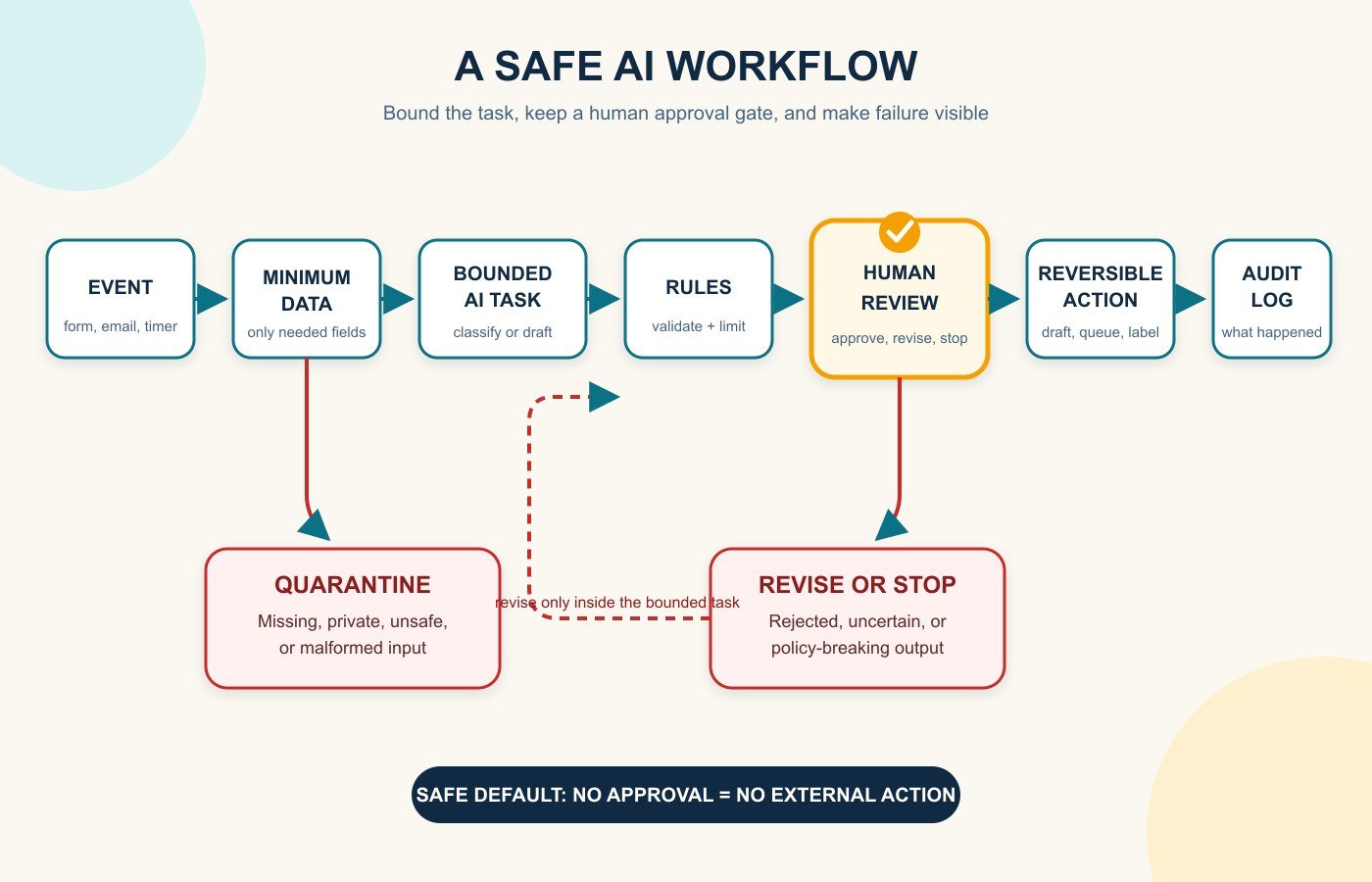
This structure is available across common business platforms. Shopify Flow describes workflows as triggers, conditions and actions; HubSpot supports event, filter, schedule and webhook enrollment triggers; and Google AppSheet separates events, processes, tasks and actions. The labels differ, but the operating idea is the same. Read the current plan limits and permissions before assuming a feature is included.
Choose the first workflow with a four-filter test
- Frequent: it happens often enough for a reliable improvement to matter.
- Structured: the trigger, required inputs and acceptable output can be written down.
- Reversible: an error can be caught or undone without serious harm.
- Measurable: you can compare handling time, queue age, correction rate or another outcome before and after the pilot.
Do not begin with dismissing employees, paying suppliers, changing bank details, giving legal or medical advice, or sending unsupervised messages to every customer. Those actions are consequential, hard to reverse or both. A weekly classification queue is a better first experiment than a fully autonomous “AI employee.”
10 AI workflow automation examples for small businesses
1. Qualify and route new sales leads
- Outcome: put each genuine enquiry in the right follow-up queue quickly.
- Trigger: a website form or approved inbox receives a lead.
- Inputs: contact details, consent, service requested, budget band, location and timing.
- AI task: summarise the need and suggest a category from a fixed list.
- Rule and approval: reject missing consent; require a salesperson to approve priority and next step.
- Action: create or update the CRM record and assign an owner.
- Measure: median first-response time, corrected classifications and qualified-lead rate.
- Main risk: confident scoring can hide bias or poor source data.
- Pilot: run 20 historical, anonymised leads in shadow mode before routing anything.
2. Draft replies to routine customer enquiries
- Outcome: reduce drafting time without letting AI promise something the business cannot deliver.
- Trigger: a new message enters a monitored support inbox.
- Inputs: redacted message, approved knowledge articles, order status and tone rules.
- AI task: classify the request and draft a reply grounded only in supplied material.
- Rule and approval: quarantine privacy, safety, payment and hostile-instruction cases; a person reviews every draft.
- Action: place the approved reply in the outbox and log the source material used.
- Measure: handling time, edit distance, reopen rate and incorrect-claim count.
- Main risk: hallucinated policies or prompt injection embedded in an email.
- Pilot: create drafts only; disable automatic sending.
3. Turn meeting notes into tasks and CRM updates
- Outcome: capture agreed actions while the conversation is still fresh.
- Trigger: an approved transcript or note is saved after a meeting.
- Inputs: attendee list, transcript, project names and allowed task fields.
- AI task: extract decisions, owners, due dates and unresolved questions.
- Rule and approval: the meeting owner confirms every task and resolves missing owners or dates.
- Action: create tasks, append a CRM note and send the approved recap.
- Measure: missing-action rate, correction rate and time from meeting to assigned tasks.
- Main risk: the summary may turn a discussion into an agreement that never happened.
- Pilot: compare outputs with notes from five non-sensitive internal meetings.
4. Prepare appointment intake and reminders
- Outcome: collect the right information and reduce avoidable back-and-forth.
- Trigger: a customer requests or books an appointment.
- Inputs: service type, preferred time, approved preparation instructions and calendar availability.
- AI task: identify missing information and draft a concise clarification or preparation note.
- Rule and approval: never infer health, legal or eligibility facts; require staff approval for anything beyond a standard reminder.
- Action: update the booking record and queue the approved message.
- Measure: incomplete bookings, no-show rate and staff touches per booking.
- Main risk: exposing sensitive intake information to an unsuitable service.
- Pilot: use fictional appointments and a calendar with no live customer names.
5. Extract invoice or receipt details into a review queue
- Outcome: reduce retyping while keeping financial records under human control.
- Trigger: a document arrives in a dedicated folder or inbox.
- Inputs: image or PDF, supplier list, tax fields and purchase-order references.
- AI task: extract supplier, date, total, tax, currency and line items with confidence flags.
- Rule and approval: block duplicates and mismatched totals; a bookkeeper validates every field before posting.
- Action: create a draft transaction and attach the source document.
- Measure: corrected fields per document, processing time and duplicate detection.
- Main risk: a plausible but wrong amount or account code can corrupt the ledger.
- Pilot: use synthetic invoices and a separate test company.
6. Prioritise overdue invoices and draft reminders
- Outcome: focus follow-up without damaging customer relationships.
- Trigger: a daily report finds an invoice before or after its due date.
- Inputs: due date, amount, prior reminders, disputed status and approved payment policy.
- AI task: summarise account context and draft the appropriate approved reminder.
- Rule and approval: exclude disputes, payment plans and sensitive accounts; finance approves exceptions.
- Action: queue the reminder and create a follow-up task.
- Measure: days sales outstanding, inappropriate-reminder count and time spent chasing invoices.
- Main risk: sending the wrong message to a customer with an agreed exception.
- Pilot: compare drafts with the finance owner’s normal wording; send none automatically.
You may not need generative AI for the sending step. QuickBooks Online, for example, can schedule invoice reminders using due-date rules and templates. Add AI only if summarising context or selecting an approved message genuinely improves the process.
7. Review ecommerce order exceptions
- Outcome: bring unusual orders to a person before fulfilment or refund action.
- Trigger: an order receives a risk, address, stock or fulfilment exception.
- Inputs: order facts, approved risk labels, inventory status and delivery policy.
- AI task: explain the exception in plain language and suggest the next review question.
- Rule and approval: never let free-form AI capture payment, cancel an order or issue a refund; an authorised employee decides.
- Action: tag the order, pause the relevant step and notify the owner.
- Measure: time to review, false alarms and preventable fulfilment errors.
- Main risk: treating an AI explanation as fraud evidence.
- Pilot: replay synthetic orders with known exception types.
Shopify Flow supports store automations using triggers, conditions and actions. Its official guidance for high-risk orders specifically distinguishes the later “order risk analysed” event from “order created,” because risk analysis takes time. That detail shows why trigger timing must match the real process.
8. Summarise stock and purchasing alerts
- Outcome: turn scattered inventory warnings into a short, reviewable purchasing queue.
- Trigger: stock falls below a threshold or a scheduled report runs.
- Inputs: stock on hand, sales velocity, open purchase orders, lead time and minimum order quantity.
- AI task: summarise why an item needs attention and list missing information.
- Rule and approval: formulas calculate quantities; a buyer approves every purchase order.
- Action: create a draft requisition and notify the owner.
- Measure: stockouts, excess-stock value and corrected recommendations.
- Main risk: unreliable forecasts presented as exact demand.
- Pilot: use ten low-value products and cap proposed quantities.
9. Repurpose approved content into channel drafts
- Outcome: turn one approved source into consistent drafts for email and social channels.
- Trigger: an article or announcement receives final editorial approval.
- Inputs: approved source, brand voice, channel limits, prohibited claims and campaign links.
- AI task: create channel-specific drafts without adding facts.
- Rule and approval: an editor checks claims, links, accessibility and disclosure before scheduling.
- Action: place drafts in the content calendar with source attribution.
- Measure: editing time, rejected-claim count and publication errors.
- Main risk: multiplying one unsupported claim across several channels.
- Pilot: repurpose three evergreen articles and compare against human drafts.
10. Route internal requests and approvals
- Outcome: stop leave, purchasing, content or discount requests disappearing in chat and email.
- Trigger: an employee submits a standard form.
- Inputs: request type, amount, deadline, business reason and approval matrix.
- AI task: summarise the request, detect missing fields and select an allowed category.
- Rule and approval: rules determine the approver; AI never approves its own recommendation.
- Action: start approval, notify the requester and record the decision.
- Measure: approval time, incomplete requests and policy exceptions.
- Main risk: excessive access to employee or commercial information.
- Pilot: begin with a low-value, non-sensitive request type.
Human approval is a standard automation pattern, not a workaround. Microsoft Power Automate supports approval flows that pause until people respond, including sequential approvals. Slack Workflow Builder can collect structured requests and connect to other services, subject to the workspace’s permissions. If you need a broader system view, see our guide to AI platforms for business or compare CRM software for small businesses.
Field example: The Article Spot’s assisted publishing workflow
The Article Spot used this controlled pattern to publish How to Choose an AI Tool for Jira ticket ARTSPOT-78. The trigger was an approved Jira brief containing the search topic, required internal links and acceptance evidence. The permitted inputs included the ticket and a 90-day Google Search Console view; official primary sources were gathered for claims that could change.
AI assisted with research organisation, drafting and the content package. The workflow then stopped for human/editor review before WordPress changed. That review covered factual support, the hands-on test record, link destinations, downloadable assets, featured-image metadata, Rank Math fields and Article, FAQ and breadcrumb schema. Only after those checks was the article published and the Jira ticket updated.
ARTSPOT-79 is following the same sequence: Jira brief → Search Console evidence → assisted draft package → human QA → WordPress publish. The example proves the workflow was used; it does not prove a time or cost saving. Post-publication SEO impact for the completed article is not yet known and must be measured against dated Search Console baselines.
What our two dummy-data sandbox tests proved—and did not prove
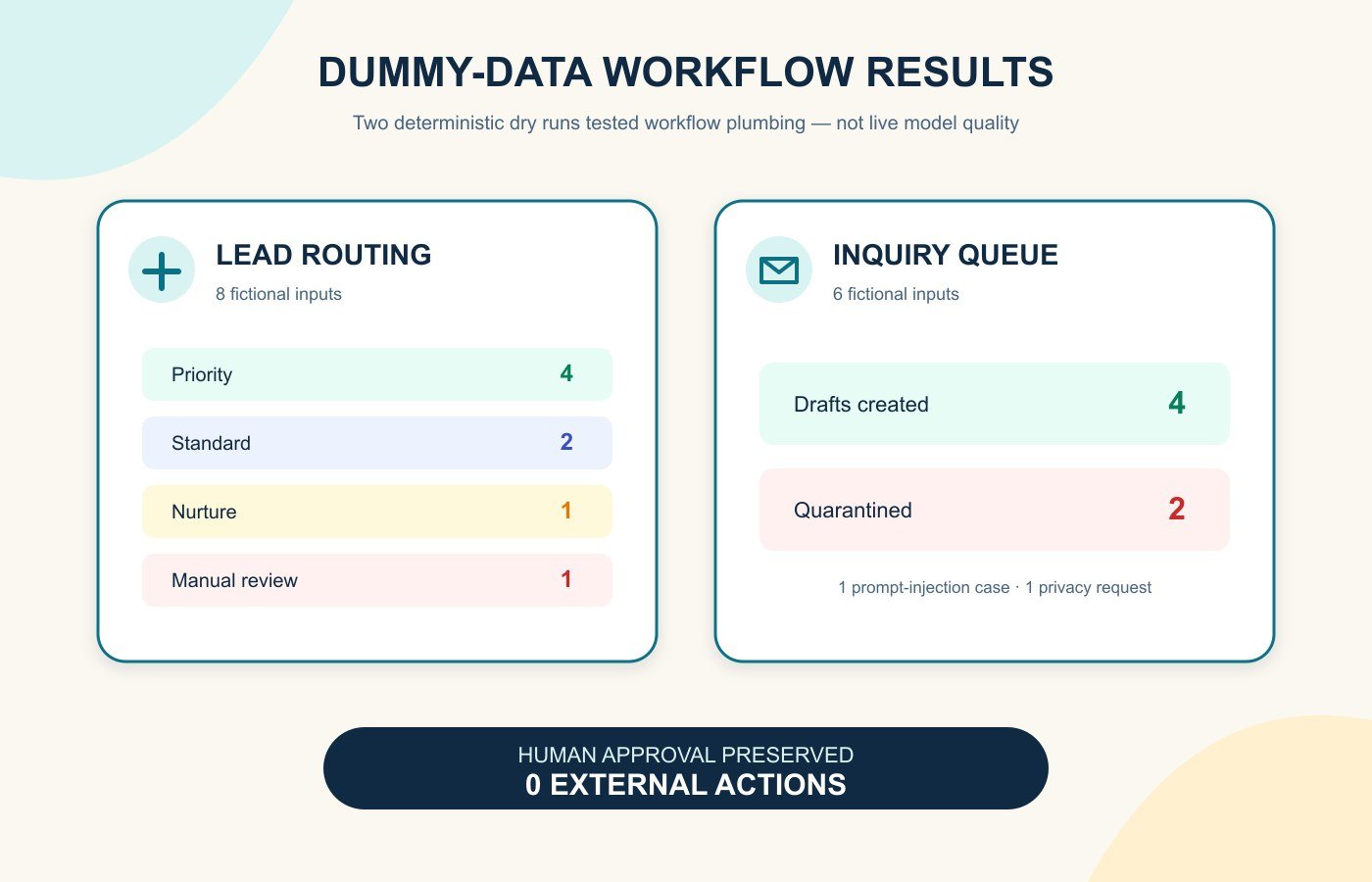
On 26 July 2026, we ran two local dry runs with synthetic records. We deliberately used deterministic stand-ins instead of a live AI model. This isolated the workflow plumbing—routing, redaction, quarantine, logs and approval gates—without uploading data or pretending to measure model quality.
| Sandbox test | Inputs | Observed result | External actions |
|---|---|---|---|
| Lead intake and routing | 8 fictional leads | 4 priority, 2 standard, 1 nurture, 1 manual review; reason codes and approval flag recorded on all 8 | 0 |
| Customer inquiry queue | 6 fictional enquiries | 4 drafts; a prompt-injection example and a privacy request quarantined; raw email addresses removed from text | 0 |
The tests passed their narrow checks: every item stopped for human approval and nothing was sent or written to a live system. They did not establish classification accuracy, writing quality, connector reliability or safety under every input. A vendor pilot must replace the stand-in with the exact model and plan you intend to use, keep expected answers fixed, and have a person grade every result.
Reusable AI workflow template
- Outcome: “Reduce [current problem] from [baseline] to [target] without increasing [guardrail metric].”
- Owner: name one person accountable for design, approval, monitoring and shutdown.
- Trigger: define the exact event, schedule or threshold and how duplicates are handled.
- Minimum inputs: list permitted fields, prohibited data, retention and source of truth.
- AI task: choose one bounded job, fixed output format, allowed categories and uncertainty response.
- Rules: define thresholds, exceptions, timeouts, retries and a safe default path.
- Human checkpoint: state who reviews what, using which evidence, before which action.
- Actions: list each system change, message or task; make the first pilot queue-only.
- Audit and alerts: record inputs, version, output, decision, approver, timestamp and failure.
- Test and rollback: use dummy data, edge cases and adversarial inputs; document how to disable and reverse the workflow.
If these concepts are new, start with AI and automation for beginners before connecting a model to business systems.
Risk checklist before turning the workflow on
- Is the workflow necessary, and is a non-AI rule or existing product feature enough?
- Are personal, confidential, payment, health and employee data removed unless explicitly approved?
- Have you checked the vendor’s terms for data collection, storage, ownership, model training, deletion and incident notice?
- Does each connection use the least access needed, with multi-factor authentication and named accounts?
- Can untrusted text cause instructions to be ignored, data to be exposed or an action to run?
- Are factual claims and calculated values checked against a trusted source?
- Does a person approve customer messages, financial changes and other consequential decisions?
- Are logs useful without storing unnecessary sensitive content?
- Will owners receive alerts for failures, unusual volume, drift and repeated corrections?
- Can the workflow be paused quickly, rolled back and replaced without losing business records?
The Australian Cyber Security Centre’s 2026 guidance for small businesses highlights data leakage, unreliable or manipulated outputs and third-party supply-chain dependence. It recommends verifying outputs, involving people in sensitive decisions, reviewing vendor data terms and monitoring AI behaviour. NIST’s Generative AI Profile likewise treats confabulation, privacy, security and governance as risks to manage across the lifecycle.
A safe 14-day rollout
- Days 1–2: record the baseline, owner, permitted data, success measure and stop conditions.
- Days 3–4: draw the trigger-to-action map and remove any permission the workflow does not need.
- Days 5–7: run synthetic normal, edge and malicious examples with all actions disabled.
- Days 8–10: run in shadow mode beside the current process; grade errors and review time.
- Days 11–13: allow a small queue-only pilot with a named reviewer and daily checks.
- Day 14: compare the full workflow with the baseline and decide to revise, expand or stop.
The best small-business automation is usually modest: one clear judgement, narrow access, a visible approval gate and a useful log. If you cannot explain what happens when the AI is wrong, the workflow is not ready to run.
Frequently asked questions
What is the best first AI workflow for a small business?
Start with frequent, structured and reversible work such as drafting replies, summarising notes or routing low-risk requests. Use dummy data and keep every external action behind human approval.
Do I need coding skills for AI workflow automation?
No-code platforms can build many trigger, condition, approval and action sequences. Coding may be needed for custom integrations, but process design, permissions, testing and monitoring matter regardless of the tool.
Should AI send customer emails automatically?
Not at the start. Generate drafts, ground them in approved sources and require a person to check claims, tone and customer context. Consider automatic sending only for tightly templated, low-risk messages after sustained evidence.
How do I measure whether automation saves time?
Measure the complete process before and after: queue time, hands-on time, review time, corrections, failures and rework. Fast generation is not a saving if staff spend longer repairing outputs.
What data should never go into an unapproved AI workflow?
Do not use personal, confidential, payment, health, legal, employee or security-sensitive information unless the use is authorised and the exact service, plan, retention, access and legal obligations have been assessed.