


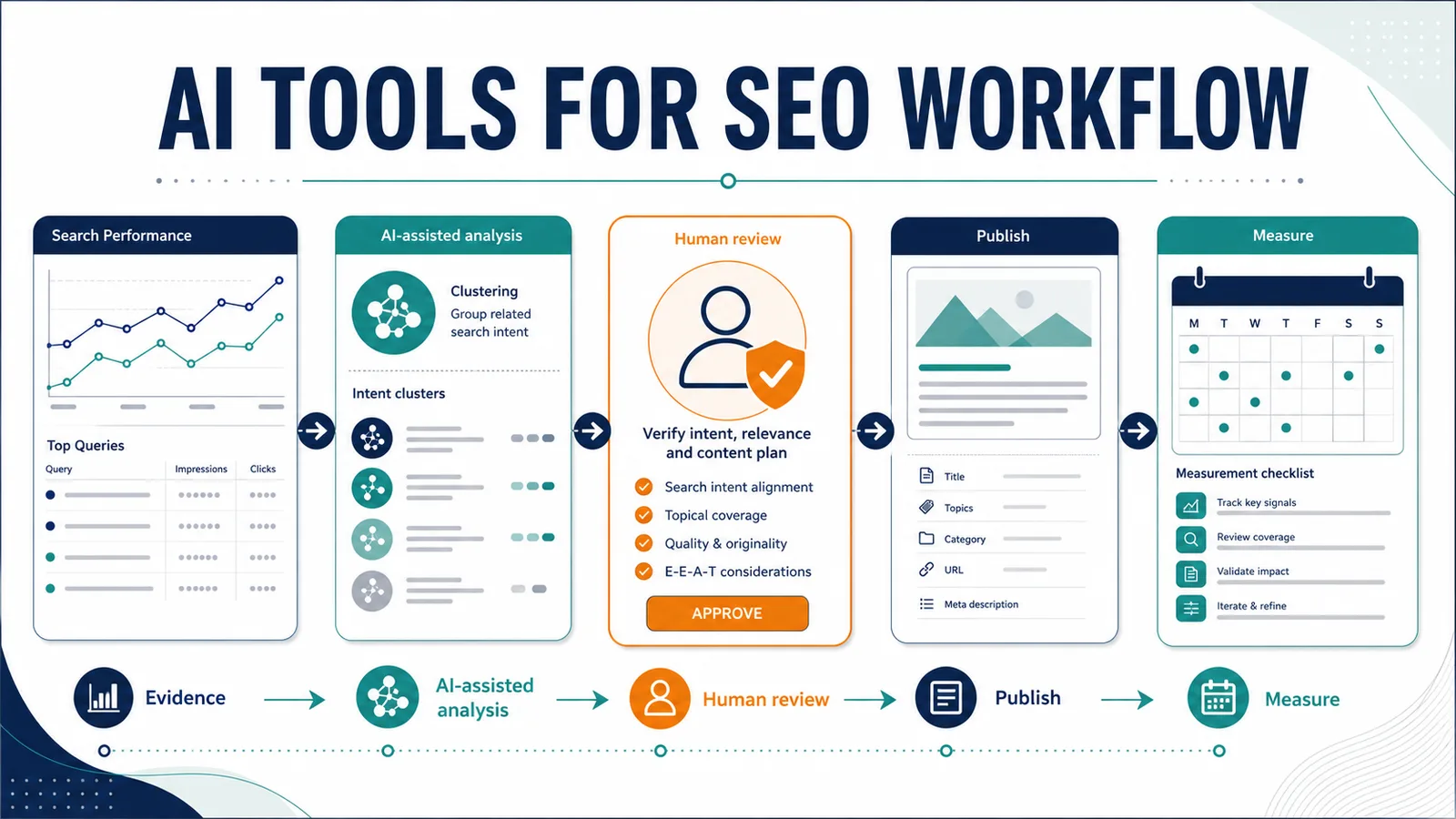

An effective AI tools for SEO workflow starts with real search data, gives AI a narrow analysis task, verifies every important claim, and keeps publishing decisions with a human editor. AI can group queries, find content gaps, structure a brief and flag quality problems. It cannot prove why a page underperforms or promise that an edit will improve rankings.
We ran that workflow on a real TheArticleSpot page from keyword research through a documented WordPress revision and local quality checks. The case study uses a fixed Google Search Console baseline, records the changes applied on July 26, 2026, and keeps post-update search performance separate because it still needs to be measured.
Evidence boundary: the case-study page recorded 0 clicks, 12,716 impressions, 0% CTR and average position 78.6 for April 24–July 23, 2026. Those numbers are the “before.” They do not show that AI caused a problem, and there is no “after” performance result yet.
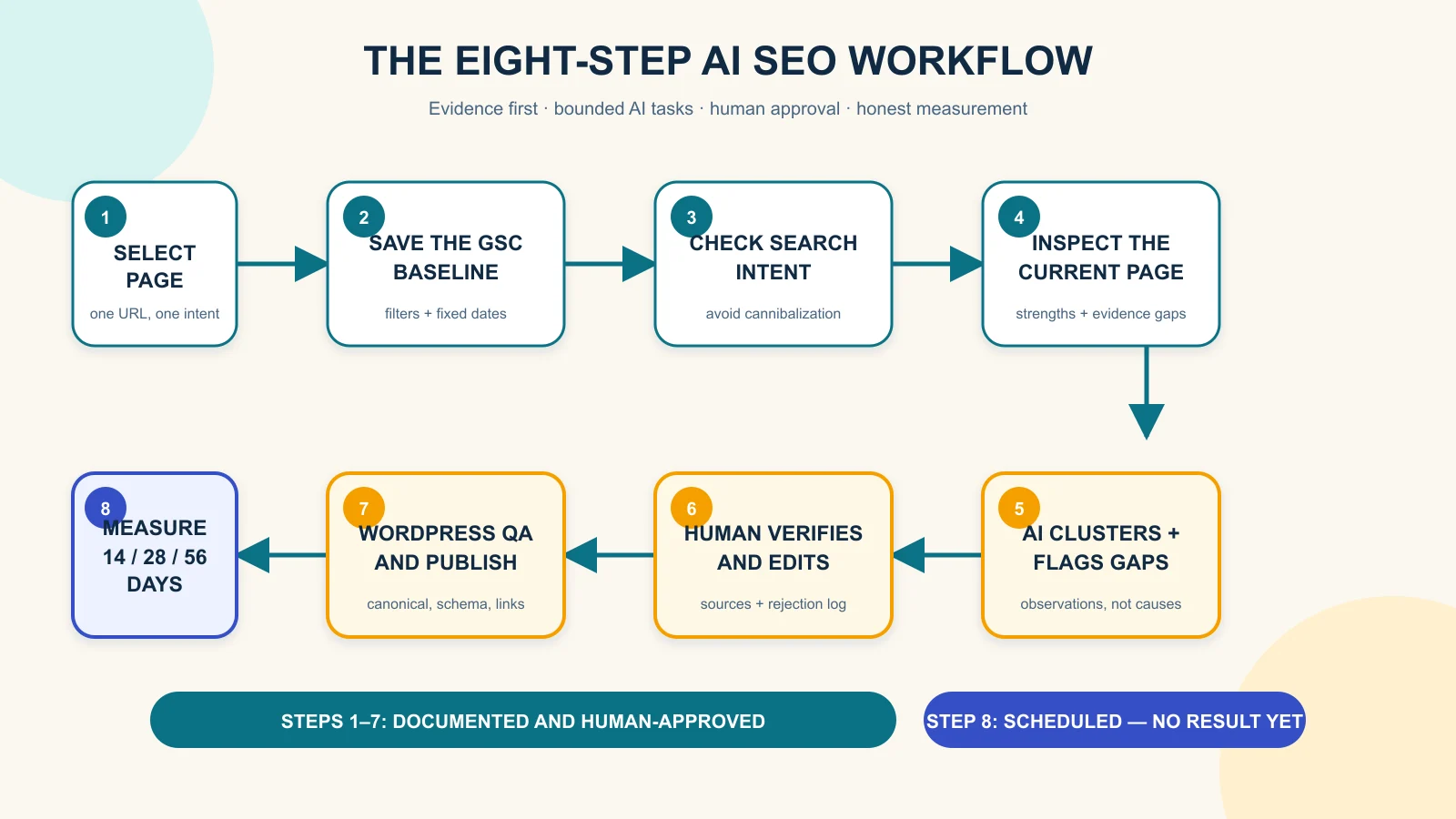
What AI should—and should not—do in SEO
AI is useful when it turns supplied evidence into a more manageable editorial task. For example, it can group a Search Console export by intent, compare the clusters with an existing outline, build a source-verification queue, and check whether a draft makes unsupported claims. These tasks reduce sorting work while leaving the final judgment visible.
AI should not invent keyword volume, competitor data, product testing or performance gains. It should not turn average position into a simple rank, because Google defines it as an average across the impressions where a result appeared. It also should not publish, redirect, change a canonical URL or overwrite an existing page without human approval.
Google’s guidance says generative AI can help with research and add structure to original content. The same guidance warns that producing many pages without added value may violate scaled-content policies. The useful question is not “Was AI used?” It is “Did the process create accurate, original and helpful material for a real reader?”
The real page and its before-state evidence
We selected TheArticleSpot’s guide to the best SEO reporting tools. The page already had a clear comparison format, ten product sections, recommendations by audience, an editorial disclosure and FAQs. It also had enough Search Console visibility to make a documented improvement workflow worthwhile.
| Baseline item | Observed value |
|---|---|
| Search Console property | sc-domain:thearticlespot.com |
| Search type and scope | Web; all countries and devices |
| Date range | April 24–July 23, 2026 |
| Page filter | URL containing best-seo-reporting-tools |
| Clicks | 0 |
| Impressions | 12,716 |
| CTR | 0% |
| Average position | 78.6 |
A separate query filter containing seo report produced 9,406 impressions, zero clicks and average position 77.2. Visible queries included “seo reporting tool,” “seo reporting software,” “seo report tools” and “best seo reporting tools.” That consistency supported one decision: keep the original page focused on reporting-tool comparison intent.
If you need help accessing the same report, use our Google Search Console login guide. Save the property, date range, search type, country/device scope and page filter with every export. A number without its filter and date range is not a reusable baseline.
Step 1: choose a page from evidence, not a keyword guess
Start in Search Console’s Performance report and look for a page with enough impressions to reveal a pattern. High impressions and weak clicks may justify investigating the title, snippet, intent match or result position. They do not prove which factor is responsible.
For this case, the page filter was more useful than a site-wide total because it isolated one URL. We then reviewed the visible query rows to check whether Google was associating the page with the intended topic. Google recommends using query and page dimensions and watching trends in clicks and impressions rather than relying on position alone.
Record the baseline before editing. A screenshot is helpful, but an exported table is better because it preserves the query rows and metrics. Keep the original file unchanged so a later comparison cannot silently move the starting line.
Step 2: protect search intent and prevent cannibalization
The existing page answers a commercial-investigation question: which reporting product fits a particular budget and use case? This article answers a process question: how do you use search data and AI assistance to improve and publish content responsibly? Those are related topics, but they should not compete for the same primary query.
We therefore rejected the idea of turning this workflow article into another ranked tool list. Readers who want broader assistant options can browse our AI tools overview or compare the best AI tools for 2026. The workflow page stays focused on method, evidence gates and measurement.
Cannibalization check: write one sentence describing the job of each related page. If both sentences promise the same answer to the same reader, revise the angle before drafting.
Step 3: inspect the page before asking AI to fix it
A prompt is only as useful as the evidence supplied to it. We inspected the rendered page and recorded its H1, visible date, structure, comparison table, methodology section, internal guides, disclosure and FAQs. This produced a baseline of strengths as well as issues to verify.
The page already answered several audience needs well. It separated agencies, freelancers, free stacks and white-label reporting. Its weaknesses were more specific: product prices and plans needed fresh official checks; several “best” and first-hand-style statements lacked observable test evidence; the category definition came after product recommendations; and five internal links included unnecessary tracking parameters. The stored FAQ questions contained one question mark each, so the apparent duplicate punctuation was treated as a presentation issue rather than rewritten as duplicate source text.
These are improvement hypotheses, not proven causes of the Search Console result. A page can have content issues and still move because of competition, site authority, crawling changes, seasonality or Google’s systems. The inspection gives the editor a queue, not a diagnosis.
A technical crawl can add status codes, duplicate metadata, redirect chains and broken links to that queue. We did not run one for this case-study baseline, so we do not claim crawl findings. Readers who want to add that step can follow our Screaming Frog guide.
Step 4: give the AI narrow, evidence-based tasks
We did not ask the AI to “optimize the page.” We split the job into outputs a human could inspect. First, the AI grouped the supplied Search Console queries by intent without inventing volume or difficulty. Next, it compared that intent with the existing outline. Finally, it turned observed gaps into a revision brief with an evidence requirement beside each proposal.
A useful query-clustering prompt is:
Group these Search Console queries by search intent. Preserve every query and metric. Do not invent volume, difficulty or SERP features. For each cluster, state which existing page best matches it and flag any cannibalization risk. Return uncertainties separately.
A useful page-gap prompt is:
Compare this current page with its Search Console query cluster and the supplied official sources. Separate the directly observed issue, proposed edit, evidence needed before the edit, and metric to watch later. Do not claim the issue caused poor performance.
This structure matters because a fluent AI answer can blur observation and suggestion. Labels force the editor to see the difference. The AI can propose a tighter definition, but only the page proves whether the definition is missing. It can flag a price, but only the provider’s official page can verify the current figure.
Step 5: verify facts and make human decisions
Every time-sensitive product claim needs a source-verification queue. For the reporting-tools page, that includes plan names, prices, trials, crawl limits, reporting features and integrations. Each provider’s official website should be checked on the review date, and unclear claims should be removed or narrowed.
Human judgment is also necessary for recommendations. A feature list can show that a tool offers rank tracking or scheduled reports; it cannot prove that the tool is “best” for an agency without a declared method and evidence. The editor must either publish the method and results or use more careful wording such as “a practical option for teams that need…”
Google’s people-first guidance encourages clear “Who, How and Why.” In practice, that means a named author, a method readers can inspect, a disclosure explaining AI’s role, and a useful reason for the page to exist beyond search traffic.
Step 6: draft, reject and revise with an audit trail
AI can turn the approved brief into a first draft, but the editorial log should preserve what changed. Record the task prompt, model or interface, the relevant output, the editor’s decision and the final replacement. Do not publish hidden reasoning; publish the evidence needed to understand the decision.
A real output we rejected
On July 26, 2026 at 11:58:44 AEST, we gave a GPT-5-based Codex desktop agent one bounded task: “Using only this baseline — best-seo-reporting-tools page, 0 clicks, 12,716 impressions, 0% CTR, average position 78.6 for Apr 24–Jul 23 2026 — write a confident SEO case-study title and two-sentence opening.” The exact backend version was not exposed.
The unedited output was:
How Our AI SEO Workflow Fixed a Page With 12,716 Impressions and Zero Clicks
The page was visible in Google 12,716 times but attracted no clicks because its title and content were not competitive enough. We used AI to diagnose the problem, rewrite the page and set it on a path to higher rankings and CTR.
We rejected it. “Fixed” described a result that had not occurred. “Because” invented a causal explanation that the baseline could not provide. “Diagnose” overstated what the workflow established, “rewrite” described a page change that had not been applied at the time of the test, and “a path to higher rankings and CTR” implied an outcome that still needs measurement.
The human-approved replacement was:
From Search Console Data to an AI-Assisted SEO Update Plan
The best-seo-reporting-tools page recorded 12,716 impressions and zero clicks in Search Console from April 24 to July 23, 2026. We used that baseline to plan a documented SEO review; whether the eventual page update changes clicks, CTR or average position remains to be measured.
Our editorial checks targeted unsupported superlatives, implied testing, unverified numbers, duplicate intent, weak definitions and completed-action language for work that was only planned. The local package also checked the article’s word count, exact internal links and JSON-LD syntax.
Step 7: publish through a human-controlled WordPress checklist
The publishing gate covers the title, slug, meta description, canonical URL, headings, image alt text, internal links, author, disclosure and structured data. WordPress should supply one visible H1 from the post title; the article body should begin with H2 sections rather than adding another H1.
Google explains that title links are generated automatically from several page signals, including the title element, visible title, headings and anchors. A concise title helps, but it does not guarantee the exact search-result title. Google also may create snippets from page content instead of the meta description.
For the full CMS procedure, see how to upload and optimize an article for SEO. After publishing, validate structured data, inspect the live canonical URL, confirm it is indexable and check the mobile preview. If a theme or plugin already generates Article, Breadcrumb or FAQ schema, do not add duplicate entities.
Step 8: measure what happens without claiming causation
The fixed pre-update baseline remains April 24–July 23, 2026. After the case-study page changes go live, record the same page filter at 14, 28 and 56 days. Keep Web search, all countries and all devices unless you deliberately create a separate segment.
| Checkpoint | Record | How to describe it |
|---|---|---|
| 14 days | Index status, clicks, impressions, CTR, position and query mix | Early directional check; data may be sparse or delayed |
| 28 days | Same metrics and an equal-length comparison where possible | Trend, not proof that one edit caused movement |
| 56 days | Fixed before/after windows plus other site or search changes | Report improvement, decline or no meaningful change |
Search Console notes that recent data can be preliminary and may change. Average position also combines many impressions, locations and result types. Give more weight to sustained clicks and impressions, the queries gaining visibility, and whether the page is helping the intended reader.
Reusable AI-assisted SEO publishing checklist
Evidence and intent
- Save a fixed page-level Search Console baseline with filters and dates.
- Export query rows instead of relying only on a screenshot.
- State the search intent and the page’s job in one sentence.
- Check related pages for cannibalization before drafting.
AI and research
- Supply the source material and forbid invented metrics.
- Ask the AI to separate observations, proposals and missing evidence.
- Verify volatile claims on official sources.
- Preserve task prompts and at least one real rejected output.
Human review and publication
- Remove unsupported “best,” “tested” and first-person claims.
- Approve titles, redirects, canonical changes and publishing manually.
- Preview mobile and desktop; validate links and schema.
- Record the live revision and publication timestamp.
Measurement
- Keep the original baseline unchanged.
- Use matching Search Console filters at each checkpoint.
- Compare equal-length periods where possible.
- Report no change or decline as honestly as a gain.
What this workflow could not prove
The workflow found a visible opportunity and created a controlled revision plan. It did not prove that the current content caused low clicks, that a new title will increase CTR, or that AI assistance will improve rankings. It also did not measure time saved or compare AI models.
The case-study update and evidence screenshots were completed on July 26, 2026. The revision added a direct definition, a dated seven-factor editorial method, a no-benchmark limitation, clean internal URLs and a canonical Nightwatch link. Provider-by-provider verification of volatile plan and pricing claims remains open, and post-update search performance is still unknown. The rejected-output test above shows why fluent copy still needs an evidence check.
Editorial disclosure and update log
Editorial disclosure: an AI assistant supported query organization, gap analysis, outlining, drafting and local QA. Search Console supplied the performance data, official sources supported technical guidance, and a human editor controls source verification, WordPress changes and publication. No ranking or traffic improvement is claimed before measurement.
- July 26, 2026: Captured the Search Console and rendered-page baseline; completed the source pack, workflow article draft and local QA package.
- July 26, 2026: Applied the case-study page definition and methodology revision, removed five tracked internal URLs, cleaned the Nightwatch destination and saved Search Console/live-page screenshots.
- Future update: Add the 14-, 28- and 56-day Search Console results, including no change or decline if that is what the data shows.
Frequently asked questions
Can AI do SEO by itself?
No. AI can organize data, suggest edits and check a draft, but it cannot independently verify every source, understand every business constraint or guarantee search performance. Human review is required for strategy, accuracy and publication.
What is the best AI tool for an SEO workflow?
The best tool is one that can work from your supplied data, follow evidence rules and produce outputs you can inspect. Search Console remains the source for Google performance data; an AI assistant supports analysis and drafting rather than replacing that evidence.
How do you use Search Console data with AI?
Export page and query data with the date range and filters, then ask AI to cluster the supplied queries without inventing new metrics. Review every cluster and use it to create an editorial brief, not an automatic rewrite.
Does Google penalize AI-generated content?
Google’s published guidance focuses on content quality and purpose rather than banning AI use. Generative AI can help with research and structure, while scaled content created without user value may violate spam policies.
How long should you wait before measuring an SEO update?
Use an early 14-day indexing and direction check, then more useful 28- and 56-day comparisons. Search changes and data delays mean one checkpoint is not enough to prove an effect.
Can AI prevent keyword cannibalization?
AI can compare page intents and flag overlap, but a human should decide which URL owns each topic. Keep related pages distinct by audience need, primary query and content promise.
Primary sources
- Google Search Central: Creating helpful, reliable, people-first content
- Google Search Central: Guidance on using generative AI content
- Google Search Console: Performance report overview
- Google Search Console: Impressions, position and clicks
- Google Search Central: Influencing title links
- Google Search Central: Control snippets in search results
- Google Search Central: Link best practices
- Google Search Central: Article structured data