


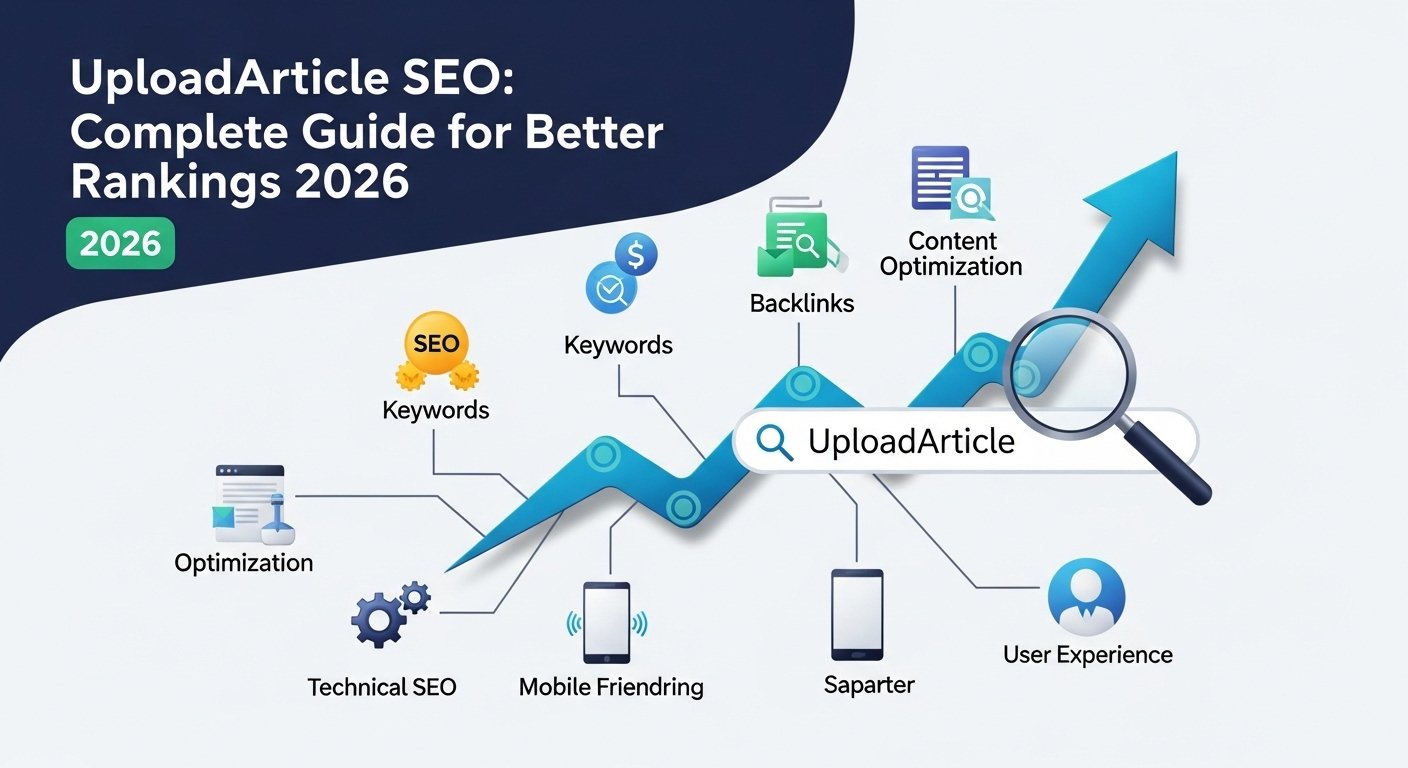

Uploading an article is not just pressing “Publish.”
A page can get great CTR even from position 28 if the topic matches search intent. That is exactly why the upload process matters. If people are willing to click a result buried deep in Google, it usually means the topic is useful, the title is promising, and the page answers something people genuinely want. But good interest alone is not enough.
If you want your content to rank faster in 2026, you need to optimize the page before it goes live. That means checking the SEO title, meta description, URL slug, headings, internal links, images, schema, and indexing settings. A strong article can underperform if it is uploaded carelessly. A normal article can perform much better when it is published with a proper SEO structure. This guide will show you how to publish SEO-friendly blog posts step by step, especially if you use WordPress, Rank Math, Yoast, or Google Search Console.
Editorial note: This article was reviewed by TheArticleSpot’s editorial team for clarity, source accuracy, and relevance. AI tools may have supported outlining, editing, formatting, or research organization, but final review and publication decisions are handled by a human editor. Tool features, pricing, and availability can change, so readers should verify important details on the official provider website before making a final decision.
What Does Article Upload SEO Mean?
Article upload SEO is the process of optimizing a blog post at the time of publishing so search engines and readers can understand it clearly.
It includes:
- Writing a strong SEO title
- Creating a clean URL slug
- Adding a click-worthy meta description
- Formatting headings correctly
- Adding useful internal links
- Optimizing images and alt text
- Checking Rank Math or Yoast settings
- Adding schema where needed
- Making sure the page is indexable
- Submitting the URL in Google Search Console
In simple words, it is the difference between randomly uploading content and publishing a blog post with a clear SEO purpose.
If you already use AI to create drafts, outlines, or meta descriptions, do not stop there. AI can help with the first version, but the final upload still needs human editing, SEO checks, and proper formatting. You can also read our guide on AI writing tools that pass detection if you want to understand how AI-assisted content should be reviewed before publishing.
Why the Upload Process Can Affect Rankings
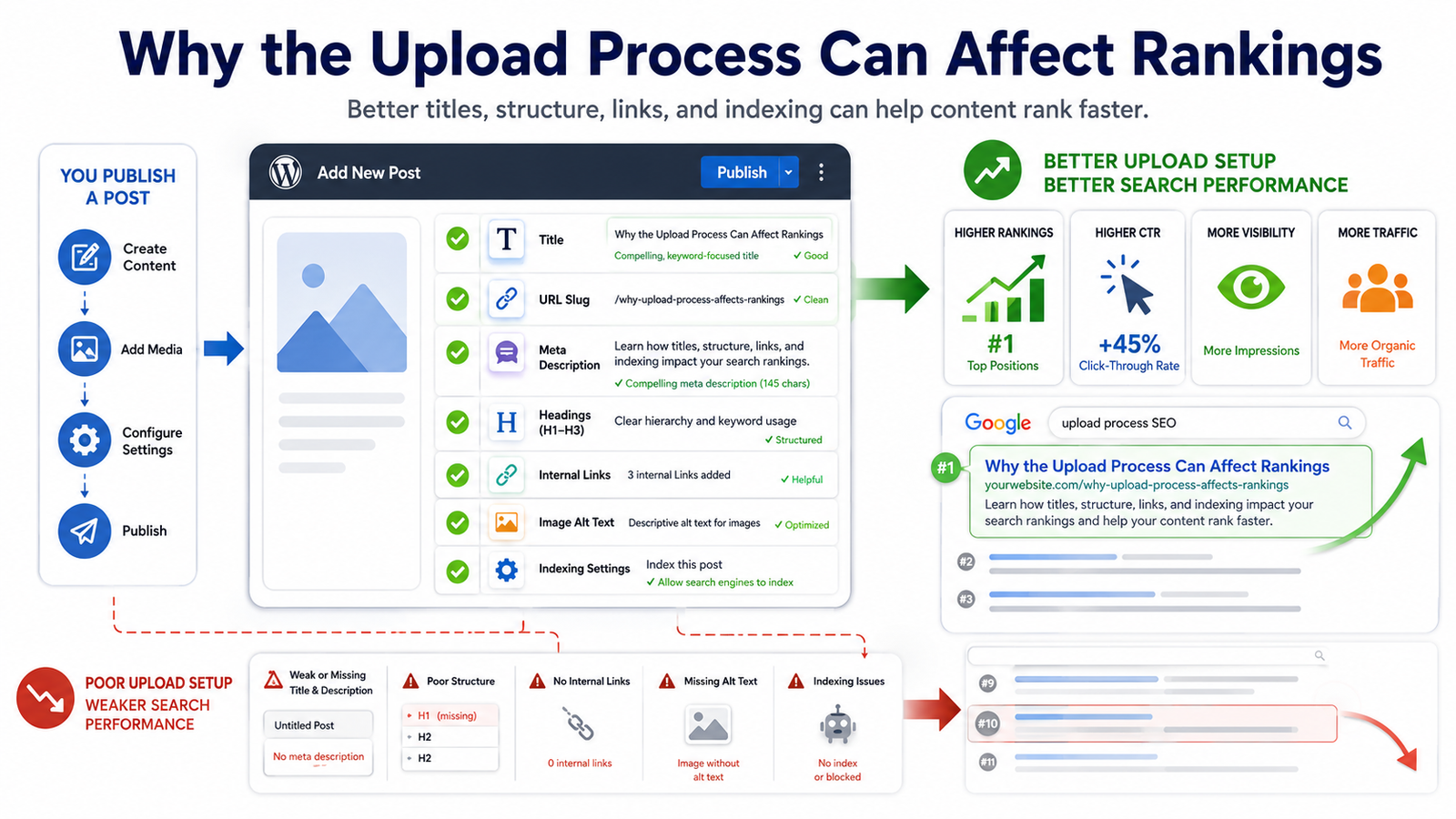
Many people think SEO starts after publishing.
They write the article first. Then they publish it. Then they wait. Then they check rankings.
That is the wrong order.
SEO should be part of the publishing process from the beginning. Google needs clear signals to understand what the page is about. Readers also need a clean structure so they can quickly find answers.
When you upload an article properly, it becomes easier for search engines to:
- Crawl the page
- Understand the main topic
- Read the heading structure
- Follow internal links
- Identify the correct title
- Understand image context
- Index the page correctly
- Match the page with relevant queries
It also helps users stay longer because the article feels easier to read.
That is why an SEO article upload checklist is important. It helps you avoid small mistakes that can quietly reduce performance.
Step-by-Step Guide to Publish SEO-Friendly Blog Posts
Follow these steps before publishing your next blog post.
1. Choose One Clear Main Keyword
Before uploading the article, decide the main keyword.
For this page, the main keyword is:
how to upload articles for SEO
But you should not repeat the same phrase unnaturally in every paragraph. Use natural variations too, such as:
- publish SEO-friendly blog posts
- upload SEO articles
- SEO article upload checklist
- optimize a blog post before publishing
- blog post SEO settings
- article publishing SEO guide
Your main keyword should appear naturally in:
- SEO title
- H1 heading
- First 100 words
- URL slug
- Meta description
- One H2 or H3 heading
- Conclusion or CTA
Avoid keyword stuffing. The page should sound human, not robotic.
If you are still planning your article, our guide on best AI prompt generators can help you create better blog outlines, title ideas, and SEO content prompts.
2. Write a Strong SEO Title
Your SEO title is one of the biggest CTR factors. It is often the first thing people notice in Google.
A weak title gives no clear reason to click. A strong title tells users exactly what they will learn.
Bad title:
Upload Article SEO Tips
Better title:
How to Upload Articles for SEO and Rank Faster in 2026
The better version works because it includes the main keyword, adds a clear benefit, and feels current.
A good SEO title should:
- Include the main keyword naturally
- Match the article content
- Be easy to understand
- Create a reason to click
- Avoid fake promises
- Stay readable on mobile search results
Do not stuff too many keywords into the title. A title should attract people, not just search engines.
3. Use a Clean URL Slug
The URL slug should be short, readable, and keyword-focused.
Bad slug:
/UQBWRFuk-BJ_JA4XswSoaPFvd-uYwLHZtrXqiMLIyLeyl5Y_-google-2026/
Good slug:
/how-to-upload-article-seo/
A clean slug is easier for both users and Google to understand.
Best practices:
- Keep it short
- Use lowercase letters
- Use hyphens between words
- Remove unnecessary words
- Avoid dates unless needed
- Do not change the slug later without redirects
If your article is already indexed, be careful before changing the slug. Changing URLs without proper redirects can cause ranking and indexing issues.
4. Write a Meta Description That Encourages Clicks
The meta description is your short pitch in search results. It should explain the value of the page clearly.
Bad meta description:
This article is about SEO and uploading articles.
Better meta description:
Learn how to upload SEO-friendly articles with the right title, meta tags, headings, images, links, and indexing settings to rank faster in 2026.
The better version is more specific. It tells readers what they will learn before they click.
A strong meta description should:
- Be around 140–160 characters
- Include the main topic naturally
- Mention the benefit
- Sound useful and human
- Avoid keyword stuffing
- Match the article content
Google may rewrite your meta description sometimes, but writing a good one still gives your page a better chance of showing a strong snippet.
5. Format the Article With Clean Headings
Heading structure matters because it helps Google and readers understand the page.
Use one H1 only. Usually, the article title is the H1.
Then use H2 headings for major sections and H3 headings for steps or sub-points.
Example structure:
H1: How to Upload Articles for SEO and Rank Faster in 2026
H2: What Does Article Upload SEO Mean?
H2: Step-by-Step Guide to Publish SEO-Friendly Blog Posts
H3: 1. Choose One Clear Main Keyword
H3: 2. Write a Strong SEO Title
H3: 3. Use a Clean URL Slug
H2: WordPress, Rank Math, and Yoast SEO Upload Settings
H2: Common Mistakes to Avoid
H2: FAQs
Do not use headings just to make text bigger. Use them to organize the article properly.
6. Add Internal Links Before Publishing
Internal links help Google understand how your pages connect. They also help readers move to useful related content.
- AI writing tools that pass detection
- Best AI prompt generators
- Semrush login and SEO guide
- Screaming Frog SEO audit guide
- Google Search Console login guide
- Google Business Profile optimization tips
Use natural anchor text like:
- AI writing tools for SEO content
- SEO audit guide
- Google Search Console guide
- prompt generators for blog outlines
- Google Business Profile optimization
Avoid anchors like “click here” or “read more.” They do not give enough context.
7. Optimize Images Before Uploading
Images can improve user experience, but they can also slow down your website if they are not optimized.
Before uploading images:
- Compress the image
- Rename the file properly
- Add descriptive alt text
- Use WebP or JPG where possible
- Avoid oversized dimensions
- Preview the image on mobile
Bad image filename:
IMG_8847.jpg
Good image filename:
seo-article-upload-checklist.jpg
Bad alt text:
image
Good alt text:
SEO article upload checklist for publishing blog posts
Alt text should describe the image clearly. Do not stuff keywords into every image.
8. Add Useful External Links
External links are not needed in every paragraph, but they can help when you are supporting a fact or pointing readers to an official source.
Good external links may include:
- Google Search Central documentation
- WordPress plugin documentation
- Official Rank Math or Yoast guides
- Tool documentation for SEO software
Avoid linking to weak, unrelated, or spammy websites. Every external link should help the reader.
9. Add FAQ Section for Long-Tail Queries
FAQs are useful because they answer quick questions and can target long-tail searches. For Example:
- How do I upload an article for SEO?
- How do I add meta tags to a blog post?
- Should I use Rank Math or Yoast?
- What is the best URL slug format?
- How long does it take for a new article to rank?
- Do internal links help blog posts rank?
Keep FAQ answers short, direct, and helpful.
10. Check Indexing Before and After Publishing
Before publishing, make sure the page is not set to noindex.
After publishing, inspect the URL in Google Search Console.
Go to:
Google Search Console → URL Inspection → Paste URL → Request Indexing
You can also read our Google Search Console login guide if you need help accessing GSC or checking indexed pages.
WordPress, Rank Math, and Yoast SEO Upload Settings
Many users searching for this topic are not just looking for theory. They want to know exactly what to check inside WordPress before publishing.
Here is a practical CMS checklist.
WordPress Upload Checklist
Before clicking publish in WordPress, check:
- Post title is clear and keyword-focused
- Permalink is short and clean
- Article uses only one H1
- H2 and H3 headings are structured properly
- Paragraphs are short
- Images are compressed
- Image alt text is added
- Category is selected
- Tags are relevant but not excessive
- Internal links are added
- External links open correctly
- Featured image is added
- Mobile preview looks clean
- Page is not set to noindex
WordPress gives you the structure, but you still need an SEO plugin to control metadata properly.
Rank Math Upload Settings
If you use Rank Math, check these before publishing:
- Add the focus keyword.
- Write the SEO title.
- Write the meta description.
- Check the permalink.
- Make sure the page is set to index.
- Add a canonical URL only if needed.
- Check schema type.
- Add FAQ schema if the article has FAQs.
- Add social title and social image.
- Check Rank Math suggestions, but do not follow them blindly.
Rank Math scores can be useful, but your goal is not just to turn the score green. Your goal is to make the article genuinely helpful and easy to understand.
Yoast SEO Upload Settings
If you use Yoast SEO, check these:
- Add the focus keyphrase.
- Edit the SEO title.
- Edit the meta description.
- Check the slug.
- Review readability suggestions.
- Confirm the page is indexable.
- Set the canonical URL if needed.
- Add schema settings where available.
- Add social preview details.
- Preview how the snippet may look in Google.
Yoast is helpful for basic SEO checks, but it cannot fully judge whether your article satisfies search intent. Always review the content manually.
Rank Math vs Yoast: Which One Is Better for Upload SEO?
Both Rank Math and Yoast can help you publish SEO-friendly blog posts.
Rank Math gives more built-in features in many setups, especially for schema and detailed SEO checks. Yoast is simpler and widely used, especially for beginners.
The plugin matters less than the process.
Whether you use Rank Math or Yoast, always check:
- Title
- Meta description
- Slug
- Indexing
- Canonical URL
- Schema
- Social preview
- Internal links
- Readability
- Mobile layout
Practical SEO Examples Before Publishing
Here are a few real examples that show how small changes can improve article quality.
Example 1: Bad Title vs Good Title
Bad title:
SEO Upload Tips
Good title:
How to Upload Articles for SEO and Rank Faster in 2026
Why it works:
The good title is specific, keyword-focused, and benefit-driven. It tells readers exactly what they will get.
Example 2: Bad Slug vs Good Slug
Bad slug:
/2026-best-seo–tips-uploading-articles-ranking-fast-in-google/
Good slug:
/how-to-upload-article-seo/
Why it works:
The good slug is short, clean, and easy to understand. It does not include unnecessary words.
Example 3: Bad Alt Text vs Good Alt Text
Bad alt text:
blog image
Good alt text:
WordPress SEO article upload checklist
Why it works:
The good alt text describes the image clearly and gives search engines useful context.
Example 4: Bad Meta Description vs Good Meta Description
Bad meta description:
Learn SEO tips for articles and blogs.
Good meta description:
Learn how to upload SEO-friendly articles with the right title, meta tags, headings, images, links, and indexing settings to rank faster in 2026.
Why it works:
The good version gives more detail and makes the result more clickable.
What to Do After Publishing
Publishing is not the final step. After your article goes live, you need to track its performance.
Check Google Search Console Queries
After a few days or weeks, open Google Search Console and check which queries are triggering the page.
Go to:
Performance → Search Results → Pages → Select the URL → Queries
Look for queries such as:
- how to upload articles for SEO
- publish SEO-friendly blog posts
- how to add meta tags to blog post
- WordPress SEO article settings
- Rank Math blog post settings
- Yoast SEO upload settings
- SEO article checklist
- how to index a new blog post
If the page gets impressions for a query but does not answer it well, add a new section.
This is one of the fastest ways to improve rankings because you are expanding the article based on real search data, not guesses.
Improve the Article Based on Search Intent
- If people are finding the page through “Rank Math settings,” add more Rank Math steps.
- If they are searching “Yoast SEO settings,” expand the Yoast section.
- If they are searching “how to add meta tags,” add more practical examples.
- This is how a page can move from page 3 to page 2, and eventually toward page 1.
Add More Internal Links
After publishing, add links from older relevant articles to this page.
Good source pages include:
- AI writing tools guides
- Prompt generator guides
- Semrush guides
- Screaming Frog guides
- Google Search Console guides
- Blogging and content optimization articles
For example, inside an AI writing article, you can add:
Once your draft is ready, follow this guide on how to upload articles for SEO so your title, meta description, headings, images, links, and indexing settings are properly optimized.
That type of internal link feels natural because readers using AI writing tools also need to publish the content correctly.
Common Mistakes to Avoid When Uploading SEO Articles
Even good articles can fail if they are uploaded badly. Avoid these mistakes.
1. Publishing Without Search Intent
Do not publish only because you have written 1,000 words. Ask what the user actually wants.
For this topic, users likely want a practical upload checklist, not a vague explanation of SEO.
2. Repeating the Same Keyword Too Often
Using the same phrase again and again makes the article sound unnatural.
Instead of repeating one keyword, use natural variations like:
- publish SEO-friendly blog posts
- optimize blog posts before publishing
- SEO article checklist
- article publishing guide
- blog upload SEO settings
3. Forgetting Internal Links
A page with no internal links is harder for Google and users to discover.
Every important blog post should connect to related content on your site.
4. Uploading Large Images
Large images slow down the page and create a poor user experience.
Compress images before uploading them.
5. Ignoring Mobile Preview
Most users will read your content on mobile. Always preview the article before publishing.
Check:
- Paragraph spacing
- Table width
- Font size
- Image size
- Buttons
- Ads
- Table of contents
6. Leaving the Page on Noindex
This is one of the most damaging mistakes.
If the page is set to noindex, Google will not show it in search results. Always check the indexing setting before publishing.
7. Copying From Google Docs Without Cleaning Formatting
Copying from Google Docs or Word can add messy formatting to WordPress.
After pasting, check the layout, headings, spacing, and HTML if needed.
Upload SEO vs Traditional SEO
Traditional SEO focuses on the whole website. It includes page speed, backlinks, content quality, technical SEO, site structure, and authority.
Article upload SEO focuses on how each blog post is published.
Both are important.
Traditional SEO builds the foundation. Upload SEO makes sure every new article is added properly.
If your website has strong technical SEO but your blog posts are uploaded with weak titles, missing meta descriptions, broken headings, and no internal links, your content will still struggle.
Helpful SEO Tools for Uploading Articles
SEO tools can make the publishing process easier.
Semrush can help with keyword research, competitor analysis, and rank tracking. You can check our Semrush login and SEO guide if you use Semrush for content planning.
Screaming Frog can help find missing titles, duplicate meta descriptions, broken links, and crawl problems. Our Screaming Frog SEO audit guide explains how technical audits work.
These tools are useful, but they do not replace human judgment. A tool can identify missing metadata, but it cannot always tell whether your article feels helpful, trustworthy, and easy to read.
Local SEO Note for Business Articles
If you are publishing blog posts for a local business, add local relevance carefully.
For example, you can include:
- City or region
- Local customer problems
- Service area
- Local examples
- Google Business Profile connection
If local visibility matters, read our guide on Google Business Profile optimization.
Do not force city names into every paragraph. Add location details only where they make sense.
Final SEO Article Upload Checklist
Before publishing your next blog post, check this list:
| SEO Item | Status |
|---|---|
| Main keyword selected | Done / Not Done |
| SEO title added | Done / Not Done |
| URL slug cleaned | Done / Not Done |
| Meta description written | Done / Not Done |
| H1, H2, and H3 structure checked | Done / Not Done |
| Internal links added | Done / Not Done |
| External links checked | Done / Not Done |
| Images compressed | Done / Not Done |
| Image file names optimized | Done / Not Done |
| Alt text added | Done / Not Done |
| Rank Math or Yoast settings checked | Done / Not Done |
| Schema added if needed | Done / Not Done |
| Page set to index | Done / Not Done |
| Mobile preview checked | Done / Not Done |
| URL submitted in Google Search Console | Done / Not Done |
Publishing an article is easy. Publishing it properly takes a few extra minutes.
Those few minutes can make the difference between a page that sits quietly and a page that starts gaining impressions, clicks, and rankings.
Bookmark this SEO article upload checklist before publishing your next blog post.
For a documented method that connects search evidence, AI-assisted analysis, human review and WordPress QA, follow our AI-assisted SEO publishing workflow.
FAQs
How do I upload an article for SEO?
To upload an article for SEO, add a strong title, clean slug, meta description, proper headings, internal links, optimized images, alt text, schema where needed, and indexing settings before publishing.
How do I publish SEO-friendly blog posts in WordPress?
In WordPress, write a clear title, clean the permalink, use proper headings, add internal links, optimize images, check Rank Math or Yoast settings, preview the post on mobile, and make sure the page is indexable.
Should I use Rank Math or Yoast for blog SEO?
Both Rank Math and Yoast can help. Rank Math offers more built-in SEO features in many setups, while Yoast is simple and beginner-friendly. The most important thing is checking the title, meta description, slug, schema, indexing, and internal links before publishing.
What is the best URL slug for an SEO article?
The best URL slug is short, readable, and focused on the main topic. For example, /how-to-upload-article-seo/ is better than a long slug with unnecessary words.
How do I add meta tags to a blog post?
You can add meta tags through an SEO plugin like Rank Math or Yoast. Add the SEO title, meta description, canonical URL if needed, robots settings, and social sharing tags before publishing.
Do internal links help articles rank faster?
Internal links can help search engines discover your article, understand its topic, and connect it with related pages. They also help readers find more useful content on your website.
How long does it take for a new article to rank?
Some pages get indexed within a few days, but rankings usually improve over weeks or months. Query coverage, internal links, content quality, and site authority all affect how quickly a page grows.