



You don’t need a computer science degree, a paid bootcamp, or any coding experience to learn AI in 2026. You need a laptop, an internet connection, and a path that doesn’t waste your time. That last part is the problem — there are thousands of “AI courses for beginners” out there, most of them either too shallow to be useful or too technical to start with.
So this guide does something different. Instead of selling you a course, it gives you the actual path: a free, structured, step-by-step curriculum that takes you from “I keep hearing about AI in meetings and nodding blankly” to genuinely understanding what AI is, using the main tools confidently, and having a small project you can point to. Every course linked here is real and free to start, and the whole thing requires zero coding.
If you’ve been waiting until you feel “ready enough” to begin — this is the starting line.
What you’ll be able to do after this path
Before we get into the modules, it’s worth being clear about what beginner actually means here, because a lot of courses are vague about it. By the end of this learning path you’ll be able to:
- Explain what AI and machine learning are — and the difference — without faking it
- Use ChatGPT, Claude, and Gemini for real work tasks, not just party tricks
- Write effective prompts that get useful output instead of generic mush
- Spot where AI is genuinely useful in your own job or studies
- Recognise AI’s limits — bias, hallucination, when not to trust it
- Show one small finished project that proves you can apply what you learned
None of that requires you to build a neural network from scratch. That’s a different, more advanced journey, and we’ll point to it at the end for anyone who wants it. For most people — marketers, analysts, students, small business owners, career changers — the path below is exactly the right level. For a stronger conceptual foundation as you go, keep our explainer on what artificial intelligence is open in a tab.
Do you need any background to start?
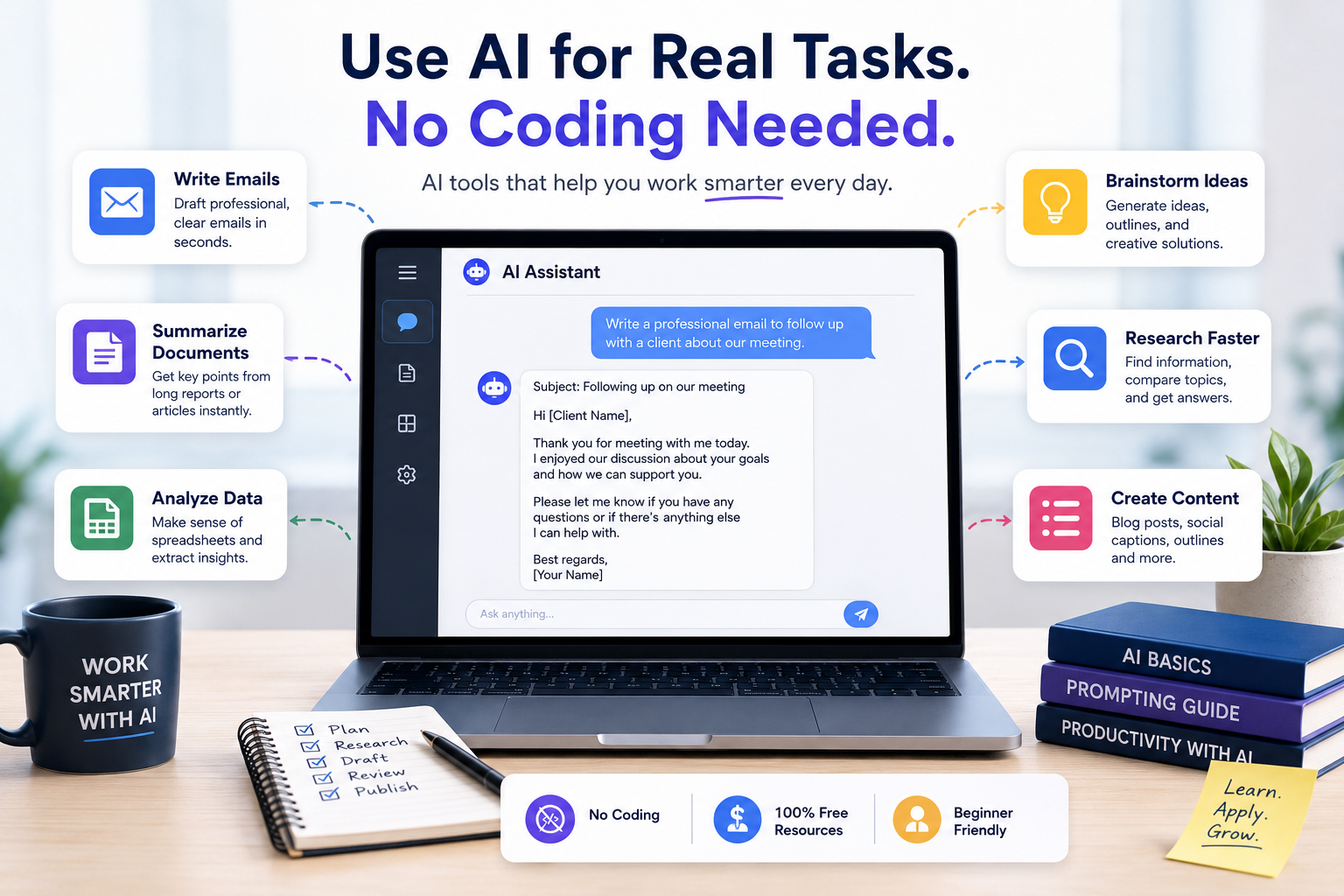
No. The only honest prerequisite is curiosity and a willingness to actually finish what you start. You don’t need maths, you don’t need Python, and you don’t need to have worked in tech.
This matters because intimidating terminology stops more beginners than difficulty ever does. People see words like “deep learning,” “transformers,” or “neural networks” in a course title and assume that’s the level they need to aim for on day one. It isn’t. Starting at the right level and building properly is almost always faster than jumping into the deep end and quietly giving up three weeks later.
If you can use a web browser and write an email, you’re ready for Module 1.
The free AI learning path: 8 weeks, no coding
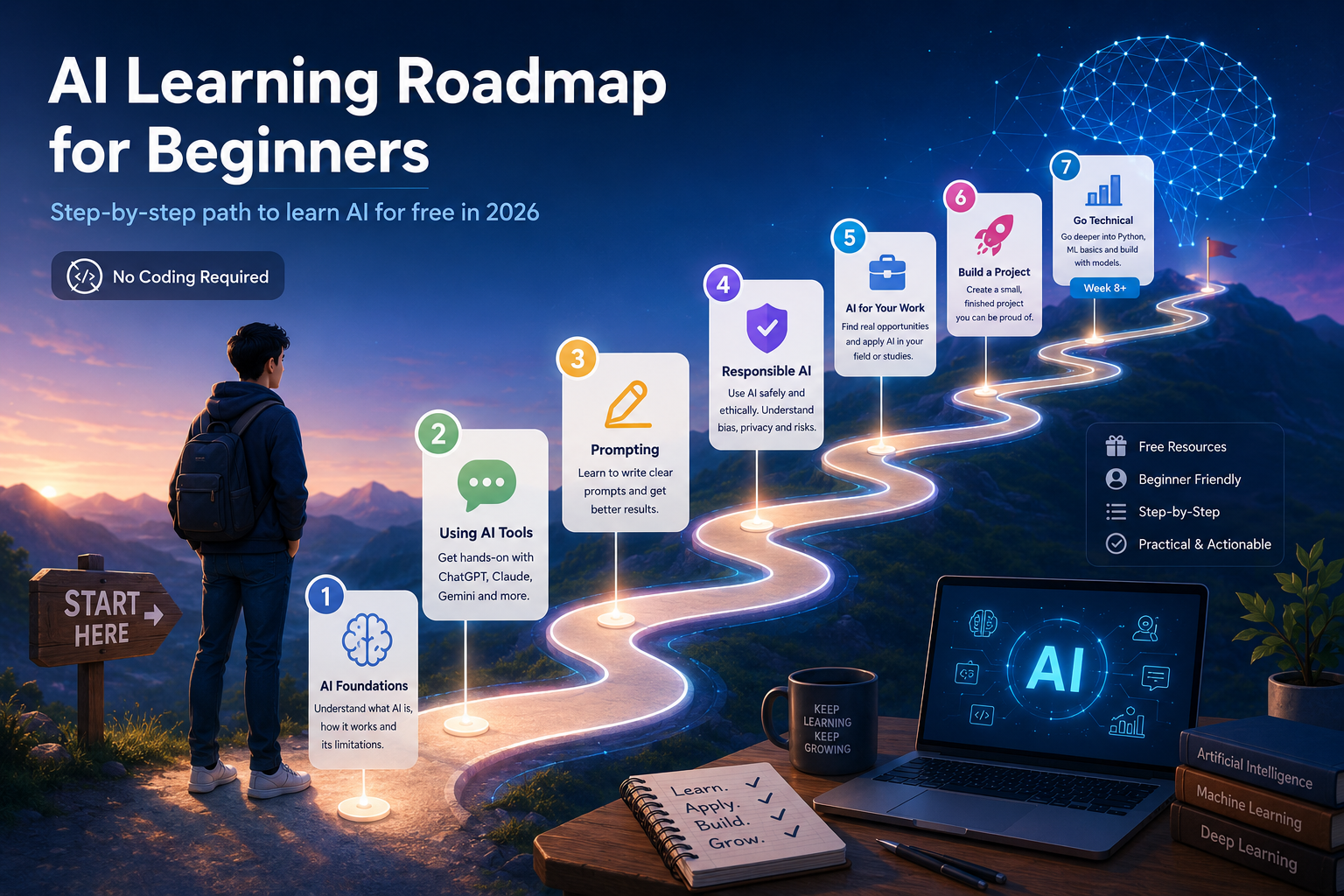
Here’s the sequence that works for most beginners. It’s built around free courses from names you can trust — Google, DeepLearning.AI, the University of Helsinki — and it’s deliberately paced so you build confidence before complexity. Treat it as roughly 4–6 hours a week. You can go faster; just don’t skip the foundations.
The whole path is laid out as a curriculum table further down, but here’s how each stage works and why it’s in this order.
Weeks 1–2 — Understand what AI actually is
Start with the concepts, not the tools. You want to understand what AI is, how machine learning lets systems learn from data instead of following fixed rules, and crucially what AI can’t do. This is the part that stops you from either over-trusting AI or being scared of it.
Two free options here, pick one (or do both):
- Elements of AI — a free course from the University of Helsinki and MinnaLearn, taken by over 2 million people. No maths, no programming, just clear explanations of the core ideas. It’s the gentlest possible on-ramp.
- Google’s “Introduction to AI” — the first course inside Google AI Essentials (more on that below). Covers foundational concepts including machine learning and the rise of generative AI, and it’s free to access.
Pair either one with our plain-English explainers on what machine learning is and how AI works so the vocabulary sticks.
Weeks 2–3 — Get hands-on with the actual tools
This is where it becomes real. Sign up for free accounts on ChatGPT, Claude, and Gemini and use each one for genuine tasks — drafting an email, summarising a long document, researching a topic, brainstorming ideas. Use them side by side and notice the differences. You’ll learn more from a week of real use than from a month of watching videos about them.
If you want structure around this, the early modules of Google AI Essentials walk you through using AI tools for everyday work scenarios. Our roundup of the best AI tools in 2026 is a useful map of what’s out there beyond the big three chatbots.
Weeks 3–4 — Learn to prompt properly
Most beginners get mediocre results from AI not because the tools are weak but because their prompts are vague. Prompting is a genuine, learnable skill, and it’s the single highest-leverage thing a beginner can get good at.
Google AI Essentials has a dedicated course called Discover the Art of Prompting that teaches you how to give AI clear, specific instructions and how to chain prompts together for multi-step tasks. It’s the most practical few hours you’ll spend in this whole path. If you want extra practice, our guide to prompt generator tools gives you templates to riff on.
Weeks 4–5 — Use AI responsibly (this is not optional)
AI tools reproduce biases in their training data, they sometimes confidently make things up (“hallucinate”), and anything you type into them is data you’re sharing. A beginner who understands this is far more employable than one who doesn’t, because the most common way AI projects fail in the real world isn’t bad technology — it’s people trusting output they shouldn’t have.
Google AI Essentials includes a Use AI Responsibly module with a practical framework for spotting AI harms and security risks. Anthropic’s free AI Fluency course (from the team behind Claude) covers a complementary framework for working with AI effectively, ethically, and safely. Don’t skip this stage just because it sounds like the boring bit — it’s a real differentiator.
Weeks 5–6 — Apply AI to your own field
Now connect it to your actual life. Take a real challenge from your work or study — a repetitive task, a research process, a recurring document — and use AI tools to improve it. This is where learning becomes a skill rather than trivia.
DeepLearning.AI’s “AI for Everyone”, taught by Andrew Ng, is perfect here. It’s a non-technical, roughly four-week course (free to audit) that helps you spot where AI genuinely fits into an organisation and how to think about AI projects strategically. It’s the course to take if you want to talk credibly about AI at work. Ng’s follow-up, Generative AI for Everyone, goes a layer deeper on the tools beginners are actually using.
Weeks 6–7 — Build one small thing
Employers and clients respond to work you can show far more than to a certificate. Your project doesn’t need to be impressive — it needs to be finished and real. A prompt library for your team. A spreadsheet workflow that uses AI to clean or summarise data. A short research process you automated. A simple custom chatbot for a hobby. Pick something small, finish it, and be able to walk someone through it.
Week 8+ (optional) — Go technical if you want to
If you’ve enjoyed all of this and want to understand how the models actually work under the hood, this is where the coding path opens up. It’s completely optional — plenty of valuable, well-paid AI-adjacent roles never require it. But if you’re curious:
- Google’s Machine Learning Crash Course — free, recently refreshed, covers the fundamentals of how ML models are built. Some Python helps but it’s beginner-tolerant.
- fast.ai — free and genuinely rigorous, used by people who’ve gone on to publish real research. It treats you like an adult.
- Microsoft’s AI for Beginners — a free 24-lesson open-source curriculum on GitHub with hands-on projects.
- Hugging Face’s free courses — the place to go once you want to build with real models and agents.
AI for beginners: the free curriculum at a glance
Here’s the whole path as a single curriculum you can work through module by module. Bookmark this table.
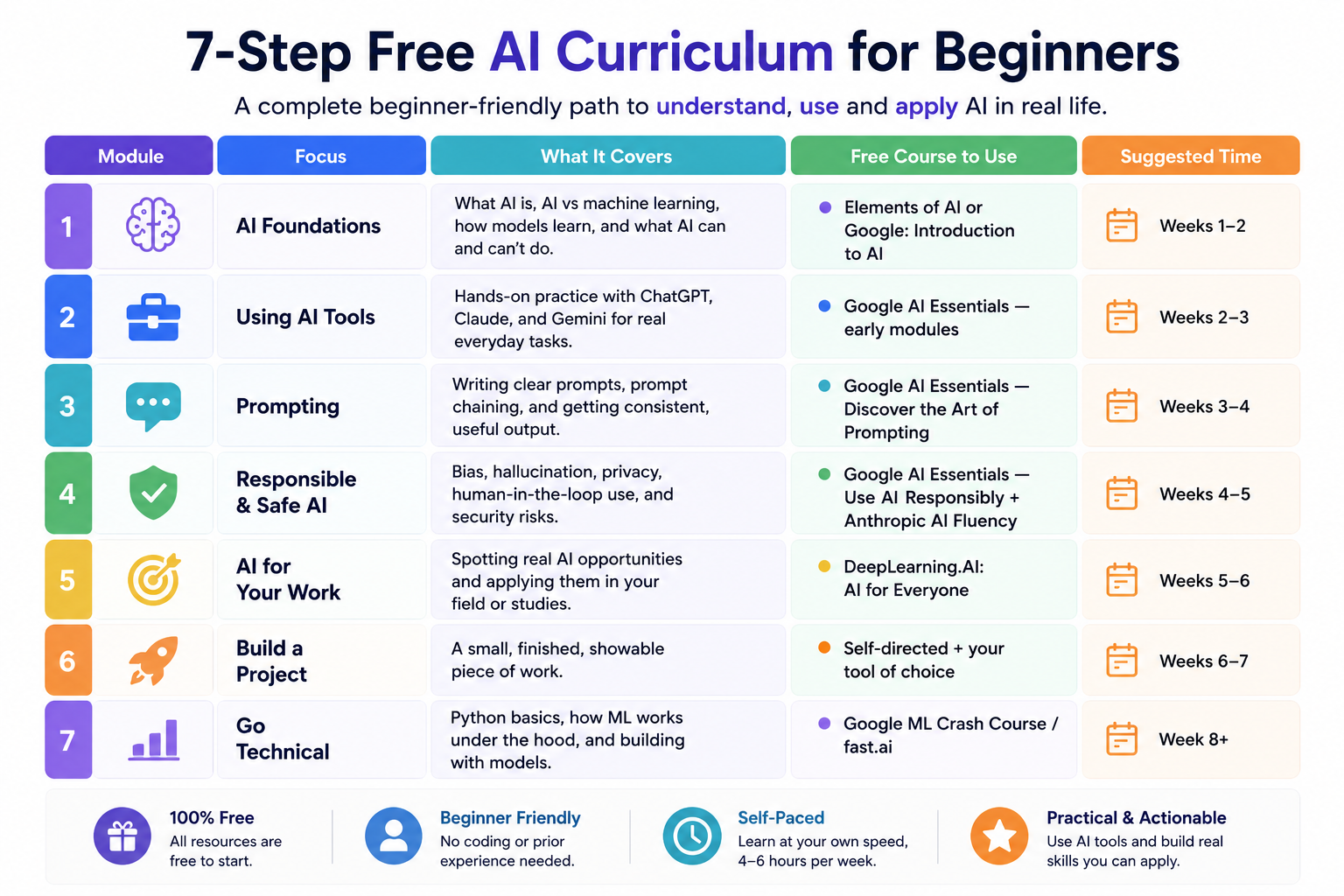
| Module | Focus | What it covers | Free course to use | Suggested time |
|---|---|---|---|---|
| 1 | AI foundations | What AI is, AI vs machine learning, how models learn, and what AI can and can’t do | Elements of AI or Google: Introduction to AI | Weeks 1–2 |
| 2 | Using AI tools | Hands-on practice with ChatGPT, Claude, and Gemini for real everyday tasks | Google AI Essentials — early modules | Weeks 2–3 |
| 3 | Prompting | Writing clear prompts, prompt chaining, and getting consistent, useful output | Google AI Essentials — Discover the Art of Prompting | Weeks 3–4 |
| 4 | Responsible & safe AI | Bias, hallucination, privacy, human-in-the-loop use, and security risks | Google AI Essentials — Use AI Responsibly + Anthropic AI Fluency | Weeks 4–5 |
| 5 | AI for your work | Spotting real AI opportunities and applying them in your field | DeepLearning.AI: AI for Everyone | Weeks 5–6 |
| 6 | Build a project | A small, finished, showable piece of work | Self-directed + your tool of choice | Weeks 6–7 |
| 7 | Go technical | Python basics, how ML works under the hood, and building with models | Google ML Crash Course / fast.ai | Week 8+ |
Are these courses really free? Mostly, yes. Every course above can be started for free. Some are free end-to-end (Elements of AI, fast.ai, Microsoft, Hugging Face, Google’s ML Crash Course). Others — Google AI Essentials and the DeepLearning.AI courses — are free to access and audit, with an optional paid certificate (financial aid is available if you want the certificate but can’t pay for it). You can complete this entire path without spending a cent.
The best free AI courses for beginners (and who each is for)
If you’d rather pick one strong course than follow the full sequence, here’s the short list, sorted by who they suit.
Google AI Essentials — The best all-round starting point for working professionals. Five short courses (Introduction to AI, Maximise Productivity With AI Tools, Discover the Art of Prompting, Use AI Responsibly, Stay Ahead of the AI Curve), under 10 hours total, zero experience required, built by AI experts at Google. Free to access; the Google-issued certificate is optional and paid.
DeepLearning.AI — AI for Everyone — The best course for understanding AI strategically. Taught by Andrew Ng, no coding or maths, about four weeks. Ideal if you want to lead or contribute to AI conversations at work rather than build models. Free to audit.
Elements of AI — The best pure beginner on-ramp. Free, no jargon, no programming, designed by the University of Helsinki for the general public. Start here if the word “AI” still feels intimidating.
Google Machine Learning Crash Course — The best free first step into the technical side, once you’re ready. Free, well-structured, with interactive exercises.
fast.ai — The best free deep-dive for people who want rigour and intend to build. Not watered down, and that’s the point.
A pattern worth noticing: the quality gap between free and paid AI courses has narrowed dramatically over the last couple of years. Google, Microsoft, IBM and several universities have put serious effort into free AI education, partly because they want you building on their platforms. You benefit from that. Where free courses still fall short is feedback on your work, peer interaction, and job-placement support — so if those things matter to you, a paid program might be worth it later. But not as your first move.
Do you actually need to learn to code?
This is the question beginners agonise over most, so let’s settle it. No — you do not need to code to start learning AI, and for a large and growing set of roles you never will. AI tools specialists, AI-literate marketers, operations people who automate workflows, product folks who direct AI effectively — these jobs reward people who understand AI and can apply it, not people who can derive the maths.
Coding becomes necessary when you want to build models, work as a machine learning engineer, or do research. If that’s your goal, the optional Module 7 above is your gateway, and Python is the language to learn (it runs the entire modern AI ecosystem). But notice the order: understand and use AI first, then decide whether you want to go technical. Plenty of people discover that the no-code path gets them exactly where they wanted to go.
How long does it take to learn AI as a beginner?
Realistically, the path above takes most people 8 to 12 weeks at a few hours a week to get a solid, confident foundation — what you’d reasonably call “beginner complete.”
Being genuinely job-ready for an AI-focused role is a longer arc: typically 9 to 18 months for someone starting from a non-technical background, including building a portfolio, getting comfortable with industry tools, and being able to handle an interview. Anyone promising you’ll be job-ready in six weeks is overselling. You can learn the vocabulary in six weeks. Learning to apply it well takes longer — and that’s true of every worthwhile skill.
The good news: you start getting useful almost immediately. The prompting and tool skills from weeks 2–4 are things you can put to work the very next day.
Mistakes beginners make (and how to avoid them)
Starting too advanced. Diving into deep learning before you understand basic AI concepts builds a shaky structure that collapses later. Start at Module 1 even if it feels too easy.
Collecting courses instead of finishing one. The job market rewards people who complete real projects, not people with forty open browser tabs and three unfinished courses. The hardest problem in online learning isn’t difficulty — it’s completion. Most platforms see single-digit completion rates, not because the content is bad but because nobody’s holding you accountable.
Chasing certificates over skills. A certificate looks nice, but if you can’t actually do anything afterwards, it does little in an interview where someone asks you to walk through a project. Aim for skills you can demonstrate.
Skipping the responsible-AI part. It feels like the boring module. It’s actually one of the most valuable, because understanding AI’s limits is exactly what separates people who use AI well from people who get burned by it.
How to actually finish (the real secret)
Since completion is the thing that trips up almost everyone, build accountability in from day one. Treat a free course like you paid $1,000 for it. Schedule the time as if it were a meeting with someone else. Tell a friend or partner you’re doing it — saying it out loud creates a small amount of social pressure that matters more than you’d expect. Set a weekly checkpoint. Join a study group or community forum attached to the course. Free removes the friction of cost but amplifies the friction of accountability, and the fix isn’t to pay more — it’s to make the commitment somewhere other than just inside your own head.
What to do after the beginner path
Once you’ve finished, go deeper in the direction most relevant to you. If your interest is using AI at work, build out a real workflow and explore more of the best AI tools for 2026 and the best AI writing tools. If you’re leaning technical, move into Google’s ML Crash Course, then fast.ai or Hugging Face. Either way, keep building small projects — a public portfolio of finished work is worth more than any single qualification.
If you’ve made it this far and you’re still not sure whether AI is for you, that’s fine. The decision doesn’t have to be a dramatic leap. Start with Elements of AI or Google AI Essentials, give it two weeks, and see if it holds your attention. That’ll tell you more than any guide ever could.
Frequently asked questions
What is AI?
Artificial intelligence (AI) is software that performs tasks normally requiring human thinking — recognising patterns, understanding language, making predictions, or generating content. Instead of following fixed, hand-written rules, modern AI systems learn from large amounts of data. Most practical AI today runs on machine learning, a specific approach within AI where systems learn patterns from data. The chatbots you’ve used, like ChatGPT, Claude and Gemini, are a type called generative AI, which creates new text, images, or code based on patterns learned during training.
How long does it take to learn AI as a beginner?
A focused beginner spending a few hours a week can build a solid foundation in about 8 to 12 weeks using a free learning path. That covers AI concepts, using the main tools, prompting, responsible use, and a small project. Becoming fully job-ready for an AI-focused role typically takes longer — around 9 to 18 months from a non-technical start — because that includes building a portfolio and getting comfortable with industry tools. You can apply basic AI skills, especially prompting, almost immediately.
Is the AI course for beginners really free?
Yes. You can complete a full beginner AI learning path without paying anything. Courses like Elements of AI, Google’s Machine Learning Crash Course, fast.ai, Microsoft’s AI for Beginners and Hugging Face’s courses are free end-to-end. Others, like Google AI Essentials and DeepLearning.AI’s AI for Everyone, are free to access and audit, with an optional paid certificate — and financial aid is available if you want the certificate but can’t afford it.
Do you need to know how to code to learn AI?
No. You can learn AI and become genuinely useful with it without writing a single line of code. Courses like Elements of AI, Google AI Essentials and AI for Everyone require no programming and focus on understanding and applying AI. Coding only becomes necessary if you want to build machine learning models yourself or work as a machine learning engineer, in which case Python is the language to learn.
Which free AI course is best for a complete beginner?
For a complete beginner, Elements of AI is the gentlest starting point (no maths, no code), while Google AI Essentials is the best all-round option for working professionals who want practical, hands-on skills in under 10 hours. If you want to understand AI strategically for the workplace, DeepLearning.AI’s AI for Everyone by Andrew Ng is the strongest pick. All three are free to start.