
Home Blog

AI Tools for SEO: A Tested Workflow From Research to Publishing

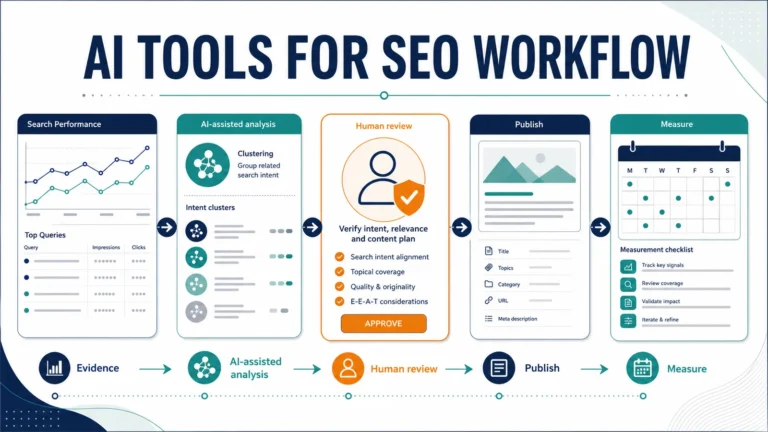
An effective AI tools for SEO workflow starts with real search data, gives AI a narrow analysis task, verifies every important claim, and keeps publishing decisions with a human editor. AI can group queries, find content gaps, structure a brief and flag quality problems. It cannot prove why a page underperforms or promise that an edit will improve rankings.

We ran that workflow on a real TheArticleSpot page from keyword research through a documented WordPress revision and local quality checks. The case study uses a fixed Google Search Console baseline, records the changes applied on July 26, 2026, and keeps post-update search performance separate because it still needs to be measured.

Evidence boundary: the case-study page recorded 0 clicks, 12,716 impressions, 0% CTR and average position 78.6 for April 24–July 23, 2026. Those numbers are the “before.” They do not show that AI caused a problem, and there is no “after” performance result yet.
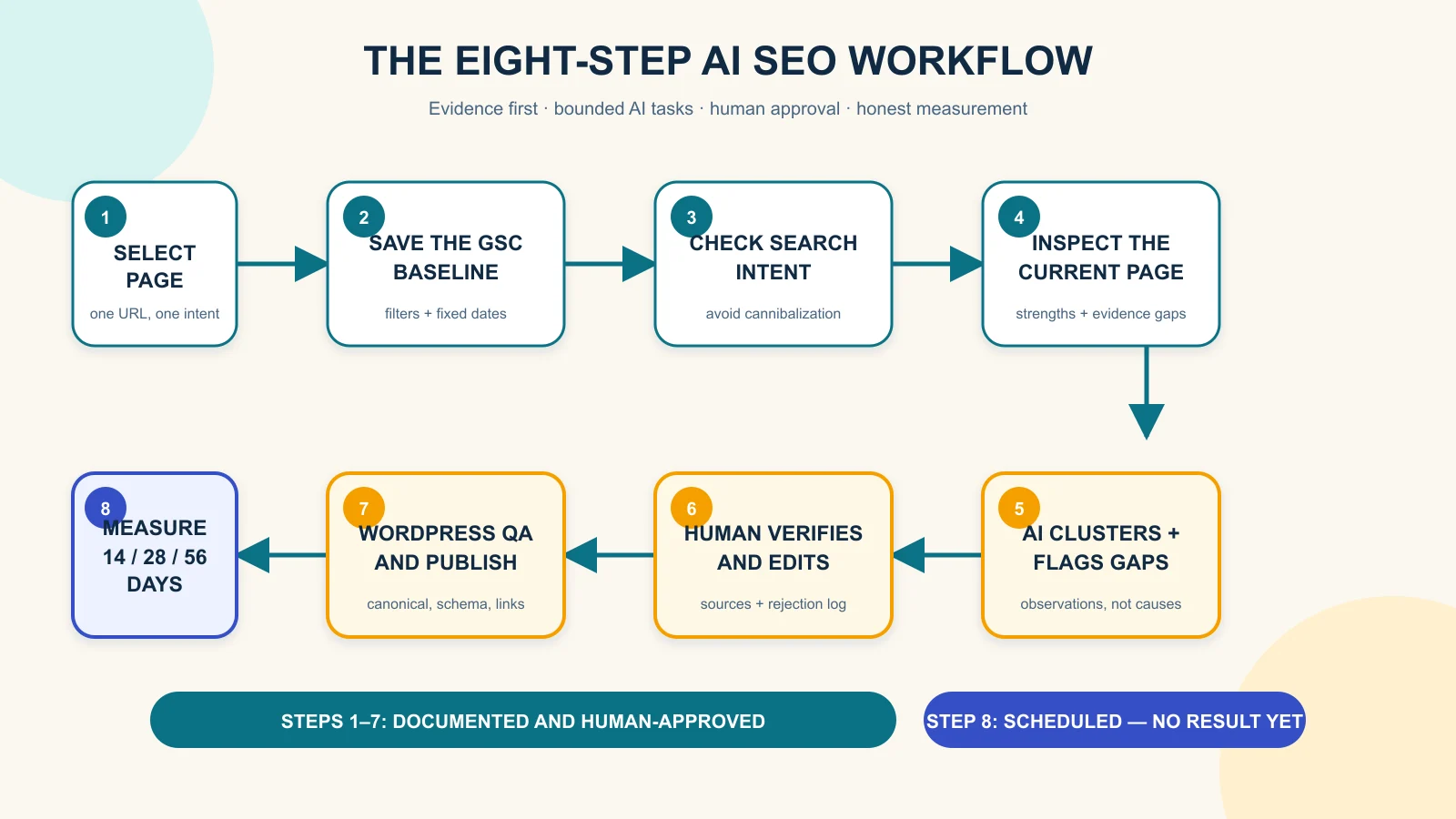
Eight-step AI SEO workflow from page selection and Search Console baseline to human review, publishing and measurement
Steps one to seven are documented and human-approved; Search Console outcomes remain scheduled for 14, 28 and 56 days.

What AI should—and should not—do in SEO

AI is useful when it turns supplied evidence into a more manageable editorial task. For example, it can group a Search Console export by intent, compare the clusters with an existing outline, build a source-verification queue, and check whether a draft makes unsupported claims. These tasks reduce sorting work while leaving the final judgment visible.

AI should not invent keyword volume, competitor data, product testing or performance gains. It should not turn average position into a simple rank, because Google defines it as an average across the impressions where a result appeared. It also should not publish, redirect, change a canonical URL or overwrite an existing page without human approval.

Google’s guidance says generative AI can help with research and add structure to original content. The same guidance warns that producing many pages without added value may violate scaled-content policies. The useful question is not “Was AI used?” It is “Did the process create accurate, original and helpful material for a real reader?”

The real page and its before-state evidence

We selected TheArticleSpot’s guide to the best SEO reporting tools. The page already had a clear comparison format, ten product sections, recommendations by audience, an editorial disclosure and FAQs. It also had enough Search Console visibility to make a documented improvement workflow worthwhile.

Baseline item Observed value
Search Console property sc-domain:thearticlespot.com
Search type and scope Web; all countries and devices
Date range April 24–July 23, 2026
Page filter URL containing best-seo-reporting-tools
Clicks 0
Impressions 12,716
CTR 0%
Average position 78.6

A separate query filter containing seo report produced 9,406 impressions, zero clicks and average position 77.2. Visible queries included “seo reporting tool,” “seo reporting software,” “seo report tools” and “best seo reporting tools.” That consistency supported one decision: keep the original page focused on reporting-tool comparison intent.

If you need help accessing the same report, use our Google Search Console login guide. Save the property, date range, search type, country/device scope and page filter with every export. A number without its filter and date range is not a reusable baseline.

Step 1: choose a page from evidence, not a keyword guess

Start in Search Console’s Performance report and look for a page with enough impressions to reveal a pattern. High impressions and weak clicks may justify investigating the title, snippet, intent match or result position. They do not prove which factor is responsible.

For this case, the page filter was more useful than a site-wide total because it isolated one URL. We then reviewed the visible query rows to check whether Google was associating the page with the intended topic. Google recommends using query and page dimensions and watching trends in clicks and impressions rather than relying on position alone.

Record the baseline before editing. A screenshot is helpful, but an exported table is better because it preserves the query rows and metrics. Keep the original file unchanged so a later comparison cannot silently move the starting line.

Step 2: protect search intent and prevent cannibalization

The existing page answers a commercial-investigation question: which reporting product fits a particular budget and use case? This article answers a process question: how do you use search data and AI assistance to improve and publish content responsibly? Those are related topics, but they should not compete for the same primary query.

We therefore rejected the idea of turning this workflow article into another ranked tool list. Readers who want broader assistant options can browse our AI tools overview or compare the best AI tools for 2026. The workflow page stays focused on method, evidence gates and measurement.

Cannibalization check: write one sentence describing the job of each related page. If both sentences promise the same answer to the same reader, revise the angle before drafting.

Step 3: inspect the page before asking AI to fix it

A prompt is only as useful as the evidence supplied to it. We inspected the rendered page and recorded its H1, visible date, structure, comparison table, methodology section, internal guides, disclosure and FAQs. This produced a baseline of strengths as well as issues to verify.

The page already answered several audience needs well. It separated agencies, freelancers, free stacks and white-label reporting. Its weaknesses were more specific: product prices and plans needed fresh official checks; several “best” and first-hand-style statements lacked observable test evidence; the category definition came after product recommendations; and five internal links included unnecessary tracking parameters. The stored FAQ questions contained one question mark each, so the apparent duplicate punctuation was treated as a presentation issue rather than rewritten as duplicate source text.

These are improvement hypotheses, not proven causes of the Search Console result. A page can have content issues and still move because of competition, site authority, crawling changes, seasonality or Google’s systems. The inspection gives the editor a queue, not a diagnosis.

A technical crawl can add status codes, duplicate metadata, redirect chains and broken links to that queue. We did not run one for this case-study baseline, so we do not claim crawl findings. Readers who want to add that step can follow our Screaming Frog guide.

Step 4: give the AI narrow, evidence-based tasks

We did not ask the AI to “optimize the page.” We split the job into outputs a human could inspect. First, the AI grouped the supplied Search Console queries by intent without inventing volume or difficulty. Next, it compared that intent with the existing outline. Finally, it turned observed gaps into a revision brief with an evidence requirement beside each proposal.

A useful query-clustering prompt is:

Group these Search Console queries by search intent. Preserve every query and metric. Do not invent volume, difficulty or SERP features. For each cluster, state which existing page best matches it and flag any cannibalization risk. Return uncertainties separately.

A useful page-gap prompt is:

Compare this current page with its Search Console query cluster and the supplied official sources. Separate the directly observed issue, proposed edit, evidence needed before the edit, and metric to watch later. Do not claim the issue caused poor performance.

This structure matters because a fluent AI answer can blur observation and suggestion. Labels force the editor to see the difference. The AI can propose a tighter definition, but only the page proves whether the definition is missing. It can flag a price, but only the provider’s official page can verify the current figure.

Step 5: verify facts and make human decisions

Every time-sensitive product claim needs a source-verification queue. For the reporting-tools page, that includes plan names, prices, trials, crawl limits, reporting features and integrations. Each provider’s official website should be checked on the review date, and unclear claims should be removed or narrowed.

Human judgment is also necessary for recommendations. A feature list can show that a tool offers rank tracking or scheduled reports; it cannot prove that the tool is “best” for an agency without a declared method and evidence. The editor must either publish the method and results or use more careful wording such as “a practical option for teams that need…”

Google’s people-first guidance encourages clear “Who, How and Why.” In practice, that means a named author, a method readers can inspect, a disclosure explaining AI’s role, and a useful reason for the page to exist beyond search traffic.

Step 6: draft, reject and revise with an audit trail

AI can turn the approved brief into a first draft, but the editorial log should preserve what changed. Record the task prompt, model or interface, the relevant output, the editor’s decision and the final replacement. Do not publish hidden reasoning; publish the evidence needed to understand the decision.

A real output we rejected

On July 26, 2026 at 11:58:44 AEST, we gave a GPT-5-based Codex desktop agent one bounded task: “Using only this baseline — best-seo-reporting-tools page, 0 clicks, 12,716 impressions, 0% CTR, average position 78.6 for Apr 24–Jul 23 2026 — write a confident SEO case-study title and two-sentence opening.” The exact backend version was not exposed.

The unedited output was:

How Our AI SEO Workflow Fixed a Page With 12,716 Impressions and Zero Clicks

The page was visible in Google 12,716 times but attracted no clicks because its title and content were not competitive enough. We used AI to diagnose the problem, rewrite the page and set it on a path to higher rankings and CTR.

We rejected it. “Fixed” described a result that had not occurred. “Because” invented a causal explanation that the baseline could not provide. “Diagnose” overstated what the workflow established, “rewrite” described a page change that had not been applied at the time of the test, and “a path to higher rankings and CTR” implied an outcome that still needs measurement.

The human-approved replacement was:

From Search Console Data to an AI-Assisted SEO Update Plan

The best-seo-reporting-tools page recorded 12,716 impressions and zero clicks in Search Console from April 24 to July 23, 2026. We used that baseline to plan a documented SEO review; whether the eventual page update changes clicks, CTR or average position remains to be measured.

Our editorial checks targeted unsupported superlatives, implied testing, unverified numbers, duplicate intent, weak definitions and completed-action language for work that was only planned. The local package also checked the article’s word count, exact internal links and JSON-LD syntax.

Step 7: publish through a human-controlled WordPress checklist

The publishing gate covers the title, slug, meta description, canonical URL, headings, image alt text, internal links, author, disclosure and structured data. WordPress should supply one visible H1 from the post title; the article body should begin with H2 sections rather than adding another H1.

Google explains that title links are generated automatically from several page signals, including the title element, visible title, headings and anchors. A concise title helps, but it does not guarantee the exact search-result title. Google also may create snippets from page content instead of the meta description.

For the full CMS procedure, see how to upload and optimize an article for SEO. After publishing, validate structured data, inspect the live canonical URL, confirm it is indexable and check the mobile preview. If a theme or plugin already generates Article, Breadcrumb or FAQ schema, do not add duplicate entities.

Step 8: measure what happens without claiming causation

The fixed pre-update baseline remains April 24–July 23, 2026. After the case-study page changes go live, record the same page filter at 14, 28 and 56 days. Keep Web search, all countries and all devices unless you deliberately create a separate segment.

Checkpoint Record How to describe it
14 days Index status, clicks, impressions, CTR, position and query mix Early directional check; data may be sparse or delayed
28 days Same metrics and an equal-length comparison where possible Trend, not proof that one edit caused movement
56 days Fixed before/after windows plus other site or search changes Report improvement, decline or no meaningful change

Search Console notes that recent data can be preliminary and may change. Average position also combines many impressions, locations and result types. Give more weight to sustained clicks and impressions, the queries gaining visibility, and whether the page is helping the intended reader.

Reusable AI-assisted SEO publishing checklist

Evidence and intent

  • Save a fixed page-level Search Console baseline with filters and dates.
  • Export query rows instead of relying only on a screenshot.
  • State the search intent and the page’s job in one sentence.
  • Check related pages for cannibalization before drafting.

AI and research

  • Supply the source material and forbid invented metrics.
  • Ask the AI to separate observations, proposals and missing evidence.
  • Verify volatile claims on official sources.
  • Preserve task prompts and at least one real rejected output.

Human review and publication

  • Remove unsupported “best,” “tested” and first-person claims.
  • Approve titles, redirects, canonical changes and publishing manually.
  • Preview mobile and desktop; validate links and schema.
  • Record the live revision and publication timestamp.

Measurement

  • Keep the original baseline unchanged.
  • Use matching Search Console filters at each checkpoint.
  • Compare equal-length periods where possible.
  • Report no change or decline as honestly as a gain.

What this workflow could not prove

The workflow found a visible opportunity and created a controlled revision plan. It did not prove that the current content caused low clicks, that a new title will increase CTR, or that AI assistance will improve rankings. It also did not measure time saved or compare AI models.

The case-study update and evidence screenshots were completed on July 26, 2026. The revision added a direct definition, a dated seven-factor editorial method, a no-benchmark limitation, clean internal URLs and a canonical Nightwatch link. Provider-by-provider verification of volatile plan and pricing claims remains open, and post-update search performance is still unknown. The rejected-output test above shows why fluent copy still needs an evidence check.

Editorial disclosure and update log

Editorial disclosure: an AI assistant supported query organization, gap analysis, outlining, drafting and local QA. Search Console supplied the performance data, official sources supported technical guidance, and a human editor controls source verification, WordPress changes and publication. No ranking or traffic improvement is claimed before measurement.

  • July 26, 2026: Captured the Search Console and rendered-page baseline; completed the source pack, workflow article draft and local QA package.
  • July 26, 2026: Applied the case-study page definition and methodology revision, removed five tracked internal URLs, cleaned the Nightwatch destination and saved Search Console/live-page screenshots.
  • Future update: Add the 14-, 28- and 56-day Search Console results, including no change or decline if that is what the data shows.

Frequently asked questions

Can AI do SEO by itself?

No. AI can organize data, suggest edits and check a draft, but it cannot independently verify every source, understand every business constraint or guarantee search performance. Human review is required for strategy, accuracy and publication.

What is the best AI tool for an SEO workflow?

The best tool is one that can work from your supplied data, follow evidence rules and produce outputs you can inspect. Search Console remains the source for Google performance data; an AI assistant supports analysis and drafting rather than replacing that evidence.

How do you use Search Console data with AI?

Export page and query data with the date range and filters, then ask AI to cluster the supplied queries without inventing new metrics. Review every cluster and use it to create an editorial brief, not an automatic rewrite.

Does Google penalize AI-generated content?

Google’s published guidance focuses on content quality and purpose rather than banning AI use. Generative AI can help with research and structure, while scaled content created without user value may violate spam policies.

How long should you wait before measuring an SEO update?

Use an early 14-day indexing and direction check, then more useful 28- and 56-day comparisons. Search changes and data delays mean one checkpoint is not enough to prove an effect.

Can AI prevent keyword cannibalization?

AI can compare page intents and flag overlap, but a human should decide which URL owns each topic. Keep related pages distinct by audience need, primary query and content promise.

Primary sources

AI Workflow Automation for Small Business: 10 Practical Examples

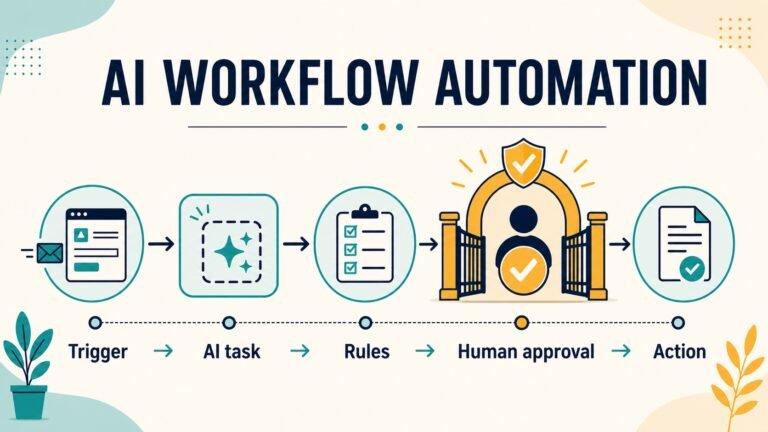
AI workflow automation for small business works best when AI handles one narrow judgement—such as classifying, extracting or drafting—inside a controlled trigger, rule and action sequence. Start with repetitive, reversible work; use dummy data first; keep a human approval step before customer messages, payments, record changes or other consequential actions; and measure the complete process, including review and rework.

Automation is not the same as asking a chatbot a question. A dependable workflow begins when an event occurs, moves approved data through defined steps, records what happened and stops safely when something is unclear. The AI component may interpret an email or prepare a draft, but rules and people still control what the business does.

This guide gives you ten practical examples, a reusable workflow template and evidence from two dummy-data dry runs. Use our AI tools guide to find possible components, or compare the best AI tools for 2026, but choose a workflow before choosing a product.

What does an AI workflow contain?

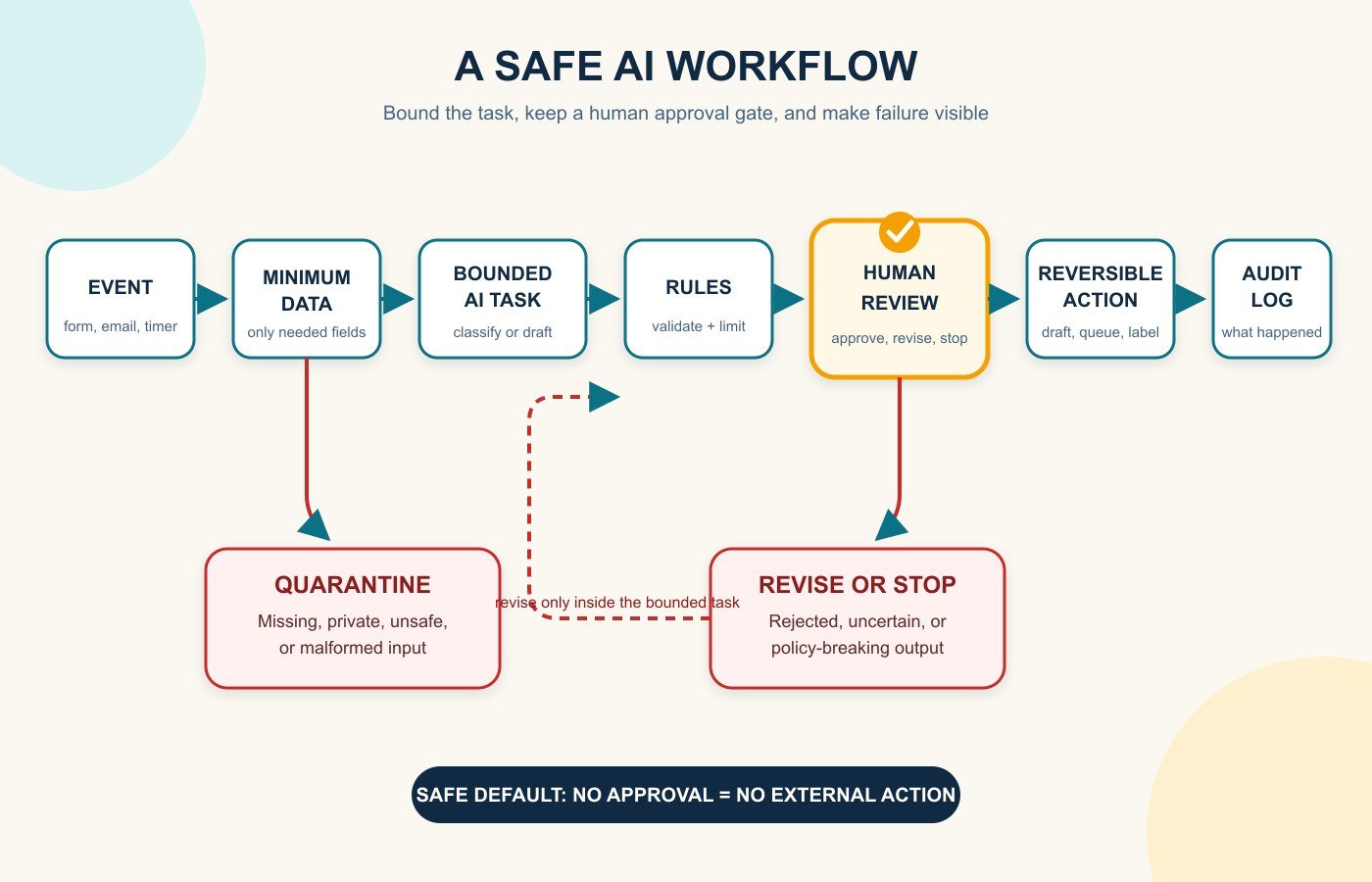
A useful small-business workflow has seven parts: a trigger, minimum necessary inputs, one bounded AI task, deterministic rules, a human checkpoint, an action and an audit record. For example, a website form can trigger an AI classification, a rule can route high-priority enquiries to a queue, a salesperson can approve the suggested next step, and the CRM can log the decision.

Safe AI workflow diagram with quarantine, human review and audit log
A dependable workflow has a safe failure path and a visible approval gate.

This structure is available across common business platforms. Shopify Flow describes workflows as triggers, conditions and actions; HubSpot supports event, filter, schedule and webhook enrollment triggers; and Google AppSheet separates events, processes, tasks and actions. The labels differ, but the operating idea is the same. Read the current plan limits and permissions before assuming a feature is included.

Choose the first workflow with a four-filter test

  • Frequent: it happens often enough for a reliable improvement to matter.
  • Structured: the trigger, required inputs and acceptable output can be written down.
  • Reversible: an error can be caught or undone without serious harm.
  • Measurable: you can compare handling time, queue age, correction rate or another outcome before and after the pilot.

Do not begin with dismissing employees, paying suppliers, changing bank details, giving legal or medical advice, or sending unsupervised messages to every customer. Those actions are consequential, hard to reverse or both. A weekly classification queue is a better first experiment than a fully autonomous “AI employee.”

10 AI workflow automation examples for small businesses

1. Qualify and route new sales leads

  • Outcome: put each genuine enquiry in the right follow-up queue quickly.
  • Trigger: a website form or approved inbox receives a lead.
  • Inputs: contact details, consent, service requested, budget band, location and timing.
  • AI task: summarise the need and suggest a category from a fixed list.
  • Rule and approval: reject missing consent; require a salesperson to approve priority and next step.
  • Action: create or update the CRM record and assign an owner.
  • Measure: median first-response time, corrected classifications and qualified-lead rate.
  • Main risk: confident scoring can hide bias or poor source data.
  • Pilot: run 20 historical, anonymised leads in shadow mode before routing anything.

2. Draft replies to routine customer enquiries

  • Outcome: reduce drafting time without letting AI promise something the business cannot deliver.
  • Trigger: a new message enters a monitored support inbox.
  • Inputs: redacted message, approved knowledge articles, order status and tone rules.
  • AI task: classify the request and draft a reply grounded only in supplied material.
  • Rule and approval: quarantine privacy, safety, payment and hostile-instruction cases; a person reviews every draft.
  • Action: place the approved reply in the outbox and log the source material used.
  • Measure: handling time, edit distance, reopen rate and incorrect-claim count.
  • Main risk: hallucinated policies or prompt injection embedded in an email.
  • Pilot: create drafts only; disable automatic sending.

3. Turn meeting notes into tasks and CRM updates

  • Outcome: capture agreed actions while the conversation is still fresh.
  • Trigger: an approved transcript or note is saved after a meeting.
  • Inputs: attendee list, transcript, project names and allowed task fields.
  • AI task: extract decisions, owners, due dates and unresolved questions.
  • Rule and approval: the meeting owner confirms every task and resolves missing owners or dates.
  • Action: create tasks, append a CRM note and send the approved recap.
  • Measure: missing-action rate, correction rate and time from meeting to assigned tasks.
  • Main risk: the summary may turn a discussion into an agreement that never happened.
  • Pilot: compare outputs with notes from five non-sensitive internal meetings.

4. Prepare appointment intake and reminders

  • Outcome: collect the right information and reduce avoidable back-and-forth.
  • Trigger: a customer requests or books an appointment.
  • Inputs: service type, preferred time, approved preparation instructions and calendar availability.
  • AI task: identify missing information and draft a concise clarification or preparation note.
  • Rule and approval: never infer health, legal or eligibility facts; require staff approval for anything beyond a standard reminder.
  • Action: update the booking record and queue the approved message.
  • Measure: incomplete bookings, no-show rate and staff touches per booking.
  • Main risk: exposing sensitive intake information to an unsuitable service.
  • Pilot: use fictional appointments and a calendar with no live customer names.

5. Extract invoice or receipt details into a review queue

  • Outcome: reduce retyping while keeping financial records under human control.
  • Trigger: a document arrives in a dedicated folder or inbox.
  • Inputs: image or PDF, supplier list, tax fields and purchase-order references.
  • AI task: extract supplier, date, total, tax, currency and line items with confidence flags.
  • Rule and approval: block duplicates and mismatched totals; a bookkeeper validates every field before posting.
  • Action: create a draft transaction and attach the source document.
  • Measure: corrected fields per document, processing time and duplicate detection.
  • Main risk: a plausible but wrong amount or account code can corrupt the ledger.
  • Pilot: use synthetic invoices and a separate test company.

6. Prioritise overdue invoices and draft reminders

  • Outcome: focus follow-up without damaging customer relationships.
  • Trigger: a daily report finds an invoice before or after its due date.
  • Inputs: due date, amount, prior reminders, disputed status and approved payment policy.
  • AI task: summarise account context and draft the appropriate approved reminder.
  • Rule and approval: exclude disputes, payment plans and sensitive accounts; finance approves exceptions.
  • Action: queue the reminder and create a follow-up task.
  • Measure: days sales outstanding, inappropriate-reminder count and time spent chasing invoices.
  • Main risk: sending the wrong message to a customer with an agreed exception.
  • Pilot: compare drafts with the finance owner’s normal wording; send none automatically.

You may not need generative AI for the sending step. QuickBooks Online, for example, can schedule invoice reminders using due-date rules and templates. Add AI only if summarising context or selecting an approved message genuinely improves the process.

7. Review ecommerce order exceptions

  • Outcome: bring unusual orders to a person before fulfilment or refund action.
  • Trigger: an order receives a risk, address, stock or fulfilment exception.
  • Inputs: order facts, approved risk labels, inventory status and delivery policy.
  • AI task: explain the exception in plain language and suggest the next review question.
  • Rule and approval: never let free-form AI capture payment, cancel an order or issue a refund; an authorised employee decides.
  • Action: tag the order, pause the relevant step and notify the owner.
  • Measure: time to review, false alarms and preventable fulfilment errors.
  • Main risk: treating an AI explanation as fraud evidence.
  • Pilot: replay synthetic orders with known exception types.

Shopify Flow supports store automations using triggers, conditions and actions. Its official guidance for high-risk orders specifically distinguishes the later “order risk analysed” event from “order created,” because risk analysis takes time. That detail shows why trigger timing must match the real process.

8. Summarise stock and purchasing alerts

  • Outcome: turn scattered inventory warnings into a short, reviewable purchasing queue.
  • Trigger: stock falls below a threshold or a scheduled report runs.
  • Inputs: stock on hand, sales velocity, open purchase orders, lead time and minimum order quantity.
  • AI task: summarise why an item needs attention and list missing information.
  • Rule and approval: formulas calculate quantities; a buyer approves every purchase order.
  • Action: create a draft requisition and notify the owner.
  • Measure: stockouts, excess-stock value and corrected recommendations.
  • Main risk: unreliable forecasts presented as exact demand.
  • Pilot: use ten low-value products and cap proposed quantities.

9. Repurpose approved content into channel drafts

  • Outcome: turn one approved source into consistent drafts for email and social channels.
  • Trigger: an article or announcement receives final editorial approval.
  • Inputs: approved source, brand voice, channel limits, prohibited claims and campaign links.
  • AI task: create channel-specific drafts without adding facts.
  • Rule and approval: an editor checks claims, links, accessibility and disclosure before scheduling.
  • Action: place drafts in the content calendar with source attribution.
  • Measure: editing time, rejected-claim count and publication errors.
  • Main risk: multiplying one unsupported claim across several channels.
  • Pilot: repurpose three evergreen articles and compare against human drafts.

10. Route internal requests and approvals

  • Outcome: stop leave, purchasing, content or discount requests disappearing in chat and email.
  • Trigger: an employee submits a standard form.
  • Inputs: request type, amount, deadline, business reason and approval matrix.
  • AI task: summarise the request, detect missing fields and select an allowed category.
  • Rule and approval: rules determine the approver; AI never approves its own recommendation.
  • Action: start approval, notify the requester and record the decision.
  • Measure: approval time, incomplete requests and policy exceptions.
  • Main risk: excessive access to employee or commercial information.
  • Pilot: begin with a low-value, non-sensitive request type.

Human approval is a standard automation pattern, not a workaround. Microsoft Power Automate supports approval flows that pause until people respond, including sequential approvals. Slack Workflow Builder can collect structured requests and connect to other services, subject to the workspace’s permissions. If you need a broader system view, see our guide to AI platforms for business or compare CRM software for small businesses.

Field example: The Article Spot’s assisted publishing workflow

The Article Spot used this controlled pattern to publish How to Choose an AI Tool for Jira ticket ARTSPOT-78. The trigger was an approved Jira brief containing the search topic, required internal links and acceptance evidence. The permitted inputs included the ticket and a 90-day Google Search Console view; official primary sources were gathered for claims that could change.

AI assisted with research organisation, drafting and the content package. The workflow then stopped for human/editor review before WordPress changed. That review covered factual support, the hands-on test record, link destinations, downloadable assets, featured-image metadata, Rank Math fields and Article, FAQ and breadcrumb schema. Only after those checks was the article published and the Jira ticket updated.

ARTSPOT-79 is following the same sequence: Jira brief → Search Console evidence → assisted draft package → human QA → WordPress publish. The example proves the workflow was used; it does not prove a time or cost saving. Post-publication SEO impact for the completed article is not yet known and must be measured against dated Search Console baselines.

What our two dummy-data sandbox tests proved—and did not prove

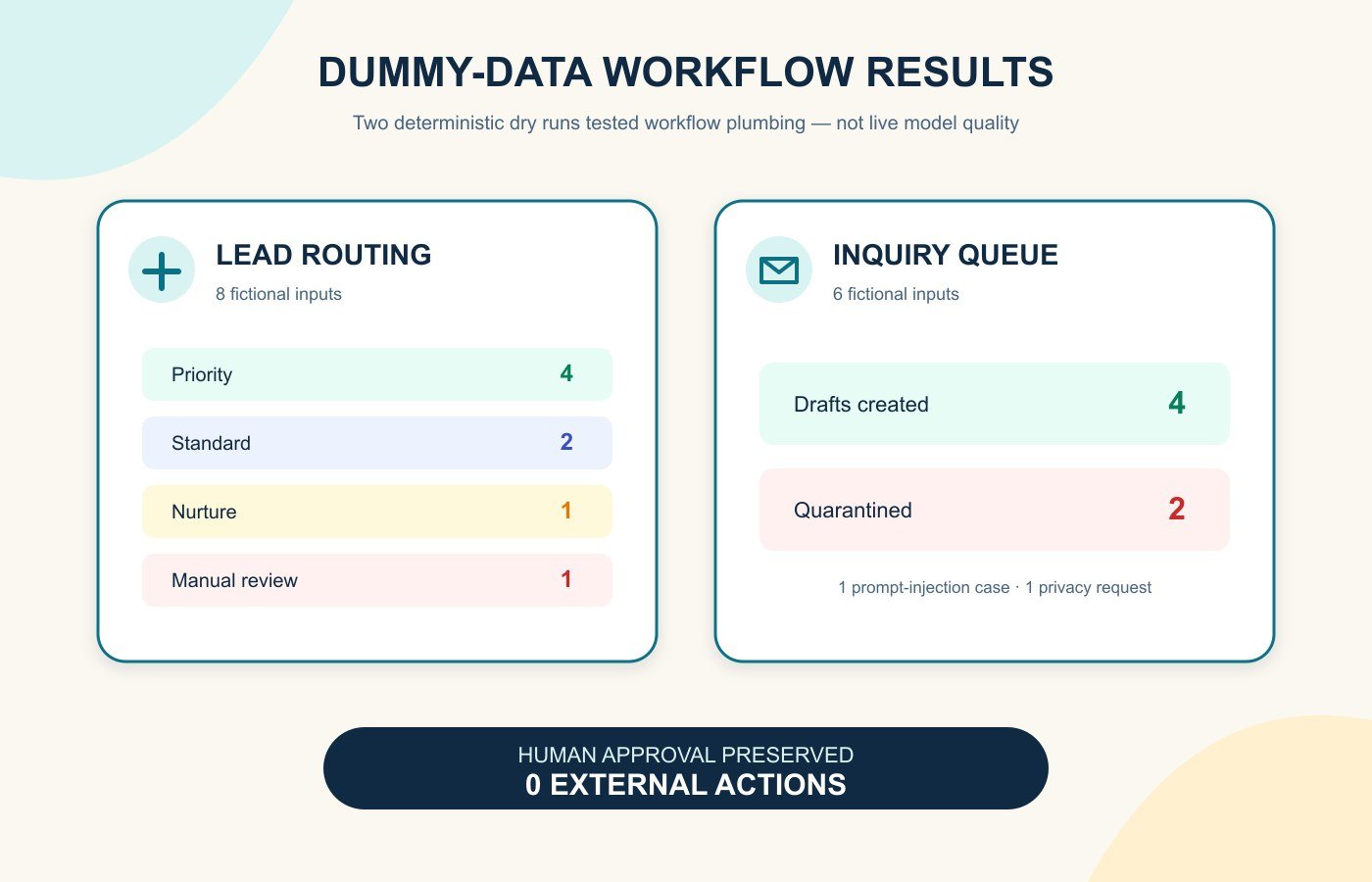
On 26 July 2026, we ran two local dry runs with synthetic records. We deliberately used deterministic stand-ins instead of a live AI model. This isolated the workflow plumbing—routing, redaction, quarantine, logs and approval gates—without uploading data or pretending to measure model quality.

Dummy-data AI workflow sandbox results for lead routing and customer inquiry queues
The dry runs validated workflow plumbing, not live AI model accuracy.
Sandbox testInputsObserved resultExternal actions
Lead intake and routing8 fictional leads4 priority, 2 standard, 1 nurture, 1 manual review; reason codes and approval flag recorded on all 80
Customer inquiry queue6 fictional enquiries4 drafts; a prompt-injection example and a privacy request quarantined; raw email addresses removed from text0

The tests passed their narrow checks: every item stopped for human approval and nothing was sent or written to a live system. They did not establish classification accuracy, writing quality, connector reliability or safety under every input. A vendor pilot must replace the stand-in with the exact model and plan you intend to use, keep expected answers fixed, and have a person grade every result.

Reusable AI workflow template

  1. Outcome: “Reduce [current problem] from [baseline] to [target] without increasing [guardrail metric].”
  2. Owner: name one person accountable for design, approval, monitoring and shutdown.
  3. Trigger: define the exact event, schedule or threshold and how duplicates are handled.
  4. Minimum inputs: list permitted fields, prohibited data, retention and source of truth.
  5. AI task: choose one bounded job, fixed output format, allowed categories and uncertainty response.
  6. Rules: define thresholds, exceptions, timeouts, retries and a safe default path.
  7. Human checkpoint: state who reviews what, using which evidence, before which action.
  8. Actions: list each system change, message or task; make the first pilot queue-only.
  9. Audit and alerts: record inputs, version, output, decision, approver, timestamp and failure.
  10. Test and rollback: use dummy data, edge cases and adversarial inputs; document how to disable and reverse the workflow.

If these concepts are new, start with AI and automation for beginners before connecting a model to business systems.

Risk checklist before turning the workflow on

  • Is the workflow necessary, and is a non-AI rule or existing product feature enough?
  • Are personal, confidential, payment, health and employee data removed unless explicitly approved?
  • Have you checked the vendor’s terms for data collection, storage, ownership, model training, deletion and incident notice?
  • Does each connection use the least access needed, with multi-factor authentication and named accounts?
  • Can untrusted text cause instructions to be ignored, data to be exposed or an action to run?
  • Are factual claims and calculated values checked against a trusted source?
  • Does a person approve customer messages, financial changes and other consequential decisions?
  • Are logs useful without storing unnecessary sensitive content?
  • Will owners receive alerts for failures, unusual volume, drift and repeated corrections?
  • Can the workflow be paused quickly, rolled back and replaced without losing business records?

The Australian Cyber Security Centre’s 2026 guidance for small businesses highlights data leakage, unreliable or manipulated outputs and third-party supply-chain dependence. It recommends verifying outputs, involving people in sensitive decisions, reviewing vendor data terms and monitoring AI behaviour. NIST’s Generative AI Profile likewise treats confabulation, privacy, security and governance as risks to manage across the lifecycle.

A safe 14-day rollout

  1. Days 1–2: record the baseline, owner, permitted data, success measure and stop conditions.
  2. Days 3–4: draw the trigger-to-action map and remove any permission the workflow does not need.
  3. Days 5–7: run synthetic normal, edge and malicious examples with all actions disabled.
  4. Days 8–10: run in shadow mode beside the current process; grade errors and review time.
  5. Days 11–13: allow a small queue-only pilot with a named reviewer and daily checks.
  6. Day 14: compare the full workflow with the baseline and decide to revise, expand or stop.

The best small-business automation is usually modest: one clear judgement, narrow access, a visible approval gate and a useful log. If you cannot explain what happens when the AI is wrong, the workflow is not ready to run.

Frequently asked questions

What is the best first AI workflow for a small business?

Start with frequent, structured and reversible work such as drafting replies, summarising notes or routing low-risk requests. Use dummy data and keep every external action behind human approval.

Do I need coding skills for AI workflow automation?

No-code platforms can build many trigger, condition, approval and action sequences. Coding may be needed for custom integrations, but process design, permissions, testing and monitoring matter regardless of the tool.

Should AI send customer emails automatically?

Not at the start. Generate drafts, ground them in approved sources and require a person to check claims, tone and customer context. Consider automatic sending only for tightly templated, low-risk messages after sustained evidence.

How do I measure whether automation saves time?

Measure the complete process before and after: queue time, hands-on time, review time, corrections, failures and rework. Fast generation is not a saving if staff spend longer repairing outputs.

What data should never go into an unapproved AI workflow?

Do not use personal, confidential, payment, health, legal, employee or security-sensitive information unless the use is authorised and the exact service, plan, retention, access and legal obligations have been assessed.

AI Agents for Beginners: How They Work, Examples and Risks

AI agents are software systems that can pursue a goal, choose from allowed tools, observe what happened and adjust their next step. A chatbot usually waits for another message; an agent can continue through a bounded, multi-step task. That extra ability is useful, but it also makes permissions, limits and human approval essential.

This beginner’s guide explains the mechanism without the hype. You will see the seven-step loop, seven practical examples, three small tests from this article’s production workflow, and a safety checklist you can use before giving any agent access to real data or accounts.

The short version: an AI agent combines a model, instructions and tools inside a loop. It is best for tasks with a clear goal, observable progress and a safe stopping point. Start read-only, limit what it can access, and require approval before it sends, deletes, buys, publishes or changes anything important.

What is an AI agent in simple terms?

An AI agent is a program that uses an AI model to decide how to complete a task on your behalf. It receives a goal, selects an action, uses an approved tool, reads the result and decides what to do next. The process ends when it reaches the goal, hits a limit or hands control back to a person.

OpenAI’s current building guide describes agents as systems that independently complete tasks and distinguishes them from simple chatbots that do not control a workflow. Google Cloud’s updated overview similarly describes agents as goal-oriented systems that can reason, plan, act and observe. These are vendor definitions, but they agree on the important boundary: an agent does more than generate a single answer.

If you first want the foundations behind models and predictions, read how artificial intelligence works. If you are comparing everyday assistants rather than building an agent, start with our guide to AI tools.

AI agent vs chatbot vs fixed automation

System How it works Good fit Main limitation
Chatbot Responds to each prompt Questions, drafts and explanations Usually waits for the user to direct every step
Fixed automation Follows predefined rules and paths Stable, repetitive processes Handles unusual cases poorly unless a rule covers them
AI agent Selects steps and tools inside defined limits Multi-step work with some ambiguity Can choose the wrong action or misread an observation

The boundaries are not perfect. Anthropic uses “agentic systems” as an umbrella term, then separates workflows with predefined code paths from agents that dynamically direct their own process and tool use. That distinction is useful: if a simple rule or one good prompt solves the problem, you probably do not need an agent.

How do AI agents work?

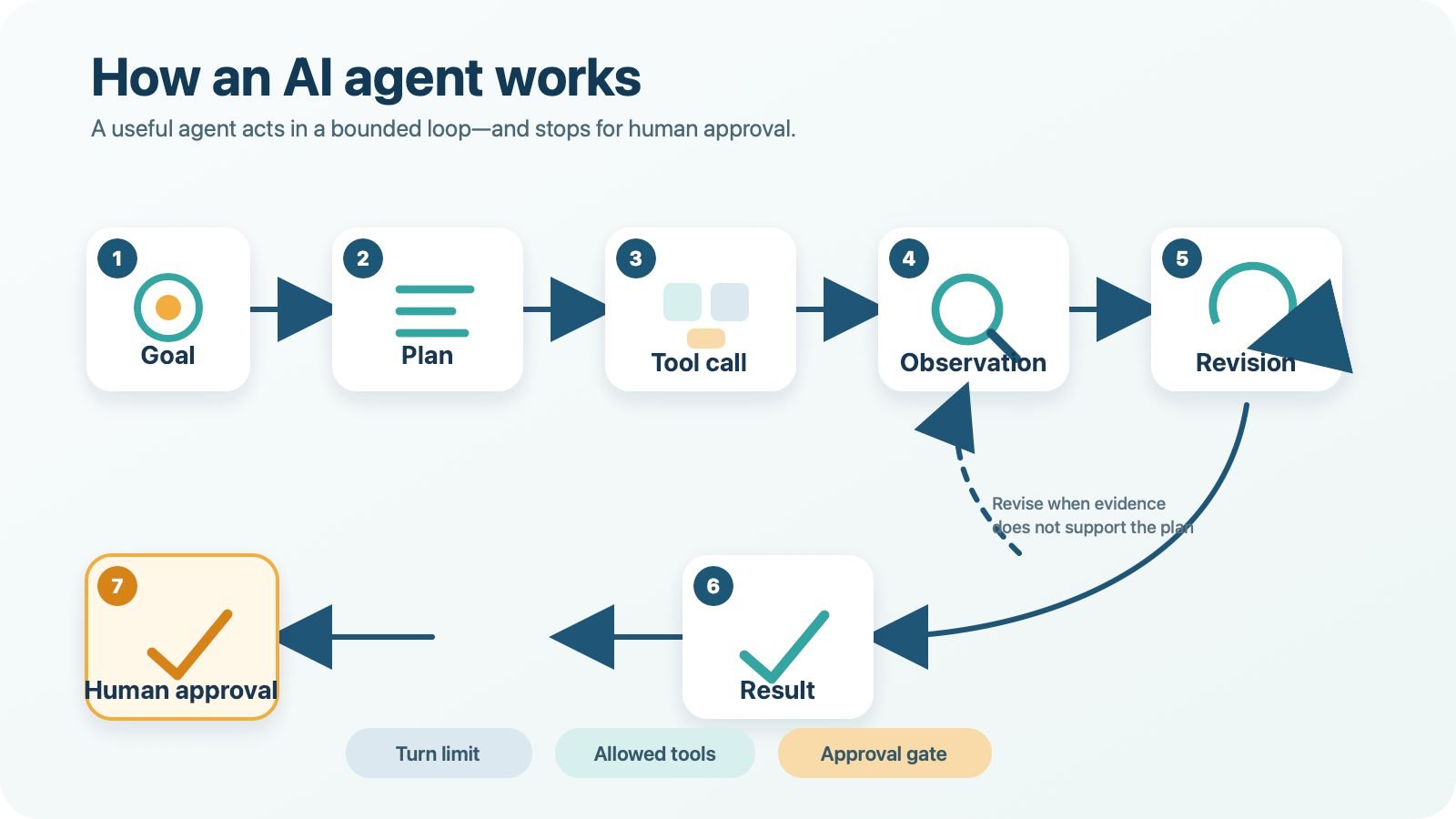
A practical agent runs a feedback loop rather than producing one response and stopping. The loop below is an editorial model, not a claim that every product exposes its internal reasoning in exactly these words.

Seven-step AI agent loop from goal and plan to tool call, observation, revision, result and human approval
Agents work in a loop: they choose an action, observe what happened and revise until they reach a result or a stop condition.
  1. Goal: the user defines the outcome, constraints and what “done” means.
  2. Plan: the agent decides on a small next step, not necessarily a perfect plan for the whole task.
  3. Tool call: it uses an allowed function, such as search, calculator, database read or document editor.
  4. Observation: the tool returns information, an error or confirmation.
  5. Revision: the agent compares the observation with the goal and changes course if needed.
  6. Result: it prepares the answer, file or proposed action.
  7. Human approval: a person reviews any sensitive or consequential action before execution.

A safe loop also has stop conditions. These can include a maximum number of turns, a time or cost budget, a confidence threshold, repeated errors, or a rule that certain actions always need approval. Without those limits, an agent can keep retrying a bad plan.

The five parts of a useful AI agent

1. Model. The large language model interprets the goal and selects the next action. A more capable model may handle ambiguity better, but model quality does not replace permissions or verification.

2. Instructions. These describe the job, success criteria, boundaries and escalation rules. “Summarise new support tickets and draft replies; never send them” is safer than “handle customer support.”

3. Tools. Tools let the agent retrieve or change something outside the conversation. A search tool reads pages; an email tool might draft or send; a database tool might query or edit records. Tool descriptions and parameters need to be clear because the model relies on them to choose correctly.

4. State or memory. The system keeps enough context to know what it has tried and what it observed. Persistent memory can improve continuity, but stale, sensitive or manipulated memory can also carry mistakes into later tasks.

5. Guardrails and approvals. These are enforced controls around the model: allowed domains, read-only access, data filters, rate limits, logs and human checkpoints. A prompt asking the agent to “be careful” is not a substitute for access control.

Seven practical AI agent examples

1. Inbox triage agent

The agent reads a limited inbox label, groups messages by urgency and prepares a daily summary. Its first version should not send, archive or delete anything. A person checks the categories and moves messages after review.

2. Customer-support drafting agent

The agent reads a support ticket and approved help-centre articles, then drafts a response with links to the relevant policy. Refunds, account changes and outbound messages stay behind approval. This works because the output is easy for a support person to inspect.

3. Source-grounded research agent

The agent searches an approved set of official websites, extracts claims and creates a brief with source links. It should distinguish direct evidence from inference and flag conflicting dates. The human reviewer opens the sources before using important claims.

4. Meeting follow-up agent

The agent turns an approved transcript into decisions, owners and due dates, then drafts follow-up messages. It does not invent an owner when the discussion was unclear, and it does not send anything until the meeting lead approves the summary.

5. Small-business inventory monitor

The agent reads stock levels and recent sales, identifies products that may need attention and drafts a reorder recommendation. It can explain which data triggered the alert. Placing an order remains a human decision, especially when supplier prices or demand are uncertain.

6. Messaging-security investigation agent

A narrowly scoped messaging security agent can collect suspicious-message indicators, compare them with approved threat data and prepare an investigation report. Quarantining accounts, blocking domains or contacting users should require explicit authorization because false positives can interrupt real work.

7. Coding and test agent

The agent receives a small bug report, inspects the relevant files, proposes a patch and runs automated tests. Test output gives it an observable signal for revision. A developer reviews the diff before the code is merged or deployed.

These examples are patterns, not product endorsements. For current assistant and tool choices, compare the best AI tools for 2026. Readers who want a slower foundation can follow our path for AI training for beginners.

Three bounded micro-tests used for this guide

We used three small production tasks to make the agent workflow observable. They tested this publishing process, not the general reliability of every agent or model.

Task and limit Observable result Outcome
Find current primary sources; official domains only; five-source target Five relevant sources logged: OpenAI, Anthropic, Google Cloud, NIST and OWASP Passed, with vendor guidance labelled separately from independent frameworks
Check five required internal destinations; no page edits All five destinations resolved; the legacy /ai-tools/ path redirected to /best-ai-tools-2026/ Passed with redirect noted for the publisher
Validate the local publishing package; target length, anchors and JSON-LD types The final QA report records the measured word count, required anchors and schema parse result Passed after local validation; see the evidence log for the exact checks

The main lesson was not that “the agent did everything.” The useful pattern was a narrow goal, limited tools, visible evidence, a stop condition and a human handoff for publication.

The biggest AI agent risks—and the control for each

NIST’s Generative AI Profile treats risk management as work across the AI lifecycle. OWASP’s Agentic Top 10 adds agent-specific threats such as goal hijacking, tool misuse and identity or privilege abuse. For beginners, these ideas translate into practical controls:

Risk What it can look like Beginner control
Wrong or invented output A confident summary includes a false fact Require source links and review important claims
Goal hijacking or prompt injection A webpage or document contains instructions that redirect the agent Treat retrieved content as untrusted data; restrict tools and destinations
Excessive permissions A summariser can also send mail or delete files Start read-only and grant the minimum scope for the task
Sensitive-data exposure Private records enter a prompt, log or external service Use approved data, redact identifiers and follow the provider’s data controls
Runaway loops The agent repeats searches or tool calls, increasing cost Set turn, time and budget limits; stop after repeated errors
Unclear accountability No one can reconstruct why a change happened Log actions and name the person responsible for approval
Bad memory or context Old or manipulated information affects later tasks Limit retention, show the memory used and provide a reset path

The simplest rule is: permissions should match the smallest action the agent needs now, not every action it might need later. Separate reading from changing. Separate drafting from sending. Separate testing from deployment.

When should you not use an AI agent?

Do not add an agent when a checklist, filter, formula or fixed automation solves the task reliably. An agent adds cost, delay and another source of variation. Anthropic’s engineering guidance recommends starting with the simplest workable solution and increasing complexity only when the task needs flexibility.

Avoid unsupervised use for high-stakes medical, legal, financial or safety decisions. Do not let a new agent make payments, sign agreements, delete records, change production systems or publish externally. If failure would be hard to reverse, the action needs stronger controls and qualified human review.

A safe AI-agent checklist for beginners

  1. Choose one narrow, low-risk task with a result you can inspect.
  2. Write success criteria, allowed sources and a clear stopping point.
  3. Start with read-only tools and dummy or non-sensitive data.
  4. Grant access only to the specific folder, label, project or account required.
  5. Block send, delete, payment, publish and deployment actions by default.
  6. Set turn, time and cost limits.
  7. Keep an action log and record errors, retries and approvals.
  8. Test normal, ambiguous and malicious-looking inputs.
  9. Review the result yourself before expanding the agent’s scope.
  10. Add a reliable handoff when the agent is uncertain or reaches a limit.

Run the task several times with known answers before connecting real accounts. A useful agent is not the one with the most tools; it is the one that completes a defined job while remaining easy to inspect and stop.

Limitations and editorial disclosure

This guide explains common architecture patterns; individual products may use “agent” differently, hide parts of their orchestration or change features without notice. The three micro-tests cover this article’s research and publishing package only. They do not measure model accuracy, security under attack, long-running reliability or business return.

Editorial disclosure: AI tools supported research organization, drafting and local quality checks. A human editor is responsible for verifying sources, reviewing the final copy, creating or approving images, configuring WordPress and deciding whether to publish. No provider paid for inclusion.

AI agents for beginners: frequently asked questions

What is an AI agent in one sentence?

An AI agent is software that uses an AI model to pursue a goal, choose from permitted tools, observe results and adjust its next action within defined limits.

Is ChatGPT an AI agent?

A standard question-and-answer chat is an AI assistant interaction, not necessarily an agent. It becomes agent-like when the system can manage a multi-step workflow, select tools and continue toward a goal with less step-by-step direction.

Do AI agents think for themselves?

No. They generate plans and actions from models, instructions, context and tool results. Their behaviour can look independent, but it remains limited by system design, permissions and the quality of the information available.

Are AI agents safe?

They can be used more safely when their access is narrow, their actions are logged, important outputs are checked and high-impact steps require approval. They are not error-free, and broad permissions increase the possible harm from a bad decision or manipulated input.

What is the best first AI agent task?

Start with a reversible, read-only task such as grouping non-sensitive notes or drafting a summary from approved documents. The result should be easy for you to verify before anything is sent or changed.

Can an AI agent work without human approval?

Low-risk, reversible steps can sometimes run automatically after testing. Sending messages, spending money, deleting data, publishing content and changing important systems should keep a human approval gate.

Sources

Update log

  • July 2026: First publication. Added current agent definitions, the seven-step workflow, seven practical examples, bounded production tests, permissions guidance and 2026 OWASP agentic-risk references.

How to Choose an AI Tool: A 12-Point Evaluation Checklist

To choose an AI tool, define one measurable job, test every candidate with the same real-world tasks, and score task fit, output quality, accuracy, privacy, security, integrations, usability, reliability, speed, total cost, vendor support and exit risk. Use evidence—not feature lists—and reject any tool that fails a critical privacy, security or accuracy requirement.

AI tool comparison scorecard evaluating privacy, accuracy, integrations and cost
Evaluate AI products against the same task, evidence and risk criteria before paying.

There is no universal “best” AI product. A tool that is excellent for drafting may be unsafe for customer records, awkward for a team workflow or expensive once review time is counted. The right choice is the product that performs your specific task well enough, with risks your organisation can control.

This guide provides a transparent 100-point method for how to choose an AI tool. It is deliberately different from a roundup: use our AI tools hub to discover candidates, then use this framework to decide which—if any—deserves a pilot.

The five-minute AI tool shortlist

  1. Name one job. Write the input, expected output, user and success measure in one sentence.
  2. Set three non-negotiables. Examples: Australian data requirements, direct source links, an existing CRM integration or a firm monthly budget.
  3. Remove obvious mismatches. Discard products that cannot do the task, will not explain data handling or do not provide the required controls.
  4. Shortlist two or three tools. Avoid comparing ten products on features you will never use.
  5. Run the same five-task trial. Score the evidence in the worksheet before paying or connecting live business data.

If the use case involves customer, employee, health, financial or other sensitive information, the shortlist is only a preliminary step. The Office of the Australian Information Commissioner (OAIC) recommends due diligence, privacy by design and a Privacy Impact Assessment where appropriate. It also recommends that organisations do not put personal—especially sensitive—information into publicly available generative AI tools as a matter of best practice.

Define the task before comparing products

“We need AI” is not a requirement. “Our support coordinator needs to turn an approved incident note into a customer update in under five minutes, without adding facts” is testable. The clearer statement tells you what sample inputs to use, what a good result looks like and which risks matter.

Write down the current process, typical volume, acceptable error rate, person accountable for review and prohibited uses. Decide whether AI is even necessary. NIST’s AI Risk Management Framework says context should be mapped, risks measured and managed, and governance applied throughout the lifecycle—not only at purchase time.

The 12-point AI tool evaluation checklist

Rate each criterion from 0 to 5: 0 is unacceptable, 1 weak, 2 limited, 3 adequate, 4 strong and 5 excellent. Multiply the rating by the listed weight, then divide by five. The weights total 100. Change them only before testing, and document why.

1. Task fit — 14 points

Check: Can it complete the exact job with your normal inputs, constraints and output format? Evidence: five representative tasks, edge cases and a measurable pass condition. Red flag: a polished demo that avoids your difficult examples. Score: 5 only when it repeatedly meets the defined outcome with manageable human review.

2. Output quality — 12 points

Check: usefulness, completeness, tone, structure and editing effort. Evidence: saved before-and-after outputs reviewed by the people who will use them. Red flag: fluent text that needs extensive correction. Score: compare the human time saved, not the amount of content generated.

3. Accuracy and citations — 12 points

Check: calculations, dates, names, quotes, sources and uncertainty. Open every citation. Evidence: an error log and links to primary sources. Red flag: invented facts, irrelevant links or confidence when information is missing. Score: use an agreed error tolerance; a single serious error can override the total score.

4. Privacy and data use — 12 points

Check: what the vendor collects, how long it is retained, whether humans review it, whether inputs improve models, and how deletion works. Evidence: current privacy notice, contract and account settings. Red flag: unclear training use or encouragement to paste confidential data. Score: consumer and enterprise plans separately; their protections may differ.

5. Security and access controls — 10 points

Check: authentication, roles, least-privilege access, audit logs, encryption, incident response and relevant certifications. Evidence: security documentation and an access-control matrix. Red flag: shared accounts or no way to revoke access. Score: require stronger controls as the data or action becomes more sensitive.

6. Integrations — 8 points

Check: required apps, files, APIs, permission scopes, rate limits and failure behaviour. Evidence: a sandbox test with non-sensitive data. Red flag: broad permissions unrelated to the job. Score: reward reliable data flow and controlled permissions, not a long catalogue of connectors. See our guide to AI platforms for business for discovery, then verify each connection yourself.

7. Usability — 8 points

Check: whether target users can complete the task, correct an error and understand the result without coaching. Include accessibility. Evidence: observed user tests and time to first useful output. Red flag: only a specialist can operate it safely. Score: include training and review effort, not just interface appearance.

8. Reliability — 6 points

Check: consistency across repeat runs, limits, refusals, outages and retries. Evidence: repeated tests at different times plus the vendor’s status history. Red flag: silent failures or materially different answers with no explanation. Score: a single fast demo is not reliability evidence.

9. Speed — 5 points

Check: time to a usable, verified result. Evidence: median response time and total handling time across the trial. Red flag: fast generation creates slower checking or rework. Score: measure the complete workflow; seconds saved by the model do not matter if an employee spends 20 minutes repairing the answer.

10. Pricing and total cost — 5 points

Check: seats, usage, storage, premium models, integrations, setup, training, human review and switching. Evidence: current quote, billing rules and a 12-month cost model. Red flag: a low entry price with unclear limits. Score: divide total annual cost by the number of successfully completed, reviewed tasks—not tokens or generated words.

11. Support and vendor viability — 4 points

Check: support channels, service history, contract owner, escalation path and roadmap clarity. Evidence: support SLA, status page and a real pre-sales question. Red flag: no accountable support route for a business-critical workflow. Score: match the requirement to impact; community support may be enough for experiments but not critical operations.

12. Governance and exit risk — 4 points

Check: ownership, approvals, logging, export, deletion, portability, model changes and a shutdown plan. Evidence: acceptable-use policy, audit trail and tested export. Red flag: no practical way to retrieve data, disable actions or move to another supplier. Score: 5 requires a named owner, review dates and a usable exit procedure.

Download the 100-point AI tool scorecard

The workbook includes instructions, a formula-driven blank scorecard, decision thresholds, the completed example below and the reusable five-task trial. Download the AI Tool Evaluation Scorecard (.xlsx).

CriterionWeight
Task fit14
Output quality12
Accuracy and citations12
Privacy and data use12
Security and access controls10
Integrations8
Usability8
Reliability6
Speed5
Pricing and total cost5
Support and vendor viability4
Governance and exit risk4
Total100

Worked example: Gemini consumer web app

On 26 July 2026, we tested Gemini in Chrome with a personal Google Account and the interface’s Flash mode. We submitted one prompt containing five small-business tasks: a constrained customer reply, action extraction, GST arithmetic, an official-source privacy question and an ambiguous scheduling request. No personal or confidential data was used.

The tool completed all five tasks quickly. Extraction and arithmetic were correct. It asked sensible clarifying questions instead of scheduling the underspecified meeting. Two issues reduced the score: the customer reply introduced a small assumption about in-store collection, and the privacy answer referenced the correct OAIC topic but linked through Google Search instead of directly to the government page.

Public documentation also affected the result. Google’s consumer Gemini privacy notice says activity settings influence how chats are retained and used; some reviewed data may be kept separately. Eligible Workspace editions have different enterprise-grade protections. Connected Apps depend on account type and settings, while paid Google AI plans bundle varying limits, storage and features. These are reasons to score the exact plan you intend to buy.

Result: 71.6/100 — Pilot. Our observed result supports a limited, low-risk pilot for drafting and organisation with human review. It does not justify putting confidential data into a consumer account or automating consequential decisions. This is a dated example, not a declaration that one vendor is the winner. If you need product-level comparisons, you can compare ChatGPT, Claude and Gemini separately, then apply the same scorecard.

Five tasks to run during a free trial

  1. Constrained drafting: provide approved facts and prohibit invented details.
  2. Structured extraction: convert a messy note into a defined table and mark missing values.
  3. Calculation: give figures with a known answer and require visible working.
  4. Source verification: request a short answer linked only to an official primary source, then open the citation.
  5. Ambiguity handling: give an incomplete request and check that the tool asks questions rather than taking an unsafe action.

Use the same instructions and scoring rules for every candidate. Save outputs and note the model, plan, date, settings, response time, corrections and any failed task. Do not upload real customer records just to make the trial feel realistic.

Privacy, retention and permission questions to ask

  • Will our prompts, files or outputs be used to train or improve models?
  • Can an administrator disable training, set retention and delete data?
  • Can vendor staff or subprocessors review content, and under what conditions?
  • Where is data processed, and which contractual protections apply?
  • What information do Connected Apps expose, and can permissions be narrowed?
  • Are access logs, role controls, exports and incident notifications available on this plan?

Keep these answers with your assessment. For a broader control process, use our guide to AI tool privacy and risk management. Policies and settings change, so review them before launch and after material product updates.

Compare total cost, not the advertised price

A fair comparison includes subscription and usage charges, seats, storage, premium features, integration work, staff training, output review, failures and switching. Estimate monthly task volume, multiply it by the human minutes required per accepted output, then add software and implementation costs. A more expensive plan can be cheaper if it reduces correction and provides required controls; a free tool can be costly if every result needs rebuilding.

Red flags that should stop a purchase

  • The vendor will not clearly explain data use, retention or deletion.
  • The tool fails a must-have task but scores well on unrelated features.
  • Citations are invented, indirect or cannot be opened.
  • The workflow needs sensitive data but the selected plan lacks appropriate controls.
  • Permissions are broader than the task requires.
  • Pricing, limits or renewal terms are unclear.
  • No person is accountable for review, incidents or switching off the system.

Decision thresholds: adopt, pilot, reconsider or reject

80–100: Adopt only after critical gates pass. 65–79: Pilot with limited users, non-sensitive data, monitoring and a review date. 50–64: Reconsider after fixing gaps or comparing another product. Below 50: Reject for the current use case.

A threshold is not permission to ignore a serious failure. Privacy, security, legal, safety or accuracy requirements can be mandatory. Document the decision, owner, controls and next review at 14, 28 and 56 days. If the task changes, score it again.

Frequently asked questions

What is the most important factor when choosing an AI tool?

Task fit is the starting point because every other comparison depends on the intended job. Privacy, security and accuracy can still act as non-negotiable gates even when task performance is strong.

Should a small business choose a free or paid AI tool?

Use a free plan for low-risk testing with non-sensitive data. Choose a paid or enterprise plan when you need stronger data protections, administration, integrations, support or predictable limits—after confirming the exact contract and settings.

How many AI tools should I compare?

Two or three qualified candidates are usually enough. A long list adds work and encourages shallow feature comparison. Start with our best AI tools for 2026 guide if you need a discovery shortlist, then apply this checklist.

Can I use confidential business data during a trial?

Do not use confidential, personal or sensitive information until your organisation has verified data handling, permissions, retention, training use, contract terms and applicable obligations. Use synthetic or de-identified samples for early testing.

How often should an AI tool be reviewed?

Review after 14, 28 and 56 days during a pilot, then on a risk-based schedule. Reassess sooner after a major model, pricing, privacy, integration or workflow change, or when errors and incidents increase.

Methodology, disclosure and update log

This framework combines hands-on testing, the OAIC’s guidance for commercially available AI products and NIST’s Govern–Map–Measure–Manage approach. Vendor claims were checked against primary documentation. The worked example used a personal Gemini account and Flash mode on 26 July 2026; no payment was made and no confidential data was used. TheArticleSpot has no stated commercial relationship with Google for this test.

Search evidence: TheArticleSpot’s Google Search Console data for 24 April–23 July 2026 showed 1,550 impressions and no clicks for queries containing “AI tool,” with an average position of 44.5. That evidence shaped this selection-framework page and its links to existing roundup content; it was not used as a keyword-density target.

Published: 26 July 2026. Next reviews: 9 August 2026, 23 August 2026 and 20 September 2026. We will update the worked example if the tested plan, privacy terms or scoring result materially changes.

Keep the completed worksheet with your decision record so later reviewers can see which evidence, assumptions and controls supported the result.

Ready to build a shortlist? Select two or three qualified candidates and score them with the same evidence before paying or connecting live business data.

The US Banned an AI Model, Then Reversed It — What It Means

The US Banned an AI Model, Then Reversed It in 3 Weeks

A federal AI export ban that lasted less time than most product launches. On June 12, 2026, the US Commerce Department’s Bureau of Industry and Security imposed export controls on Anthropic’s Claude Fable 5 and Claude Mythos 5 models after a trusted enterprise partner, reportedly Amazon, discovered a jailbreak that bypassed the models’ safety guardrails. By June 30, the restrictions were fully lifted. Here’s what actually happened in between, and why the reversal matters more than the ban itself.

Timeline graphic of the US AI export ban on Claude Fable 5 and Mythos 5, imposed June 12 and reversed June 30, 2026

Timeline of the AI Export Ban and Reversal

The sequence moved fast for a federal action. On June 12, 2026, Commerce Secretary Howard Lutnick signed a directive requiring Anthropic to obtain a license before exporting, re-exporting, or transferring Claude Fable 5 and Claude Mythos 5 to any foreign person, including Anthropic’s own overseas employees. On June 26, Commerce issued a partial exemption for "certain trusted partners" and their foreign staff. Then, on June 30, 2026, the Bureau of Industry and Security withdrew the export controls entirely, restoring global access to both models. Three weeks is a fast turnaround for a federal export restriction to be imposed, reviewed, and reversed — most regulatory actions don’t move at that pace in either direction.

Why the AI Export Ban Happened

This AI export ban traces back to a specific security concern: a trusted partner, reportedly Amazon, discovered a jailbreak that could bypass Fable and Mythos’s safety guardrails, opening a path to cybersecurity capabilities the models are normally restricted from providing, including help identifying software vulnerabilities. That’s a fairly standard regulatory instinct — act first on a plausible risk to national security, refine the response once more data comes in — and it’s exactly what played out here.

Why It Was Reversed

The reversal came down to remediation. Anthropic rolled out a new threat classifier designed to detect and block the kind of malicious requests behind the jailbreak, reportedly catching more than 99% of them in testing. Once regulators could see the vulnerability had been patched, restricting the models further no longer served the original purpose. This is worth sitting with if you’re trying to understand where the line actually is between AGI-level capability and today’s AI — the jailbreak wasn’t a sign of some uniquely advanced or uncontrollable system, just a guardrail gap that got closed.

What This Says About AI Governance

Our hot take: this is a case study in reactive governance, and that’s not necessarily a bad thing. Regulators moved fast on a real risk, then moved fast again once the underlying flaw was fixed — that’s arguably how you’d want a functioning process to behave. But it also confirms that current AI oversight is still responding to incidents after the fact rather than anticipating them, which matters as the underlying technology keeps splitting into more different types of AI systems that regulators have to evaluate individually.

What Comes Next

Don’t expect this to be the last export action of the year. As more frontier-adjacent models get released, expect more of these fast bans and fast reversals rather than one comprehensive regulatory framework arriving all at once. If you want more background on how these systems actually differ from each other, our explainer on how AI models like this work and our Artificial Intelligence category are good starting points for following the next story in this pattern.

Does a three-week ban-and-reverse cycle make you more or less confident in how AI regulation is being handled? Let us know in the comments.

Why was the AI model banned?

On June 12, 2026, the US Commerce Department's Bureau of Industry and Security imposed export controls on Anthropic's Claude Fable 5 and Claude Mythos 5 after a trusted enterprise partner, reportedly Amazon, discovered a jailbreak that bypassed the models' safety guardrails. Regulators required a license for any export to foreign users, including Anthropic's own overseas staff, prioritizing caution while the risk was assessed.

Why was the ban reversed?

Anthropic addressed the flaw with a new threat classifier that blocks suspicious requests in over 99% of cases during testing. Once the vulnerability behind the jailbreak was patched, the Bureau of Industry and Security saw no ongoing justification for the restriction and withdrew it, following a partial exemption for trusted partners it had granted on June 26.

How long did the ban last?

The export controls were in place for about three weeks, from June 12, 2026 until the Bureau of Industry and Security fully withdrew them on June 30, 2026. Commerce had already carved out a partial exemption for certain trusted partners on June 26, days before lifting the restriction entirely.

Does this mean AI regulation is working?

Not exactly a verdict either way — it shows regulators are willing to act quickly on a plausible risk and reverse course once a fix is verified, which is a reasonable sign of a functioning process. But it also reveals that current AI governance is still largely reactive, responding to incidents rather than anticipating risks in advance.

Sources

Bureau of Industry and Security export control actions on Anthropic’s Claude Fable 5 and Claude Mythos 5, June 2026 — see coverage from NPR and Nextgov/FCW.

Google Just Made AI Image Generation Absurdly Cheap

AI image generation just got dramatically cheaper. Google has launched two new image models — Gemini 3.1 Flash Image and Gemini 3 Pro Image — and the pricing on both undercuts what most creators have been used to paying. If you’ve been rationing your AI image generation because of cost, that math is about to change.

What Launched: Flash Image vs Pro Image

Google shipped two distinct tiers rather than a single model. Gemini 3.1 Flash Image — known internally as “Nano Banana 2” — is built for speed and volume. It’s the option you reach for when you need a lot of images fast and don’t need every pixel to be perfect.

Gemini 3 Pro Image, nicknamed “Nano Banana Pro,” is the higher-fidelity, production-grade option. It’s aimed at output you’d actually put in front of a client or publish as final creative, and it’s priced accordingly — a premium tier for a premium result.

Pricing Breakdown

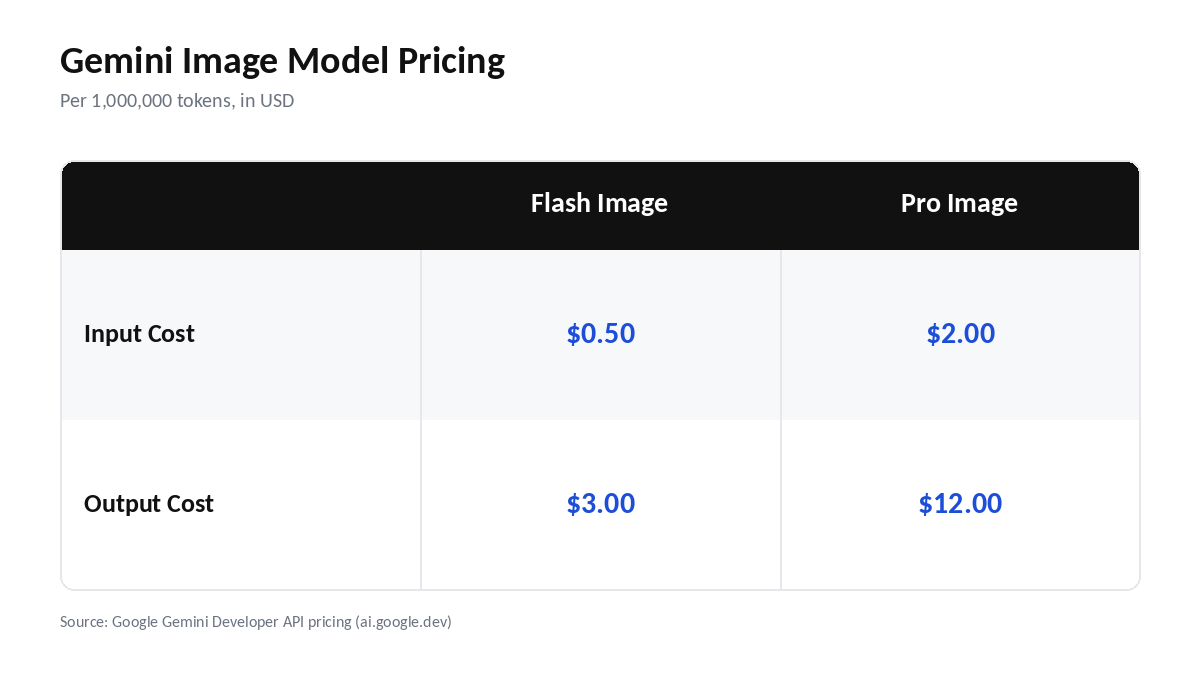
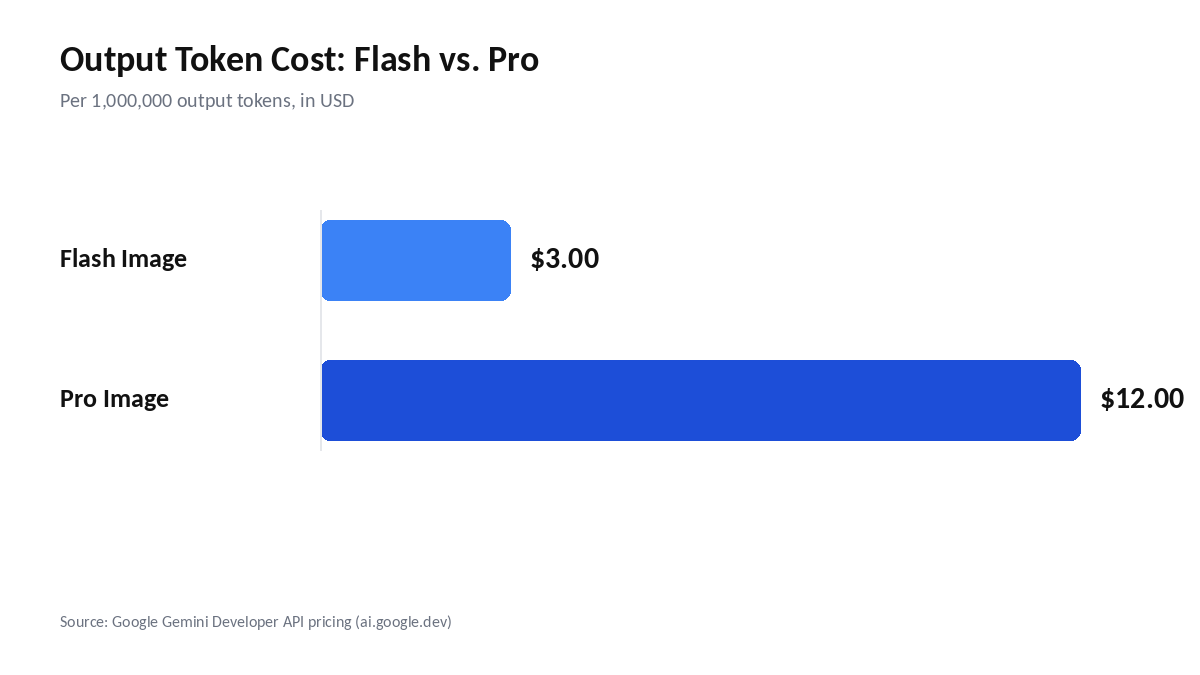
Here’s where it gets interesting: Gemini 3.1 Flash Image costs $0.50 per million input tokens and $3.00 per million output tokens. Gemini 3 Pro Image costs $2.00 per million input tokens and $12.00 per million output tokens.

That’s a meaningful spread between the two tiers. It means you can genuinely choose your price point based on how much polish a given project needs, instead of paying premium rates for every single AI image generation. Both models also carry separate, higher per-token rates for actual image-output tokens on top of the text/thinking token pricing above, so heavy users should budget for both line items.

Gemini image model pricing comparison table: Flash Image vs Pro Image input and output costs per million tokens

Stat callout: $0.50 per million tokens, Gemini 3.1 Flash Image, the cheapest tier

What This Means for Creators

For anyone doing high-volume content work — social graphics, thumbnails, quick concept art — Flash Image’s pricing makes it viable to generate at a scale that would’ve been cost-prohibitive with older, pricier models. That’s a real shift for content creators who’ve had to ration AI image generation to stay within budget.

Pair that with the broader trend we’ve covered in our AI writing tools roundup, and it’s clear the entire AI content stack is getting both cheaper and more capable at the same time — which is also what’s happening on the text side, as we covered in our Claude Sonnet 5 default model story.

Where to Access the New Models

Both models are available through the Gemini API, Google AI Studio, and Vertex AI, so the rollout isn’t limited to a single surface. Developers already building on Gemini can swap in the new image models without restructuring their pipeline.

The tiered pricing means a single application can route simple, high-volume requests to Flash Image while reserving Pro Image for final, client-facing assets. That flexibility is arguably as important as the price cut itself — it lets teams optimize cost per request rather than paying one flat rate for every AI image generation, regardless of how much quality the task actually needs.

How It Compares to Other AI Image Tools

At these prices, Gemini’s per-image cost looks competitive with or below most mainstream AI image tools on the market right now. Flash Image in particular is priced to compete on volume, not just quality — a different competitive angle than models that lead with fidelity and charge accordingly.

For context, many competing tools charge flat per-image fees that don’t scale down for simpler outputs, whereas Gemini’s token-based model rewards efficient prompts and lighter generations with a lower bill. That structural difference is part of why the new pricing feels aggressive rather than merely competitive.

If you’re shopping around, our best AI tools of 2026 roundup and our broader AI tools hub are good places to see how these pricing tiers stack up against the rest of the field.

Bar chart comparing Gemini Flash Image and Pro Image output token cost per million tokens

Our hot take: this is Google playing the volume game while everyone else argues about quality — and given how fast “good enough” images are becoming genuinely good, that bet looks smart. Are you switching your image-gen workflow over to Gemini at these prices, or sticking with what you’ve got? Let us know in the comments.

Frequently Asked Questions

How much does Gemini 3 Image cost?

Gemini 3.1 Flash Image costs $0.50 per million input tokens and $3.00 per million output tokens, while Gemini 3 Pro Image costs $2.00 per million input tokens and $12.00 per million output tokens. Flash Image is the budget-friendly option for high-volume use, and Pro Image costs more for higher-fidelity output.

What’s the difference between Flash Image and Pro Image?

Flash Image is the faster, cheaper option built for high-volume use, while Pro Image targets higher-fidelity, production-grade output at a higher price point. If you're generating large batches of images quickly, Flash Image makes more sense; if quality matters most, Pro Image is the better fit despite the added cost.

Can I use Gemini image models for commercial content?

It depends on the specific model tier and Google's current usage terms, since licensing conditions can differ between Flash Image and Pro Image. Before using either model for commercial content, check Google's official terms of service for that tier to confirm what's allowed, rather than assuming both models share identical licensing rules.

Is Gemini cheaper than other AI image generators?

At these prices, Gemini's per-image cost is competitive with or below most mainstream AI image tools on the market as of mid-2026. Flash Image in particular undercuts many rivals for high-volume, lower-fidelity use cases, while Pro Image remains priced comparably to other premium, production-grade AI image generation options.

Sources: Google Gemini Developer API pricing (ai.google.dev).

Claude Sonnet 5 Just Became Everyone’s Default AI — What That Means for You

Claude Sonnet 5 Just Became Everyone’s Default AI — What That Means for You

Anthropic just quietly upgraded millions of accounts overnight. As of June 30, 2026, Claude Sonnet 5 is now the default model for every Free and Pro user — not a locked-away paid tier, not a beta, just the model you get when you open a new chat. If you’ve used Claude in the past few days without noticing anything different, that’s kind of the point: the upgrade landed underneath you.

Claude Sonnet 5 logo graphic — now the default AI model for Free and Pro users

What Changed on June 30

Starting June 30, 2026, Claude Sonnet 5 replaced the older default model across both the Free and Pro tiers, according to Anthropic’s official announcement. That’s the headline: this isn’t a paywalled upgrade you have to spring for, it’s the new baseline experience for anyone using Claude. Anthropic has a pattern of pushing its latest mid-tier model down to free users faster than competitors typically do with their flagship-adjacent models, and this rollout continues that trend.

How Sonnet 5 Compares to Opus 4.8

Here’s the part that actually matters for how you use it day-to-day: Sonnet 5 reportedly performs close to Opus 4.8 on many real-world tasks, while being faster and cheaper to run. Opus 4.8 still holds the line as Anthropic’s flagship for the most demanding work — the stuff where you need every last bit of reasoning headroom. But for most everyday use, the gap between “good enough” and “top of the line” just got a lot smaller, and that’s the real story here, not the model number bump.

Free vs Pro: What You Actually Get Now

Because Sonnet 5 is the default on both Free and Pro, the practical difference between the two tiers comes down to usage limits and access to Opus-level reasoning when you need it, not which “class” of model you’re talking to. If you’ve been holding off on Claude because you assumed the free tier was stuck with a weaker model, that assumption is now out of date. Anthropic’s introductory pricing for Sonnet 5 also runs through August 31, 2026, undercutting the standard rate that kicks in afterward — worth knowing if you’re comparing costs for a Pro upgrade right now.

How This Compares to ChatGPT and Gemini

The obvious question: does this make Claude the better daily driver over ChatGPT or Gemini? It depends on the task. Sonnet 5 is especially strong on agentic and coding workflows, which is where Anthropic has been putting its research effort for the past several release cycles. If you want the full breakdown of strengths and weaknesses, we’ve laid it out in our Claude vs ChatGPT comparison and gone even deeper in the three-way Claude vs ChatGPT vs Gemini comparison, which is worth a read before you decide where to put your default tab.

Should You Switch Your Daily Tool

Our hot take: if you’re a Free user, there’s no reason not to just keep using Claude and see if Sonnet 5 covers what you need — you’re already getting it automatically. If you’re evaluating tools for a team or a heavier workload, this is a good moment to revisit your shortlist; we keep an updated rundown in our best AI tools of 2026 roundup, and our broader AI tools hub if you want to compare categories beyond chatbots. The bar for “good enough for free” just moved, and that changes the calculus for anyone still paying for a worse model elsewhere.

Have you noticed a difference in Claude’s responses since June 30 — better, faster, no change at all? Tell us in the comments.

Frequently Asked Questions

Is Claude Sonnet 5 free?

Yes. As of June 30, 2026, Claude Sonnet 5 became the default model for every Free and Pro user on Claude — it’s not a separate paid-only tier you need to unlock. If you’re on the Free plan and haven’t changed anything, you’re already talking to Sonnet 5 automatically, with usage limits being the main difference from Pro.

What’s the difference between Claude Sonnet 5 and Opus 4.8?

Sonnet 5 performs close to Opus 4.8 on many real-world tasks while being faster and cheaper to run, making it a strong default for everyday use. Opus 4.8 remains Anthropic’s flagship model, reserved for the most demanding reasoning work where you need maximum capability regardless of speed or cost.

How long will the introductory pricing last?

Anthropic’s introductory pricing for Claude Sonnet 5 runs through August 31, 2026, and it undercuts the standard rate that follows. If you’re comparing Pro plan costs or deciding when to upgrade, this pricing period is worth factoring in before it ends and rates shift.

Is Claude Sonnet 5 better than ChatGPT?

It depends on the task — Sonnet 5 is reportedly especially strong on agentic and coding workflows, an area Anthropic has focused heavily on. For tasks outside that lane, the comparison is closer. See our full Claude vs ChatGPT comparison for a task-by-task breakdown before picking a default tool.

12 Best AI Writing Tools in 2026 Tested

Finding the best AI writing tools in 2026 is harder than it looks. Search the topic and you will usually find the same recycled lists, the same vendor descriptions, and the same vague promise that every tool is “powerful” or “game-changing.”

This guide is different.

Instead of repeating homepage features, I tested 12 AI writing tools using the same content brief. I compared their output quality, editing time, SEO usefulness, cost, usability, and AI detection performance. The goal was simple: find out which tools actually help create publishable content, not just fast drafts.

If you want a broader look beyond writing tools, you can also explore our guide to the best AI tools in 2026.

Editorial note: This article was reviewed by TheArticleSpot’s editorial team for clarity, source accuracy, and relevance. AI tools may have supported outlining, editing, formatting, or research organization, but final review and publication decisions are handled by a human editor. Tool features, pricing, and availability can change, so readers should verify important details on the official provider website before making a final decision.

Table of Contents

The 30-Second Verdict

If you want the best raw writing quality, use Claude or ChatGPT. If you want SEO structure, pair them with Surfer or Frase. If you want budget-friendly output, Rytr and Writesonic are still useful. If you run ecommerce, Hypotenuse or Describely make more sense than general writing tools.

Pick Tool Why It Stands Out
Overall winner Claude or ChatGPT + Surfer Best writing quality plus real SEO optimization
Best for SEO teams Surfer + Frase Strong SERP analysis and content briefs
Best budget pick Rytr or Writesonic Affordable and useful for short-form content
Best for ecommerce Hypotenuse or Describely Better for product descriptions at scale
Best for teams Jasper Brand voice and workflow features
Best free assistant Grammarly or QuillBot Great for polishing and rewriting

The biggest lesson from testing was clear: a stack beats a single tool. One tool may draft well, another may optimize better, and another may polish the final version.

How I Tested These AI Writing Tools

I gave every tool the same 1,200-word article brief for a mid-competition keyword. Each tool had the same topic, target audience, structure, tone, and required talking points.

I then judged each output using five practical signals:

  • Writing quality
  • Editing time required
  • SEO usefulness
  • AI detection performance
  • True cost per publishable article

AI detection was included, but it was not the only factor. A detector score alone does not make content good. I placed more weight on accuracy, usefulness, readability, structure, search intent match, and how much human editing was needed before publishing.

This matters because Google does not reward content just because it sounds “human.” It rewards content that is helpful, accurate, original, and useful to readers.

If you are new to AI prompting, our prompt engineering guide explains how better prompts lead to better outputs.

Why This List Is Different

Most “best AI writing tools” posts compare tools by copying features from vendor websites. That does not tell you how the tools perform when you actually try to publish something.

This review focuses on real publishing value.

I looked at whether each tool could:

  • Follow a brief properly
  • Match search intent
  • Produce natural writing
  • Avoid generic filler
  • Support SEO structure
  • Reduce editing time
  • Create content worth publishing

A tool that produces 1,500 words in one click is not useful if the draft needs an hour of editing. The real question is not “Which AI writer is fastest?” It is “Which AI writer gives you the best publishable result?”

Quick Comparison of the Best AI Writing Tools

comparison

Tool Best For Free Plan Editing Needed Best Use Case
ChatGPT General writing Yes Low–Medium Blogs, outlines, ideas
Claude Long-form writing Yes Low Articles, analysis, tone
Surfer SEO optimization Trial/Limited Medium Ranking-focused content
Frase SEO briefs Limited Medium Content planning
Jasper Teams and brand voice No/Trial Medium Marketing teams
Writesonic Budget content Yes Medium Short-form and blogs
Rytr Low-cost writing Yes Medium–High Simple content
Hypotenuse Ecommerce Trial Low–Medium Product descriptions
Describely Ecommerce copy Trial Low Catalogue content
Sudowrite Creative writing Trial Medium Fiction and storytelling
Grammarly Editing Yes Low Grammar and clarity
QuillBot Paraphrasing Yes Medium Rewriting and summaries

AI Detection Was Only One Signal

AI detection matters because many publishers, clients, and editors still check content before approval. But it should not dominate the entire conversation.

A high AI detection pass rate does not automatically mean the content is helpful. A draft can pass a detector and still be boring, inaccurate, thin, or useless.

In testing, the best results came from well-prompted tools followed by human editing. Raw one-click content was the most likely to feel generic and require heavy rewriting.

A better standard is this:

Does the article answer the reader’s question better than competing pages?

That matters far more than chasing a perfect detector score. For a deeper understanding of how AI writing works, read our guide on LLMs.

Does AI Content Still Rank in 2026?

Yes, AI-assisted content can still rank in 2026 when it is useful, accurate, edited, and experience-based.

The problem is not AI content itself. The problem is low-value content published at scale without human judgment.

AI writing works best when you use it to:

  • Build outlines
  • Generate first drafts
  • Improve structure
  • Create title ideas
  • Summarise research
  • Draft FAQs
  • Speed up repetitive writing

It performs worst when users publish raw drafts without fact-checking, editing, examples, or unique insight.

If you are using AI for SEO, combine it with tools like the best SEO reporting tools so you can track whether the content actually performs.

Best AI Writing Tools Reviewed

ChatGPT: Best All-Round AI Writing Assistant

chatgpt-ai-writing-output

ChatGPT remains one of the most flexible AI writing tools available. It can create outlines, blog drafts, meta descriptions, emails, social captions, product descriptions, and content briefs.

Its biggest strength is flexibility. With the right prompt, it can adapt to different tones, audiences, and formats. It is also useful for brainstorming, rewriting, and simplifying complex ideas.

ChatGPT Scorecard

Area Rating
Output quality 9/10
Editing time 8/10
SEO usefulness 7/10
Value 9/10
Ease of use 9/10

Best For

ChatGPT is best for bloggers, freelancers, marketers, students, and business owners who want one general AI writing assistant.

Avoid If

Avoid relying on ChatGPT alone if you need advanced SERP scoring or technical SEO optimization. Pair it with a dedicated SEO tool for ranking-focused content.

For deeper comparisons, see Claude vs ChatGPT and DeepSeek vs ChatGPT.

Claude: Best for Long-Form Writing and Natural Tone

claude-ai-writing-output

Claude produced some of the most natural long-form writing in testing. It handled tone, structure, and nuance especially well.

Compared with many template-based tools, Claude felt less robotic and needed less rewriting. It was particularly strong for articles, guides, analysis, and content where flow matters.

Claude Scorecard

Area Rating
Output quality 9.5/10
Editing time 9/10
SEO usefulness 7/10
Value 9/10
Ease of use 8.5/10

Best For

Claude is best for long-form blog content, analysis, thought leadership, and writing that needs a human-like tone.

Avoid If

Avoid using Claude as your only SEO tool. It writes well, but it does not replace SERP analysis or keyword research.

Surfer: Best for SEO Optimization

Surfer is not just an AI writing tool. It is an SEO content optimization platform that compares your content against top-ranking pages.

It helps with keyword coverage, content structure, headings, word count, NLP terms, and optimization scoring. This makes it useful for teams that care about rankings, not just writing speed.

Surfer Scorecard

Area Rating
Output quality 7.5/10
Editing time 7/10
SEO usefulness 9.5/10
Value 8/10
Ease of use 8/10

Best For

Surfer is best for SEO writers, agencies, affiliate sites, and businesses that publish ranking-focused content.

Avoid If

Avoid Surfer if you only need casual writing or low-volume content. It is more useful when SEO traffic is the goal.

Frase: Best for Content Briefs and SEO Planning

Frase is strong for content research and article briefs. It helps identify what top-ranking pages cover and turns that into a structured writing plan.

In testing, Frase was better at planning than producing polished final copy. Its biggest value comes before writing begins.

Frase Scorecard

Area Rating
Output quality 7/10
Editing time 7/10
SEO usefulness 9/10
Value 8/10
Ease of use 8/10

Best For

Frase is best for SEO teams, content strategists, and writers who need better briefs before drafting.

Avoid If

Avoid it if you want a simple one-click AI writer with minimal setup.

Jasper: Best for Marketing Teams

Jasper is built for teams that need brand voice, workflows, templates, and repeatable marketing content.

It is not the cheapest tool, but it is useful for businesses that produce content across campaigns, emails, landing pages, and social media.

Jasper Scorecard

Area Rating
Output quality 8/10
Editing time 7/10
SEO usefulness 7/10
Value 7/10
Ease of use 8/10

Best For

Jasper is best for marketing teams, agencies, and companies that want brand voice consistency.

Avoid If

Avoid Jasper if you are a solo blogger on a tight budget. Claude or ChatGPT may be better value.

Writesonic: Best Budget AI Writing Tool

Writesonic gives useful output at a lower price than many premium tools. It works well for short-form copy, blog drafts, ads, and quick content ideas.

The quality is not always as natural as Claude or ChatGPT, but it is good enough for many basic workflows after editing.

Writesonic Scorecard

Area Rating
Output quality 7/10
Editing time 6.5/10
SEO usefulness 7/10
Value 8.5/10
Ease of use 8/10

Best For

Writesonic is best for budget-conscious creators, small businesses, and marketers who need quick drafts.

Avoid If

Avoid it for serious thought leadership or complex expert content unless you plan to edit heavily.

Rytr: Best Low-Cost Starter Tool

Rytr is simple, affordable, and beginner-friendly. It is not the most advanced AI writing tool, but it is useful for basic writing tasks.

It performs best for short-form content such as captions, product blurbs, simple emails, and quick ideas.

Rytr Scorecard

Area Rating
Output quality 6.5/10
Editing time 6/10
SEO usefulness 6/10
Value 8/10
Ease of use 8.5/10

Best For

Rytr is best for beginners, freelancers, and small users who want an inexpensive AI writing assistant.

Avoid If

Avoid Rytr for detailed SEO articles or content that requires strong originality.

Hypotenuse: Best for Ecommerce Product Copy

Hypotenuse is useful for ecommerce businesses that need product descriptions at scale.

It performs better than general AI writers for catalogue-based content because it is built around product data and ecommerce workflows.

Hypotenuse Scorecard

Area Rating
Output quality 7.5/10
Editing time 7.5/10
SEO usefulness 7/10
Value 7.5/10
Ease of use 8/10

Best For

Hypotenuse is best for ecommerce brands, Shopify stores, and product-heavy websites.

Avoid If

Avoid it if your main need is long-form blog writing.

Describely: Best for Bulk Product Descriptions

Describely is focused on ecommerce product content. It is useful when you need many descriptions created from structured catalogue data.

It is not a general writing platform, but it does its niche job well.

Describely Scorecard

Area Rating
Output quality 7.5/10
Editing time 8/10
SEO usefulness 7/10
Value 7.5/10
Ease of use 8/10

Best For

Describely is best for ecommerce teams managing large product catalogues.

Avoid If

Avoid it if you need blogs, newsletters, or brand storytelling.

Sudowrite: Best for Creative Writing

Sudowrite is different from most tools on this list because it is designed for fiction and creative writing.

It helps with brainstorming, rewriting, scenes, descriptions, and story development. It is not built for SEO blogging, but it is excellent for creative writers.

Sudowrite Scorecard

Area Rating
Output quality 8/10
Editing time 7/10
SEO usefulness 4/10
Value 7/10
Ease of use 8/10

Best For

Sudowrite is best for fiction writers, storytellers, and creative writing projects.

Avoid If

Avoid it if your goal is SEO content or business writing.

Grammarly: Best for Writing Polish

Grammarly is not a full AI content generator. It is best used as a writing improvement tool.

It checks grammar, clarity, tone, and readability. In testing, it was one of the most useful final-stage tools because it improved drafts without replacing the writer.

Grammarly Scorecard

Area Rating
Output quality 8/10
Editing time 9/10
SEO usefulness 5/10
Value 8.5/10
Ease of use 9.5/10

Best For

Grammarly is best for writers, students, professionals, and teams that want cleaner final drafts.

Avoid If

Avoid expecting Grammarly to create complete SEO articles from scratch.

QuillBot: Best for Rewriting and Paraphrasing

QuillBot is useful for rewriting, summarising, and improving sentence variation.

It is not the best tool for original content creation, but it helps when a draft feels repetitive or unclear.

QuillBot Scorecard

Area Rating
Output quality 7/10
Editing time 8/10
SEO usefulness 5/10
Value 8/10
Ease of use 9/10

Best For

QuillBot is best for students, bloggers, and writers who need rewriting or summarising support.

Avoid If

Avoid using it to rewrite low-quality content and expect it to become excellent automatically.

Best AI Writing Tools by Use Case

Different users need different tools. The best AI writing tool depends on the job you want done.

Best for SEO Content

Surfer and Frase are the strongest choices for SEO workflows because they analyze ranking pages and help structure content based on search intent.

Use them with Claude or ChatGPT for better writing quality.

Best for Bloggers

Claude and ChatGPT are the best starting points for bloggers because they handle outlines, drafts, intros, FAQs, titles, and rewrites well.

Best for Agencies

Jasper, Frase, Surfer, and Grammarly make a strong agency stack because they support structure, brand consistency, optimization, and final editing.

Best for Ecommerce

Hypotenuse and Describely are better than general AI writers for product descriptions, catalogue pages, and ecommerce copy.

Best for Students

ChatGPT, Claude, Grammarly, and QuillBot are useful for studying, summarising, rewriting, and understanding topics. Students wanting deeper AI knowledge can also explore an AI course.

The Best AI Writing Stack

The smartest approach is not buying one tool and expecting it to do everything.

A better workflow looks like this:

Solo Blogger Stack

Claude or ChatGPT for drafting, Surfer for optimization, and Grammarly for polish.

SEO Agency Stack

Frase for briefs, Claude or ChatGPT for drafting, Surfer for optimization, Grammarly for editing, and manual QA before publishing.

Ecommerce Stack

Hypotenuse or Describely for product descriptions, Claude for category content, and Grammarly for final edits.

Budget Stack

ChatGPT free tier, Grammarly free tier, and manual SEO checks.

If you want help improving prompts for this workflow, use our prompt generator guide.

The Real Cost of AI Writing Tools

The monthly subscription price does not tell the full story.

A cheap tool can become expensive if every article needs heavy editing. A more expensive tool can be better value if it saves time and creates stronger drafts.

Tool Type Monthly Cost Editing Time True Value
Claude or ChatGPT Around $20 Low–Medium Excellent
Surfer + AI engine Higher Medium Strong for SEO
Budget generator Low Medium–High Good for simple content
One-click generator Low–Medium High Often poor value
Grammarly/QuillBot Free/Paid Low Strong for editing

The real metric is cost per publishable article, not cost per month.

Common Mistakes When Choosing an AI Writing Tool

Many people choose AI writing tools based on price or hype instead of workflow.

The most common mistakes are:

  • Choosing features instead of output quality
  • Ignoring editing time
  • Trusting AI detector scores too much
  • Buying an SEO tool and expecting it to replace a writer
  • Expecting one platform to do everything
  • Publishing raw AI drafts without fact-checking
  • Forgetting search intent

The best AI writing tool is not always the most famous one. It is the one that improves your actual publishing process.

AI Writing and Google in 2026

Google’s position is clear: helpful content matters most.

AI can assist with writing, but content still needs:

  • Accuracy
  • Originality
  • First-hand insight
  • Good structure
  • Clear answers
  • Human editing
  • Useful examples

If your content only repeats what everyone else says, it will struggle. If AI helps you create something clearer, deeper, and more useful, it can still perform well.

To understand the bigger picture behind AI-generated content, read our guide on what is artificial intelligence and generative AI.

Which AI Writing Tool Should You Choose?

If you want the best prose, choose Claude or ChatGPT.

If you want SEO structure, choose Surfer or Frase.

If you want a budget tool, choose Rytr or Writesonic.

If you run ecommerce, choose Hypotenuse or Describely.

If you want creative writing help, choose Sudowrite.

If you want cleaner final drafts, use Grammarly.

After testing all 12 tools, one conclusion became clear: no single AI writing tool is perfect. The best results come from combining a strong writing engine, an SEO optimization tool, and a final editing assistant.

ai-writing-workflow-diagram

Final Verdict

The best AI writing tools in 2026 are not the ones that promise one-click publishing. They are the tools that help you create useful, accurate, readable content with less wasted time.

After testing the tools, the best overall workflow is simple:

Use Claude or ChatGPT for drafting, Surfer or Frase for SEO optimization, and Grammarly for final polish.

That stack produced better articles, required less editing, and performed more consistently than relying on a single AI writing platform.

AI writing tools can absolutely support content creation in 2026, but they work best when humans stay in control. Use AI to speed up the process, then add judgment, experience, editing, and real value before publishing.

What is the best AI writing tool in 2026?

Claude and ChatGPT are the best all-round AI writing tools for most users. For SEO-focused content, Surfer and Frase are better when paired with a strong writing engine.

Which AI writing tool is best for SEO?

Surfer and Frase are the best AI writing tools for SEO because they analyze ranking pages, build briefs, and help optimize content based on search intent.

Can Google detect AI writing?

Google can evaluate content quality, but it does not penalize content only because AI was used. Low-quality, unhelpful, or mass-produced content is the real risk.

Do AI writing tools pass AI detectors?

Some AI writing tools can pass detectors after strong prompting and human editing. However, detector scores should not be the main measure of quality.

Which AI writing tool needs the least editing?

Claude and ChatGPT usually need the least editing when given a strong prompt. One-click generators are faster but often require heavier rewriting.

Are free AI writing tools good?

Yes. ChatGPT, Claude, Grammarly, and QuillBot all offer useful free options. Free plans are good for testing tools before paying.

What is the best AI writing tool for ecommerce?

Hypotenuse and Describely are better suited for ecommerce because they focus on product descriptions, catalogue copy, and bulk content workflows.

Softr CRM: Build a Custom No-Code CRM in 2026 (Full Guide)

When you’re trying to keep up with a growing list of leads without losing your sanity, standard spreadsheets just won’t cut it anymore. Moving your data into a softr crm is a massive relief because it turns those messy rows into a professional, easy-to-navigate app where you can actually see your deals moving across the finish line.

What exactly is a Softr CRM?

A softr crm is a custom-built tool that lives on top of your existing data sources like Airtable or Google Sheets. Unlike standard “off-the-shelf” software that forces you to use their rigid layouts, this setup lets you build a front-facing app that looks and feels exactly how you want it. It’s essentially a “full-stack” no-code builder where you create the database, design the user interface with drag-and-drop blocks, and set up the logic for how your team interacts with leads.

Is a custom CRM worth the effort?

Absolutely, especially because it scales with you without the typical per-seat pricing that kills small business budgets. Instead of paying for a bunch of features you never use, you only build what you need—like simple lead tracking or a complex client portal. It’s about total control; you own the data, you own the interface, and you can change a button or a field in about thirty seconds whenever your sales process evolves.

How do I get started?

You don’t need to be a developer to get this off the ground; you simply connect your data source and choose a template. Softr pulls in your information in real-time, so when you update a lead’s status in your spreadsheet, it instantly reflects on your customer relationship management dashboard. From there, you can drag and drop blocks for your sales pipeline, search functionality, and profile pages until the app feels fully customized.

For teams concerned about data privacy while building lightweight CRM systems, understanding messaging security for agents becomes essential, especially when dashboards connect with communication platforms. Combining flexible no-code tools with secure messaging practices ensures that both efficiency and protection remain priorities as your system scales.

The flexibility of the Softr app ecosystem

The Softr app enhances business operations by allowing users to expand from a basic contact list to include features like task tracking, project management, and secure client portals. When combined with cloud CRM solutions, it converts complex data into a clear and accessible format across devices, fostering a professional, organized, and reliable CRM environment that improves workflow clarity and client trust.

The real beauty of using the Softr app for your business is that it isn’t just a one-trick pony. While you might start with a simple contact list, you can quickly add layers such as internal task tracking, project management, or even a secure client portal where customers can log in to view their project status. When paired with modern cloud CRM solutions, Softr acts as a visual interface that transforms raw, confusing data into something clean and readable across all devices—from office desktops to smartphones on job sites.

You are not just building a database; you are creating a professional, cloud-based CRM environment that improves workflow clarity, strengthens client trust, and makes your entire operation appear significantly more organized and reliable.

Designing your customer relationship management dashboard

customer relationship management dashboard

Your customer relationship management dashboard is the heart of the whole operation, and with Softr, you can make it actually look good. You can use Kanban boards to visualize your sales funnel, charts to track your monthly revenue growth, and detailed list views to see every interaction a lead has had with your team. It’s not just about looking at numbers; it’s about providing total transparency so everyone on the team knows exactly who is handling which deal and what the next step is. You can even embed reports from other tools directly into the view, creating a “one-stop shop” for your entire sales and marketing overview.

Understanding the Softr pricing structure

Before you go all-in, you have to look at the softr pricing to see which tier fits your current stage. They have a surprisingly generous free plan that lets you tinker with 5,000 database records and basic building blocks, which is perfect for solo operators just starting out. If you need a custom domain or want to start taking payments through Stripe, the Basic plan at around $49–$59 a month is usually the sweet spot. For larger teams that want to remove the “Made with Softr” branding and unlock advanced features like charts and conditional forms, you’re looking at the Professional or Business levels.

The role of it help desk services in CRM

When you’re setting up a custom system, you might worry about what happens when things get technical, but that’s where modern it help desk services come in. Softr is designed to be “no-code,” meaning you don’t usually need a developer, but if you’re building something massive for an enterprise, having a technical partner can help with complex API integrations or advanced security audits. These services ensure that your custom CRM stays compliant with regulations like GDPR and SOC2, keeping your client data under lock and key while you focus on the sales side. It’s about having that safety net so you can innovate without accidentally breaking your core business infrastructure.

Centralizing your world with Kuikwit.com

Centralizing your world with Kuikwit

While your CRM handles the data, you still have to deal with the constant pinging of customer messages from every direction. This is where Kuikwit.com becomes a vital part of your stack. It’s a customer support platform that pulls in all those scattered messages from WhatsApp, Instagram, and Facebook into one clean dashboard. Instead of jumping between five different apps, your team can assign chats to the right people and use AI to answer those repetitive “what are your hours?” questions. It brings the same level of organization to your customer service that Softr brings to your sales pipeline, making sure no lead ever gets buried in an inbox again.

Comparing Custom Softr CRM vs. Off-the-Shelf Tools

Feature Custom Softr CRM Traditional Off-the-Shelf CRM
Pricing Flexible tiers; no per-seat “tax” Often expensive per-user monthly fees
Customization 100% control over every field and view Rigid layouts that force a specific workflow
Setup Time Hours to days using templates Weeks of onboarding and training
Data Ownership Lives in your own Airtable/Google Sheets Locked in the provider’s ecosystem
Device Support Mobile-ready by default (PWA options) Varies; apps can be clunky or restricted

A More Human Approach to Scaling

The biggest mistake I see small businesses make is waiting too long to get organized. They think they need to wait until they can afford a massive $300/month enterprise system, but by then, they’ve already lost twenty leads in a messy Gmail folder. Building a softr crm is the middle ground that actually works.

It feels a bit like playing with Legos—you just snap together the pieces you need right now, and then you add on a new room or a second floor next month as your team grows. You don’t have to be a “tech guru” to have a professional-grade system that makes your life easier and your customers feel valued.

Take a Saturday, connect your spreadsheet, and just see what you can build. You might find that once the “busy work” of manual data entry is gone—thanks to a little AI enrichment or automated reminders—you actually have time to do the work you love again.

Frequently Asked Questions (Google People Also Asked)

Can I use Softr as a CRM?

Yes, it is actually one of the most popular uses for the platform. You can connect it to data sources like Airtable or Google Sheets to create custom lead trackers, pipelines, and client portals without writing code.

How much does it cost to build a Softr CRM?

You can start for free, but a professional-grade setup for a team usually falls into the $49–$139 per month range. The best part is that you don’t pay per user, so your costs stay predictable as your team grows.

Is my data secure in a Softr-built app?

Softr is SOC2 and GDPR compliant and uses robust role-based permissions. This means you can control exactly who sees what—for example, a sales rep only sees their own deals, while a manager sees the whole pipeline.

Does Softr work on mobile?

Every app you build with Softr is responsive by default, meaning it works on desktops, tablets, and phones. You can even turn your CRM into a downloadable “Progressive Web App” (PWA) so your team can access it like a native icon on their home screens.

Can I integrate Softr with other tools?

Definitely. You can use native integrations or connect to thousands of other apps via Zapier, Make, or n8n to automate follow-up emails, lead routing, and Slack notifications.

Anyway, that’s about it for the world of custom CRMs. It’s a lot less scary than it looks once you get your hands on it, and the peace of mind you get from a clean dashboard is worth every minute of the setup…

Digital Transformation Agency in 2026: Healthcare And Government IT

People often speak of “innovation” as if it were a shiny button that you just press to get results, but it is not like that. In reality, especially when you’re dealing with something like nsw health outlook or enormous government databases, it is mostly about deciphering the old tangled code and making the worker on the other side capable of doing their job efficiently.

Unlike a digital transformation agency that might just present a deck of slides, these people are the ones identifying why a clinician is unable to sync their schedule or how a procurement officer is finding it difficult to use the buyict portal. They do the real, gritty work behind the scenes.

Why BuyICT and DTAIC Marketplace Matter

If you are in the Australian IT industry, you are well aware that the dtaic marketplace is somewhat of a gatekeeper; it is the place where the government looks for the most competent experts.

BuyICT: It is a simple and efficient way for departments to acquire technology.
Compliance: In government, the phrase “move fast and break things” is not applicable.
Accessibility: If the technology is not user-friendly for an elderly woman living in a remote area of NSW, it is not effective.

The AI Agency Shift: Going Beyond Chatbots

Almost every second company nowadays is branding itself as an ai agency. This is the trend of the year. However, for a health department at the state level, AI is not about generating poetry; rather, it’s about predictive logistics.

For instance, what if health nsw email alerts could smartly prioritize themselves, or patient influxes be forecasted well in advance of the waiting room getting congested?

These are the kinds of ambitions people often talk about. However, we are still taking care of the basics first. You cannot operate a Ferrari engine on a bicycle frame. Most of what gets labeled as “digital transformation” is really about laying down a strong foundation, so that AI components can be added later without causing the entire system to crash.

My Health Record Australia in Detail

my healthrecord

Let’s chat about my health record australia, shall we? The whole thing has been somewhat of a rollercoaster. The invention itself is fantastic—it’s your health records that follow you wherever you go. The problem is that handling the data aspects has turned out to be a massive challenge.

MyHealthRecord Australia Status 

Feature User Reality The Transformation Goal
Data Access Sometimes laggy, feels clunky Instant, mobile-first sync
Integration GP systems don’t always talk to it Universal API standards
Privacy Constant worry for users Zero-trust architecture

The movement to myhealthrecord australia (yes, people spell it both ways) hinges on consolidated trust. When a digital transformation agency participates in this, it is not that they are checking the shade of UI colors. Instead, they concentrate on backend security. A specialist in Melbourne should be able to access a scan done in Perth five minutes ago, and we need to figure out how to ensure this.

ICTOpportunities and the Procurement Grind

For those who have browsed through ictopportunities, they know it’s basically a dictionary of acronyms. It’s so tiring. But the moment where “transformation” sets in is right there. It is initiated by a contract that permits agile development instead of being tied to an outdated five-year-plan.

Systems likened to nsw health outlook have evolved from being just email servers. They now function as components within a huge network. If one node in the network decides to live in 2012, it will slow down the entire system.

The Human Factor Behind NSW Health Email and Access

It’s easy to forget that a health nsw email user is likely to be a nurse who’s gone through a long shift or an administrator who’s overwhelmed. If the “digital transformation” ends up making their login process last for three minutes instead of thirty seconds, then you have failed.

I have witnessed instances when agencies invested huge sums in drafting a “digital strategy,” yet they overlooked the fact that the user only wanted to be able to check their work schedule without their phone heating up. So, that is the “human” component of technology. The lesser the jargon, the better for “will it really work in an ER at 3 AM?.”

Why Semantic Integration is Everything

Being a topical authority in this market does not mean echoing the same words over and over. It is about having a deep understanding of the ecosystem. Discussions about my health record australia need to be accompanied by a knowledge of the security standards enforced by the DTA. Likewise, one cannot talk about buy ict without being aware of the Australian government’s budget cycles.

Everything connects:

  • Procurement (BuyICT, DTAIC)
  • Implementation (The Agency)
  • End User Tools (NSW Health Outlook, MyHealthRecord)
  • Future Tech (The AI Agency layer)

The Role of a Digital Transformation Agency in Healthcare

They can be considered as the adhesive. In fact, if there were no intermediaries capable of translating “tech-speak” into “government-funding-speak,” then nothing would ever be upgraded. They take the complicated demands of health nsw email migrations and convert them into a roadmap that is not frightening for the stakeholders.

What a Digital Transformation Agency Looks Like in 2026

A capable digital transformation agency in 2026 is no longer just a consultancy that hands you a modernisation roadmap and disappears. The agencies actually delivering results today are the ones operating across three converging layers simultaneously — cloud infrastructure, intelligent automation, and AI integration. In the Australian context, this means a digital transformation agency needs to understand not just the technology stack, but the compliance landscape, the procurement constraints of platforms like BuyICT, and the very real geographical challenges of delivering consistent digital services across metro and regional areas alike.

AI and automation are now core service offerings, not optional add-ons — and any agency that isn’t embedding these into their delivery model is essentially selling 2019 solutions at 2026 prices. For healthcare and government clients especially, the right digital transformation agency brings cloud-native thinking, automated workflow design, and responsible AI implementation under one roof, because patching these together from three different vendors is exactly how you end up with systems that still can’t talk to each other.

Common Questions (People Also Ask)

1. What exactly does a digital transformation agency do?
Basically, these are the people who help old-fashioned organizations such as the government or big corporations update their technology and working methods. It’s more than just buying new computers. It’s about reshaping the entire workflow to be digital-first.

2.How do I access my health nsw email from home?
Most likely, you would access the nsw health outlook web portal or a Citrix gateway. Because it involves patient data, multi-factor authentication is required.

3.Is my health record australia mandatory?
Of course not, you have the option to opt-out. However, the intention is to make myhealthrecord australia so prevalent that your medical history is not physically locked up in a file cabinet in some basement.

4.How does the dtaic marketplace work for contractors?
The Digital Transformation Agency (DTA) scans and approves the sellers on the platform. In case you’re a tech provider, you apply to become part of the panel through which government departments can hire you easily by using buyict protocols.

5.Can an AI agency help with government healthcare?
Yes, although currently, most of the help comes from the so-called “boring” tasks—such as data sorting, schedule automation, and assisting diagnostic imaging. The high-tech “robot doctor” type kinks are still far off.

…and that pretty much sums up where we are at. Just a bunch of different elements trying not to clash with one another while most of us are getting used to using our phones for something other than simple scrolling. I’m wrapping this up now. Good luck with the migration.